
RESTful APIs for Australian Business Applications: A Practical Implementation Guide

Every modern business application needs to communicate with other systems. Your website talks to your payment processor. Your mobile app fetches data from your servers. Your CRM syncs with your accounting software. These connections happen through APIs.
REST (Representational State Transfer) is the most common approach for building web APIs. It’s simple to understand, works with any programming language, and has become the standard way applications talk to each other.
This guide walks Australian businesses through practical API implementation—from basic design principles to security, authentication, and deployment.
What RESTful APIs Actually Are
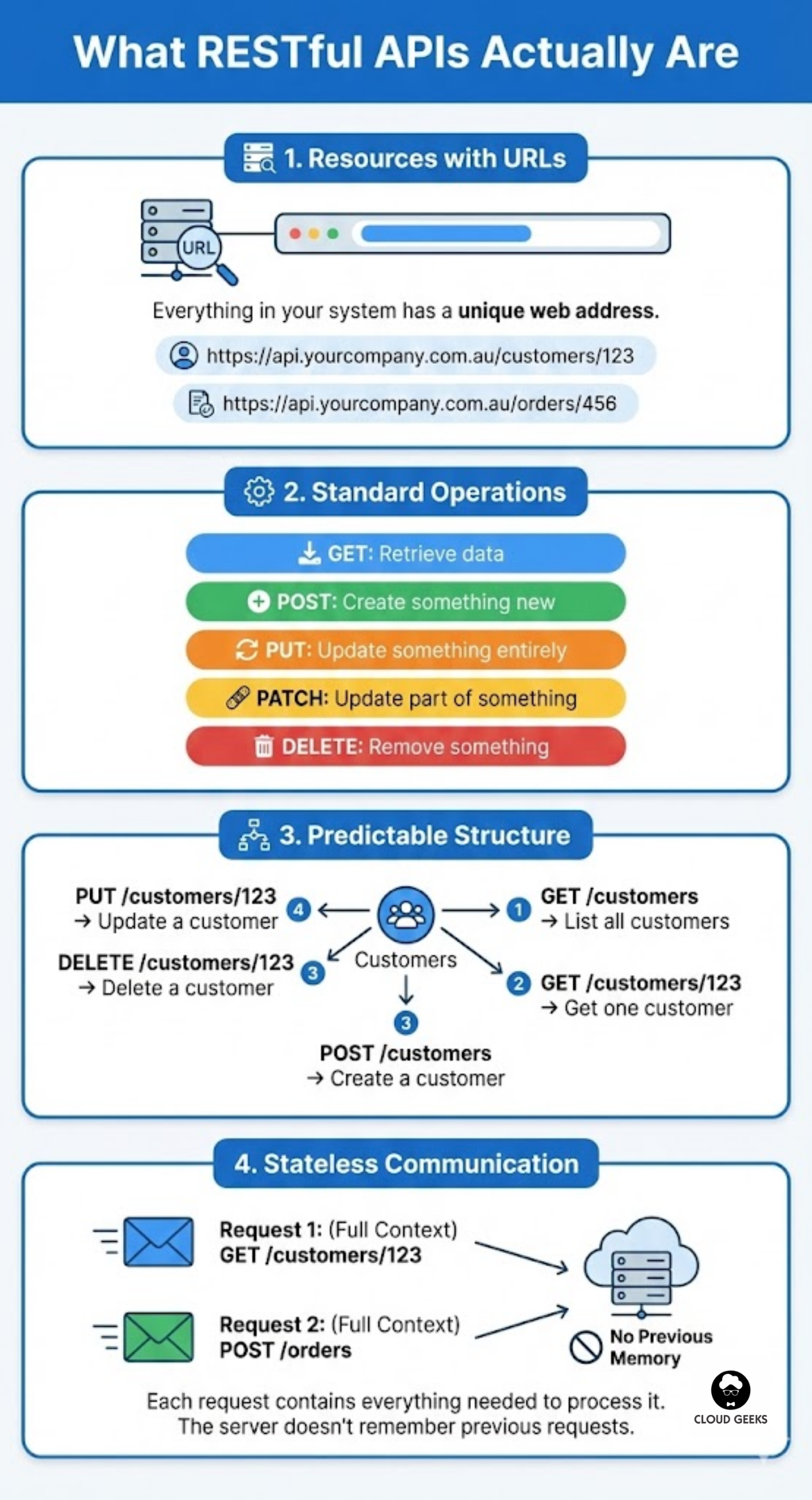
Forget the academic definitions. Here’s what REST means in practice:
Resources with URLs: Everything in your system (customers, orders, products) has a unique web address.
https://api.yourcompany.com.au/customers/123https://api.yourcompany.com.au/orders/456
Standard operations: You use HTTP methods to do things:
- GET: Retrieve data
- POST: Create something new
- PUT: Update something entirely
- PATCH: Update part of something
- DELETE: Remove something
Predictable structure: If someone knows your API handles customers, they can guess how to work with it:
GET /customers→ list all customersGET /customers/123→ get one customerPOST /customers→ create a customerPUT /customers/123→ update a customerDELETE /customers/123→ delete a customer
Stateless communication: Each request contains everything needed to process it. The server doesn’t remember previous requests.
Designing Your API: Practical Principles
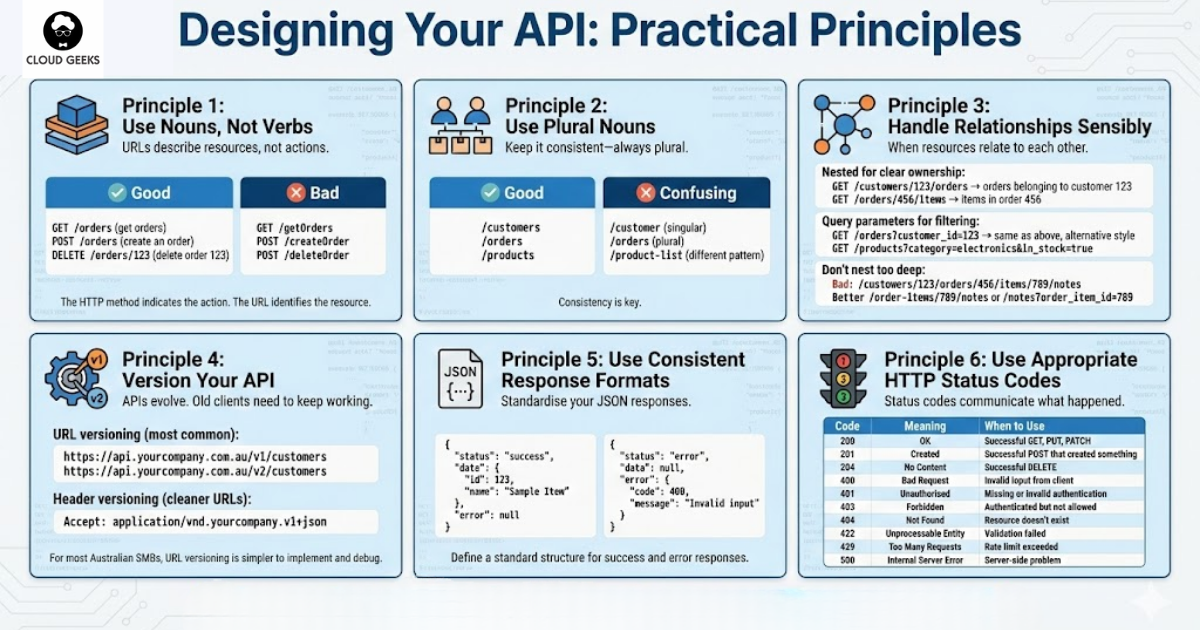
Use Nouns, Not Verbs
URLs should describe resources, not actions.
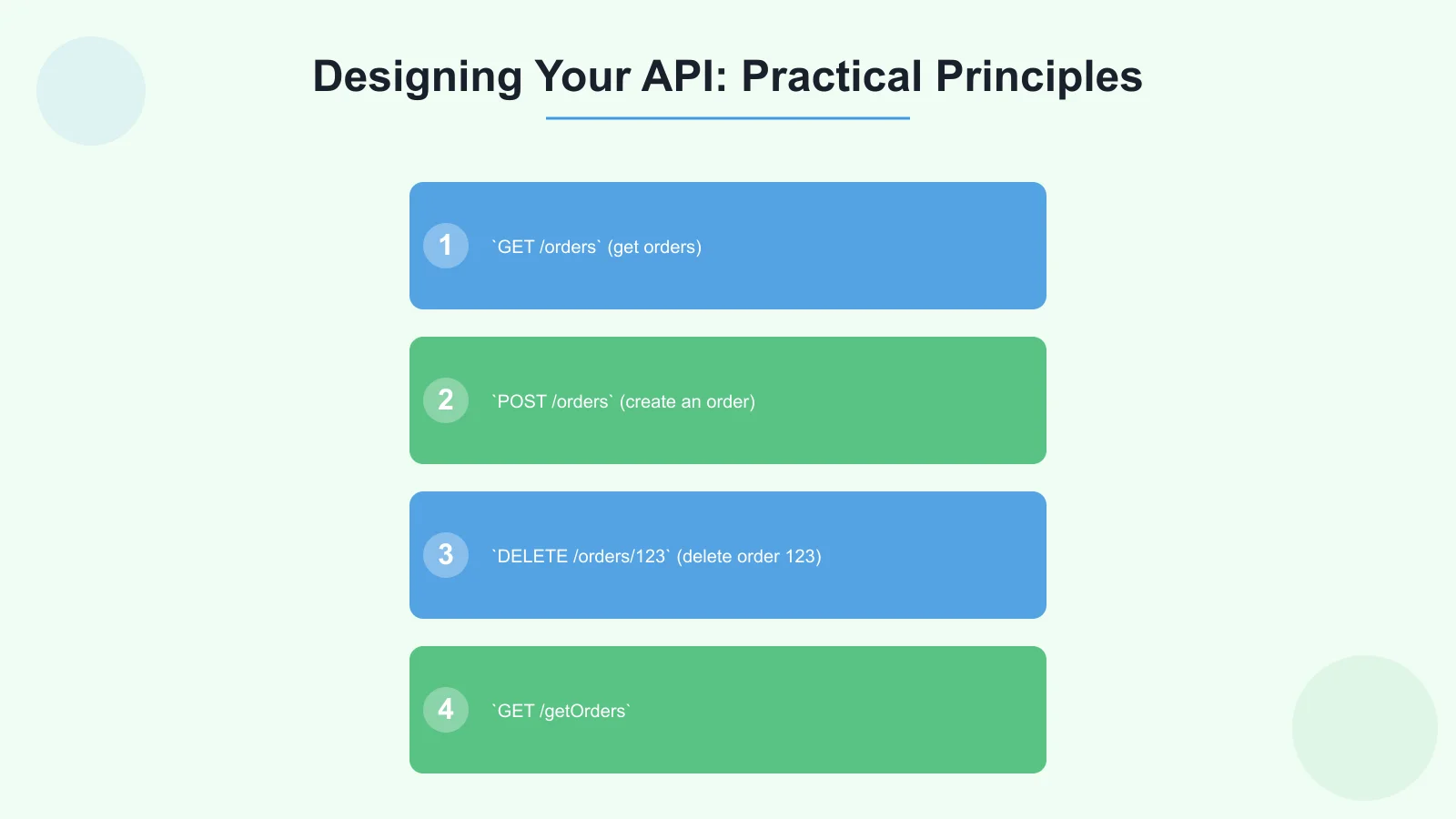
Good:
GET /orders(get orders)POST /orders(create an order)DELETE /orders/123(delete order 123)
Bad:
GET /getOrdersPOST /createOrderPOST /deleteOrder
The HTTP method indicates the action. The URL identifies the resource.
Use Plural Nouns
Keep it consistent—always plural.
Good:
/customers/orders/products
Confusing:
/customer(singular)/orders(plural)/product-list(different pattern)
Handle Relationships Sensibly
When resources relate to each other:
Nested for clear ownership:
GET /customers/123/orders→ orders belonging to customer 123GET /orders/456/items→ items in order 456
Query parameters for filtering:
GET /orders?customer_id=123→ same as above, alternative styleGET /products?category=electronics&in_stock=true
Don’t nest too deep:
- Bad:
/customers/123/orders/456/items/789/notes - Better:
/order-items/789/notesor/notes?order_item_id=789
Version Your API
APIs evolve. Old clients need to keep working.
URL versioning (most common):
https://api.yourcompany.com.au/v1/customershttps://api.yourcompany.com.au/v2/customers
Header versioning (cleaner URLs):
Accept: application/vnd.yourcompany.v1+json
For most Australian SMBs, URL versioning is simpler to implement and debug.
Use Consistent Response Formats
Standardise your JSON responses:
Success response:
{
  "data": {
    "id": 123,
    "name": "John Smith",
    "email": "[email protected]"
  },
  "meta": {
    "request_id": "abc-123",
    "timestamp": "2025-10-10T10:30:00+11:00"
  }
}
List response:
{
  "data": [
    { "id": 1, "name": "Product A" },
    { "id": 2, "name": "Product B" }
  ],
  "meta": {
    "total": 150,
    "page": 1,
    "per_page": 20
  }
}
Error response:
{
  "error": {
    "code": "VALIDATION_ERROR",
    "message": "Invalid email format",
    "details": [
      { "field": "email", "message": "Must be a valid email address" }
    ]
  }
}
Use Appropriate HTTP Status Codes
Status codes communicate what happened:
| Code | Meaning | When to Use |
|---|---|---|
| 200 | OK | Successful GET, PUT, PATCH |
| 201 | Created | Successful POST that created something |
| 204 | No Content | Successful DELETE |
| 400 | Bad Request | Invalid input from client |
| 401 | Unauthorised | Missing or invalid authentication |
| 403 | Forbidden | Authenticated but not allowed |
| 404 | Not Found | Resource doesn’t exist |
| 422 | Unprocessable Entity | Validation failed |
| 429 | Too Many Requests | Rate limit exceeded |
| 500 | Internal Server Error | Server-side problem |
API Security Essentials
Always Use HTTPS
No exceptions. HTTP traffic can be intercepted. HTTPS encrypts everything.
For Australian businesses handling personal information, unencrypted APIs violate Privacy Act obligations.
How to implement:
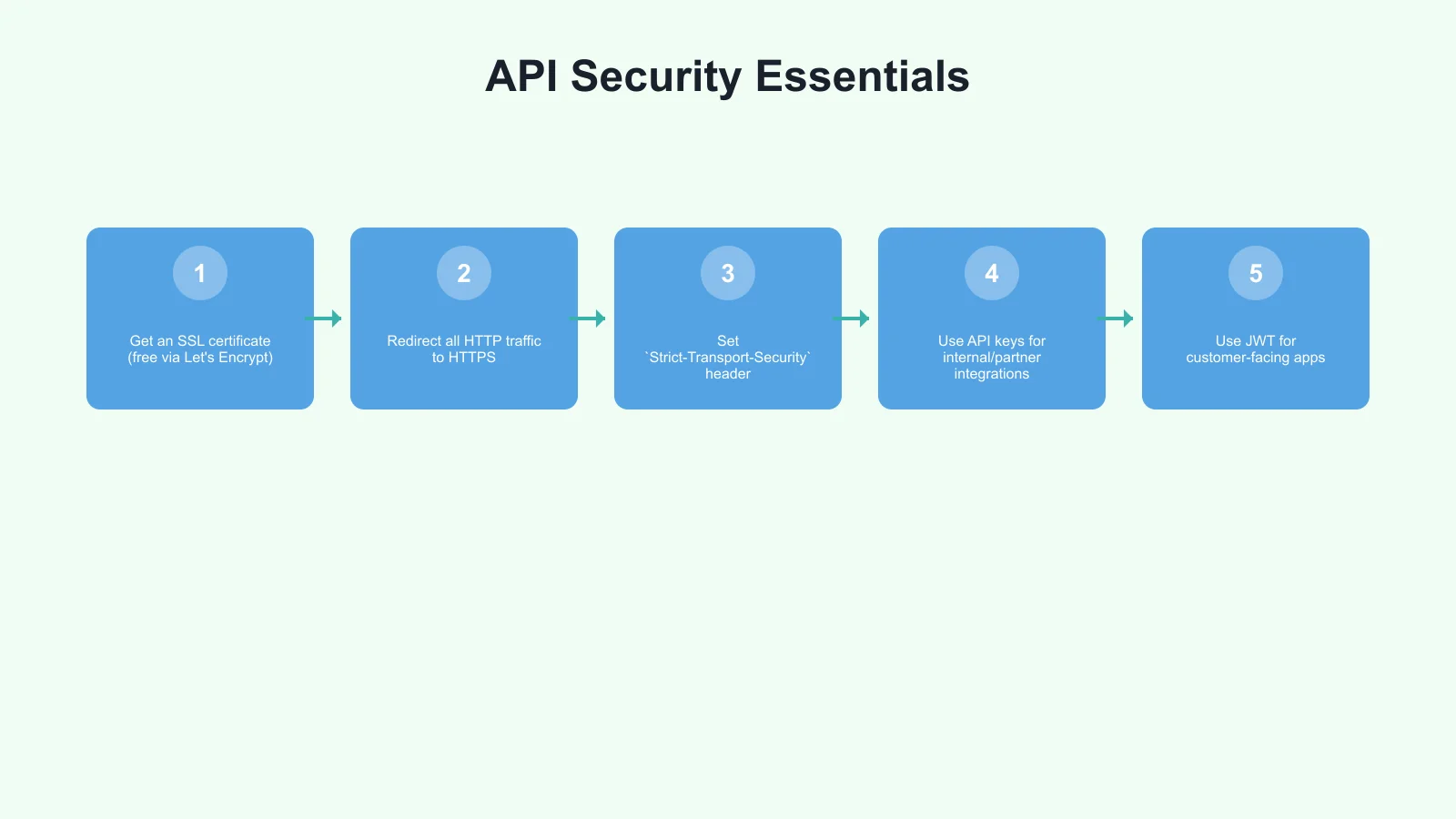
- Get an SSL certificate (free via Let’s Encrypt)
- Redirect all HTTP traffic to HTTPS
- Set
Strict-Transport-Securityheader
Authentication Options
API Keys (simplest): Good for: Server-to-server communication, low-security use cases
Authorization: Api-Key sk_live_abc123xyzPros: Simple to implement Cons: If leaked, provides full access until revoked
JWT Tokens (JSON Web Tokens): Good for: User authentication, mobile apps
Authorization: Bearer eyJhbGciOiJIUzI1NiIs...Pros: Stateless, contains user info, expires automatically Cons: More complex, tokens can’t be revoked until expiry
OAuth 2.0: Good for: Third-party access, delegated permissions
Pros: Industry standard, granular permissions, user consent Cons: Complex to implement correctly
For most Australian SMBs:
- Use API keys for internal/partner integrations
- Use JWT for customer-facing apps
- Use OAuth only if you need third-party developers
Implementing JWT Authentication
Here’s a practical Node.js example:
const jwt = require('jsonwebtoken');
const SECRET = process.env.JWT_SECRET;
// Login endpoint - issues token
app.post('/auth/login', async (req, res) => {
const { email, password } = req.body;
// Verify credentials (simplified)
const user = await verifyUser(email, password);
if (!user) {
return res.status(401).json({ error: 'Invalid credentials' });
}
// Create token
const token = jwt.sign(
{ userId: user.id, email: user.email },
SECRET,
{ expiresIn: '24h' }
);
res.json({ token });
});
// Middleware to protect routes
function authenticateToken(req, res, next) {
const authHeader = req.headers['authorization'];
const token = authHeader && authHeader.split(' ')[1];
if (!token) {
return res.status(401).json({ error: 'Token required' });
}
jwt.verify(token, SECRET, (err, decoded) => {
if (err) {
return res.status(401).json({ error: 'Invalid token' });
}
req.user = decoded;
next();
});
}
// Protected route
app.get('/api/profile', authenticateToken, (req, res) => {
res.json({ userId: req.user.userId });
});Input Validation
Never trust client input. Validate everything:
const { body, validationResult } = require('express-validator');

app.post('/customers',
  [
    body('email').isEmail().normalizeEmail(),
    body('name').trim().isLength({ min: 2, max: 100 }),
    body('phone').optional().isMobilePhone('en-AU'),
    body('abn').optional().matches(/^\d{11}$/),
  ],
  (req, res) => {
    const errors = validationResult(req);
    if (!errors.isEmpty()) {
      return res.status(422).json({
        error: {
          code: 'VALIDATION_ERROR',
          details: errors.array()
        }
      });
    }

    // Process valid input
  }
);
Rate Limiting
Protect your API from abuse (covered in detail in our rate limiting article):
const rateLimit = require('express-rate-limit');

const apiLimiter = rateLimit({
  windowMs: 60 * 1000, // 1 minute
  max: 100, // 100 requests per minute
  message: {
    error: {
      code: 'RATE_LIMITED',
      message: 'Too many requests, try again later'
    }
  }
});

app.use('/api/', apiLimiter);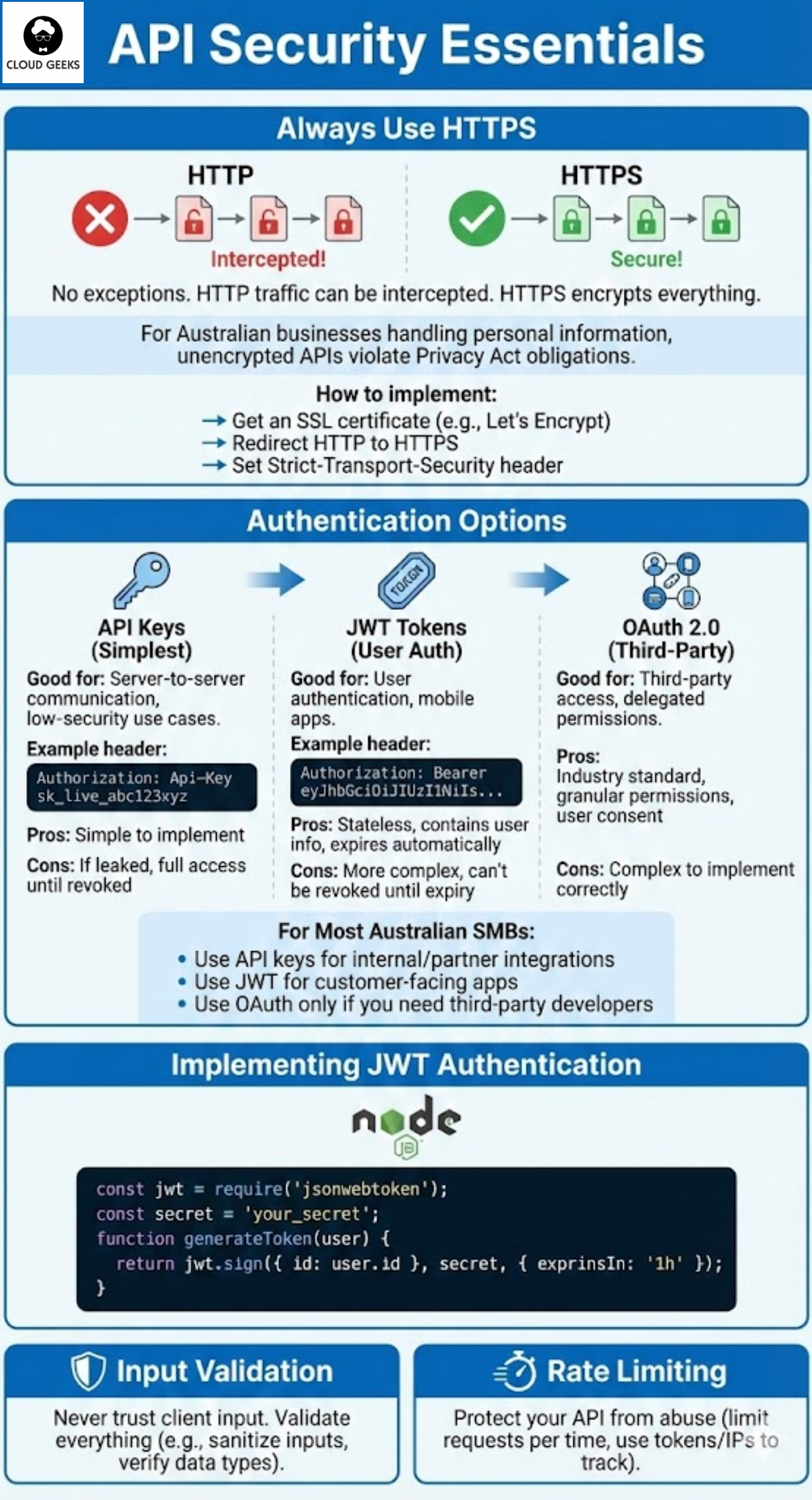
Building a Complete API Example
Let’s build a simple customer management API for an Australian business:
Project Structure
/api
  /src
    /routes
      customers.js
    /middleware
      auth.js
      validation.js
    /models
      customer.js
    server.js
  package.json
Customer Routes (customers.js)
const express = require('express');
const router = express.Router();
const { body, query, param } = require('express-validator');
const validate = require('../middleware/validation');
const Customer = require('../models/customer');

// List customers with pagination
router.get('/',
  [
    query('page').optional().isInt({ min: 1 }),
    query('per_page').optional().isInt({ min: 1, max: 100 }),
  ],
  validate,
  async (req, res) => {
    const page = parseInt(req.query.page) || 1;
    const perPage = parseInt(req.query.per_page) || 20;

    const { customers, total } = await Customer.findAll({
      page,
      perPage
    });

    res.json({
      data: customers,
      meta: {
        total,
        page,
        per_page: perPage,
        total_pages: Math.ceil(total / perPage)
      }
    });
  }
);

// Get single customer
router.get('/:id',
  [param('id').isInt()],
  validate,
  async (req, res) => {
    const customer = await Customer.findById(req.params.id);

    if (!customer) {
      return res.status(404).json({
        error: {
          code: 'NOT_FOUND',
          message: 'Customer not found'
        }
      });
    }

    res.json({ data: customer });
  }
);

// Create customer
router.post('/',
  [
    body('email').isEmail().normalizeEmail(),
    body('name').trim().isLength({ min: 2, max: 100 }),
    body('phone').optional().isMobilePhone('en-AU'),
    body('address.street').optional().trim(),
    body('address.suburb').optional().trim(),
    body('address.state').optional().isIn(['NSW', 'VIC', 'QLD', 'WA', 'SA', 'TAS', 'NT', 'ACT']),
    body('address.postcode').optional().matches(/^\d{4}$/),
  ],
  validate,
  async (req, res) => {
    try {
      const customer = await Customer.create(req.body);
      res.status(201).json({ data: customer });
    } catch (error) {
      if (error.code === 'DUPLICATE_EMAIL') {
        return res.status(422).json({
          error: {
            code: 'DUPLICATE_EMAIL',
            message: 'A customer with this email already exists'
          }
        });
      }
      throw error;
    }
  }
);

// Update customer
router.put('/:id',
  [
    param('id').isInt(),
    body('email').optional().isEmail().normalizeEmail(),
    body('name').optional().trim().isLength({ min: 2, max: 100 }),
  ],
  validate,
  async (req, res) => {
    const customer = await Customer.findById(req.params.id);

    if (!customer) {
      return res.status(404).json({
        error: { code: 'NOT_FOUND', message: 'Customer not found' }
      });
    }

    const updated = await Customer.update(req.params.id, req.body);
    res.json({ data: updated });
  }
);

// Delete customer
router.delete('/:id',
  [param('id').isInt()],
  validate,
  async (req, res) => {
    const customer = await Customer.findById(req.params.id);

    if (!customer) {
      return res.status(404).json({
        error: { code: 'NOT_FOUND', message: 'Customer not found' }
      });
    }

    await Customer.delete(req.params.id);
    res.status(204).send();
  }
);

module.exports = router;
Validation Middleware (validation.js)
const { validationResult } = require('express-validator');

module.exports = (req, res, next) => {
  const errors = validationResult(req);

  if (!errors.isEmpty()) {
    return res.status(422).json({
      error: {
        code: 'VALIDATION_ERROR',
        message: 'Invalid request data',
        details: errors.array().map(err => ({
          field: err.path,
          message: err.msg
        }))
      }
    });
  }

  next();
};
Documentation
Good documentation makes APIs usable. Options for Australian SMBs:
OpenAPI/Swagger
Industry standard. Generate docs from code or write specification first.
openapi: 3.0.0
info:
  title: Customer API
  version: 1.0.0
  description: Customer management for Australian businesses

paths:
  /customers:
    get:
      summary: List customers
      parameters:
        - name: page
          in: query
          schema:
            type: integer
      responses:
        '200':
          description: List of customers
Tools like Swagger UI turn this into interactive documentation.
Postman Collections
Share Postman collections with API consumers. They can test immediately.
README-Based Docs
For internal APIs, well-written README files in your repository often suffice.
Deployment for Australian Businesses
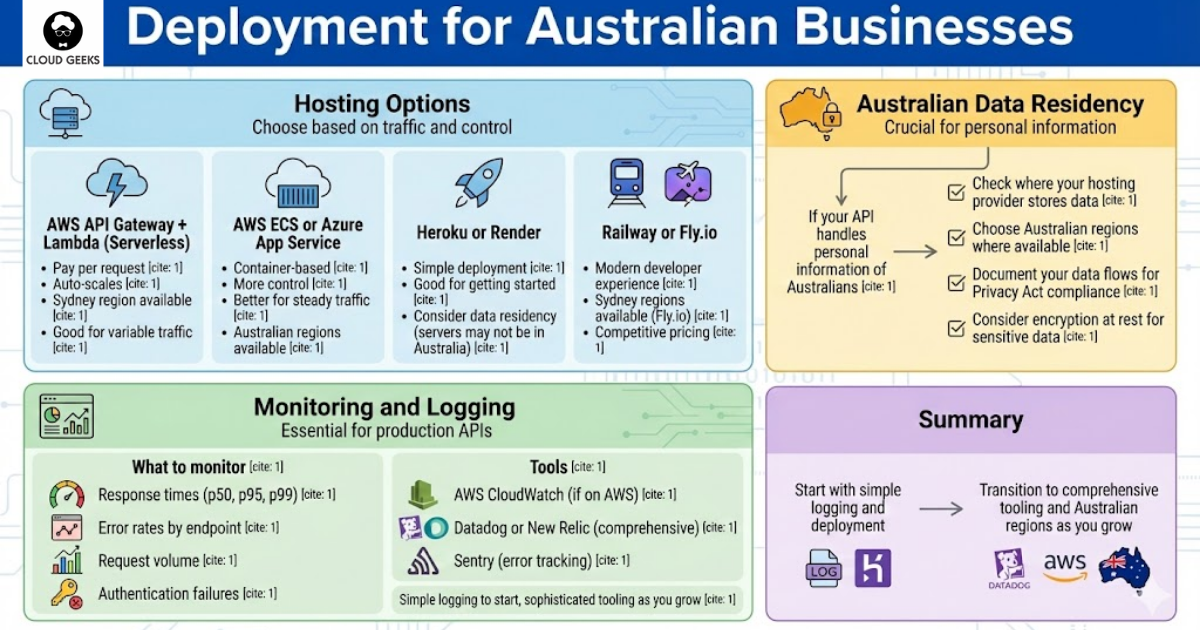
Hosting Options
AWS API Gateway + Lambda (Serverless):
- Pay per request
- Auto-scales
- Sydney region available
- Good for variable traffic
AWS ECS or Azure App Service:
- Container-based
- More control
- Better for steady traffic
- Australian regions available
Heroku or Render:
- Simple deployment
- Good for getting started
- Consider data residency (servers may not be in Australia)
Railway or Fly.io:
- Modern developer experience
- Sydney regions available (Fly.io)
- Competitive pricing
Australian Data Residency
If your API handles personal information of Australians:
- Check where your hosting provider stores data
- Choose Australian regions where available
- Document your data flows for Privacy Act compliance
- Consider encryption at rest for sensitive data
Monitoring and Logging
Essential for production APIs:
What to monitor:
- Response times (p50, p95, p99)
- Error rates by endpoint
- Request volume
- Authentication failures
Tools:
- AWS CloudWatch (if on AWS)
- Datadog or New Relic (comprehensive)
- Sentry (error tracking)
- Simple logging to start, sophisticated tooling as you grow
Testing Your API
Automated Testing
Test every endpoint:
const request = require('supertest');
const app = require('../src/server');

describe('Customers API', () => {
  test('GET /customers returns list', async () => {
    const response = await request(app)
      .get('/api/v1/customers')
      .set('Authorization', `Bearer ${testToken}`)
      .expect(200);

    expect(response.body.data).toBeInstanceOf(Array);
    expect(response.body.meta).toHaveProperty('total');
  });

  test('POST /customers creates customer', async () => {
    const response = await request(app)
      .post('/api/v1/customers')
      .set('Authorization', `Bearer ${testToken}`)
      .send({
        name: 'Test Customer',
        email: '[email protected]'
      })
      .expect(201);

    expect(response.body.data.id).toBeDefined();
    expect(response.body.data.email).toBe('[email protected]');
  });

  test('POST /customers validates email', async () => {
    const response = await request(app)
      .post('/api/v1/customers')
      .set('Authorization', `Bearer ${testToken}`)
      .send({
        name: 'Test Customer',
        email: 'not-an-email'
      })
      .expect(422);

    expect(response.body.error.code).toBe('VALIDATION_ERROR');
  });
});
Getting Started
Week 1: Design
- Define your resources
- Plan your URL structure
- Choose authentication approach
Week 2: Build Core
- Set up project structure
- Implement basic CRUD operations
- Add authentication
Week 3: Harden
- Add validation
- Implement rate limiting
- Set up error handling
Week 4: Deploy
- Choose hosting
- Set up CI/CD
- Add monitoring
Conclusion
RESTful APIs are the backbone of modern business applications. For Australian SMBs, building solid APIs enables integrations with partners, powers mobile apps, and creates opportunities for automation.
The principles are straightforward: clear URL design, consistent responses, proper security, and good documentation. The implementation takes care and attention, but the payoff is systems that work reliably and scale with your business.
Start with your most important integration need. Build it properly. Expand from there.
Need help designing or building APIs for your Australian business? Contact CloudGeeks for expert guidance on API development, security, and integration strategies.
Related Articles
- Rate Limiting Strategies to Protect Your Australian Business APIs
- Choosing the Right Database for Your Australian Business: SQL vs NoSQL
- Payment Gateway Integration for Australian E-Commerce: Stripe vs PayPal
- Quality Assurance for Australian Software Projects: Testing on a Budget
- Automating Australian Business Operations with CI/CD
Need a web presence to complement your cloud setup? Our web team at Cosmos Web Tech designs fast, secure websites for Australian businesses.
Ganda Tech Services brings together cloud infrastructure, web development, and mobile app expertise to help Australian businesses thrive in the digital economy.