
Quality Assurance for Australian Software Projects: Testing on a Budget

Bugs cost money. A bug caught in development costs a few minutes to fix. The same bug found in production can cost hours of debugging, customer compensation, and reputation damage. Studies suggest bugs found in production cost 10-100 times more to fix than those caught during development.
Yet many Australian SMBs skip proper testing because they think it’s too expensive or time-consuming. The reality? Effective QA is affordable, and the cost of not testing is far higher than the cost of testing.
This guide shows Australian software teams how to build practical QA processes that catch bugs early without breaking the budget.
The Economics of Testing
Cost of Bugs by Stage
| Stage Found | Cost to Fix | Example |
|---|---|---|
| During coding | 1x (baseline) | 15 minutes |
| During code review | 2-3x | 30-45 minutes |
| During QA testing | 5-10x | 1-2 hours |
| In staging/UAT | 10-20x | 2-4 hours |
| In production | 30-100x | 4-40+ hours |
Real example: A Sydney e-commerce company shipped a bug that miscalculated GST on certain products. Found by a customer three weeks later:
- Customer refunds: $2,400
- Developer time to fix: 4 hours ($400)
- QA regression testing: 2 hours ($150)
- Customer service time: 3 hours ($120)
- Reputation impact: Unknown
Total: ~$3,000+ for a bug that would have taken 15 minutes to fix during development.
Why Australian SMBs Avoid Testing
“We can’t afford dedicated testers.” You don’t need them. Developers can write tests. Automated testing scales without additional headcount.
“Testing slows us down.” Short-term, maybe. Long-term, testing speeds you up by reducing time spent fixing production bugs.
“Our product is too simple to need testing.” Simple products can have complex bugs. Payment processing, user authentication, and data handling need testing regardless of product complexity.
“We’ll add testing later when we’re bigger.” Technical debt compounds. Adding tests to untested code is harder than writing tests alongside code.
Building a Budget QA Strategy
The Testing Pyramid
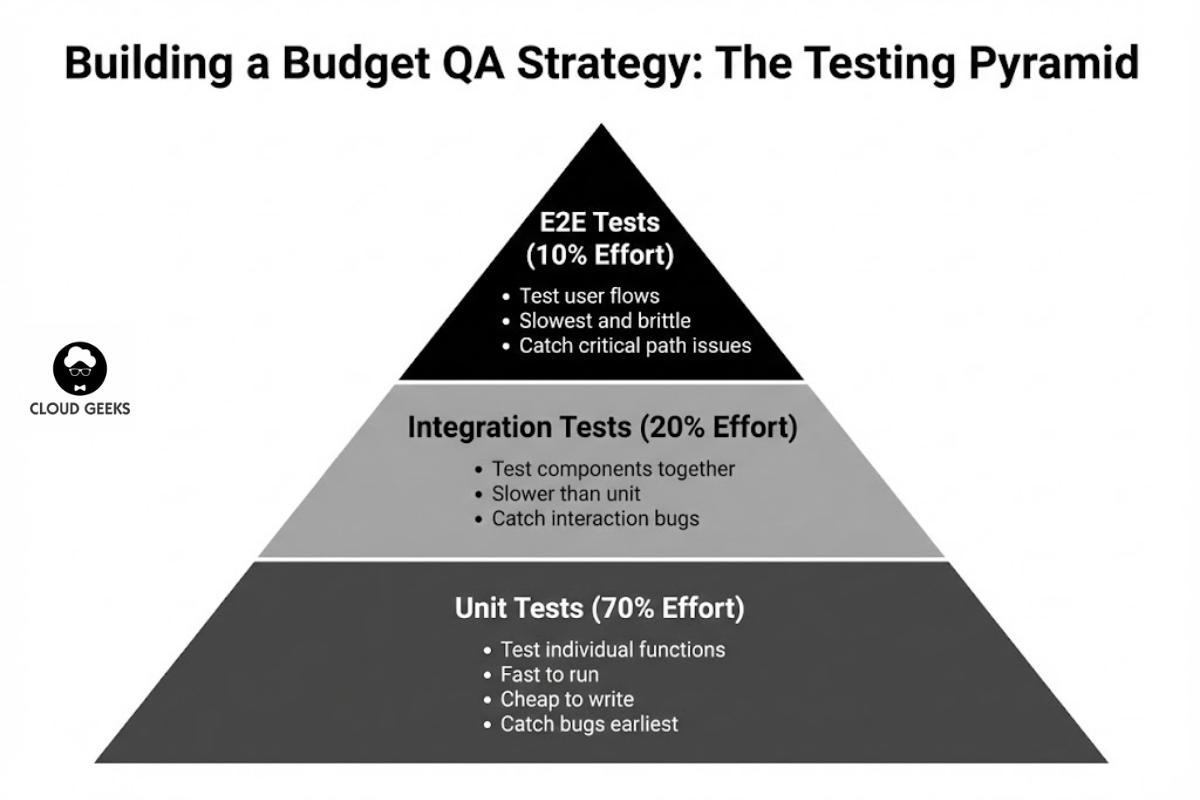
Focus testing effort where it provides most value:
        /\
       /  \    E2E Tests (few, slow, expensive)
      /----\
     /      \  Integration Tests (some)
    /--------\
   /          \ Unit Tests (many, fast, cheap)
  /------------\
Unit tests (70% of effort):
- Test individual functions and components
- Fast to run (milliseconds)
- Cheap to write and maintain
- Catch most bugs earliest
Integration tests (20% of effort):
- Test components working together
- Slower than unit tests
- Catch interaction bugs
End-to-end tests (10% of effort):
- Test complete user flows
- Slowest and most brittle
- Catch critical path issues
What to Test First
Prioritise testing by risk and impact:
Always test:
- Payment and billing logic
- User authentication
- Data validation
- Security-sensitive functions
- Core business logic
Usually test:
- API endpoints
- Database operations
- Form submissions
- Email sending
Test when time permits:
- UI appearance
- Edge cases
- Error messages
- Admin functions
Practical Testing Tools (Budget-Friendly)
For JavaScript/TypeScript Projects
Jest (Free)
- Industry standard for JavaScript testing
- Great developer experience
- Built-in mocking and coverage
// Example: Testing a GST calculator
describe('calculateGST', () => {
  test('calculates 10% GST for standard items', () => {
    expect(calculateGST(100, 'standard')).toBe(10);
  });

  test('returns 0 for GST-free items', () => {
    expect(calculateGST(100, 'gst-free')).toBe(0);
  });

  test('handles decimal amounts correctly', () => {
    expect(calculateGST(99.99, 'standard')).toBe(10.00);
  });

  test('throws error for negative amounts', () => {
    expect(() => calculateGST(-100, 'standard')).toThrow('Amount must be positive');
  });
});
Playwright (Free)
- Modern E2E testing
- Cross-browser support
- Great for testing user flows
// Example: Testing checkout flow
test('customer can complete checkout', async ({ page }) => {
  await page.goto('/products');
  await page.click('[data-testid="add-to-cart"]');
  await page.click('[data-testid="checkout-button"]');

  await page.fill('#email', '[email protected]');
  await page.fill('#card-number', '4242424242424242');
  // ... more form filling

  await page.click('[data-testid="pay-button"]');

  await expect(page.locator('.order-confirmation')).toBeVisible();
});
For Python Projects
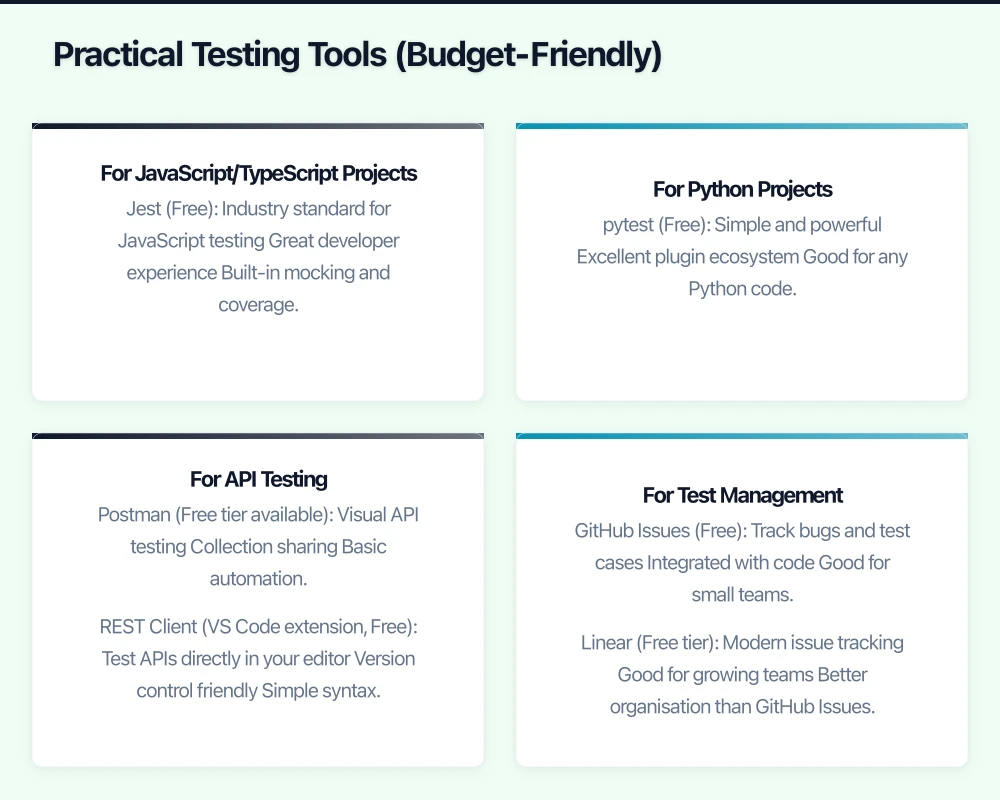
pytest (Free)
- Simple and powerful
- Excellent plugin ecosystem
- Good for any Python code
# Example: Testing order validation
import pytest
from orders import validate_order

def test_valid_order_passes():
    order = {'items': [{'id': 1, 'qty': 2}], 'total': 50.00}
    assert validate_order(order) == True

def test_empty_order_fails():
    order = {'items': [], 'total': 0}
    with pytest.raises(ValueError, match="Order must have items"):
        validate_order(order)

def test_negative_quantity_fails():
    order = {'items': [{'id': 1, 'qty': -1}], 'total': 50.00}
    with pytest.raises(ValueError, match="Quantity must be positive"):
        validate_order(order)
For API Testing
Postman (Free tier available)
- Visual API testing
- Collection sharing
- Basic automation
REST Client (VS Code extension, Free)
- Test APIs directly in your editor
- Version control friendly
- Simple syntax
### Test get products
GET https://api.example.com.au/v1/products
Authorization: Bearer {{token}}

### Test create order
POST https://api.example.com.au/v1/orders
Content-Type: application/json
Authorization: Bearer {{token}}

{
  "items": [{"product_id": 123, "quantity": 2}],
  "shipping_address": "123 Test St, Sydney NSW 2000"
}
For Test Management
GitHub Issues (Free)
- Track bugs and test cases
- Integrated with code
- Good for small teams
Linear (Free tier)
- Modern issue tracking
- Good for growing teams
- Better organisation than GitHub Issues
TestRail ($36/month)
- Purpose-built for test management
- Worth it for larger QA efforts
- Reporting and metrics
Implementing Testing: Week by Week
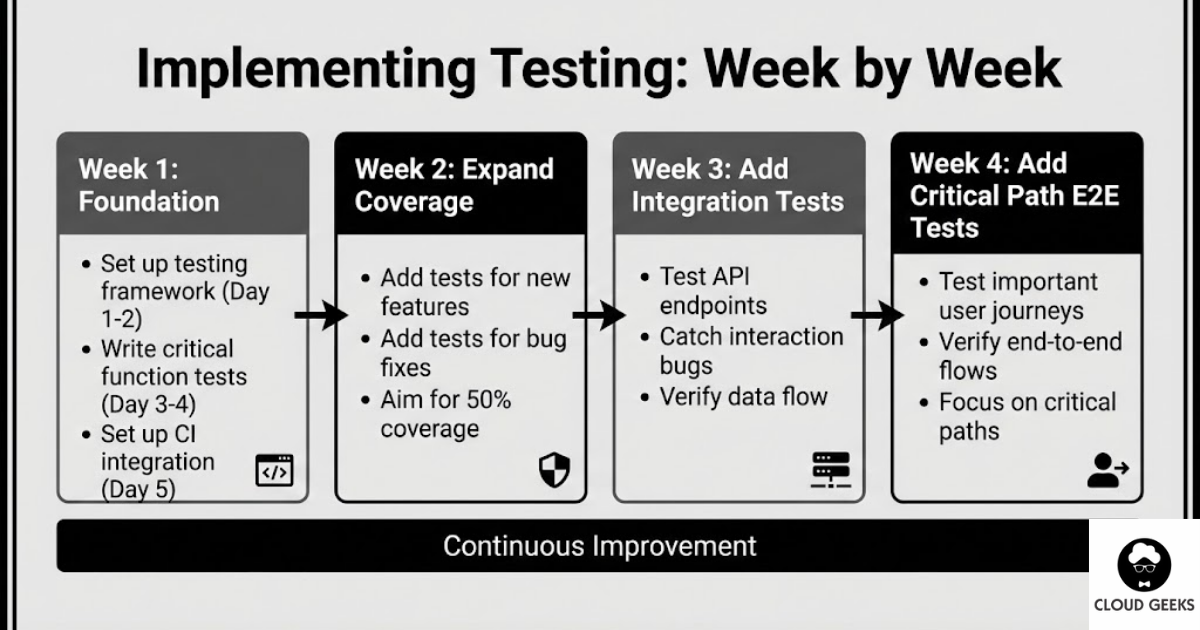
Week 1: Foundation
Day 1-2: Set up testing framework
For a JavaScript project:
npm install --save-dev jest @testing-library/reactConfigure in package.json:
{
  "scripts": {
    "test": "jest",
    "test:watch": "jest --watch",
    "test:coverage": "jest --coverage"
  }
}
Day 3-4: Write tests for critical functions
Identify your top 5 most critical functions (payment, auth, core logic). Write unit tests for each.
Day 5: Set up CI integration
Run tests automatically on every pull request:
# .github/workflows/test.yml
name: Tests
on: [push, pull_request]
jobs:
  test:
    runs-on: ubuntu-latest
    steps:
      - uses: actions/checkout@v3
      - uses: actions/setup-node@v3
        with:
          node-version: '18'
      - run: npm ci
      - run: npm test
Week 2: Expand Coverage
Add tests as you work:
- Every new feature gets tests
- Every bug fix gets a test (prevent regression)
- Aim for 50% coverage of critical paths
Example: Adding test with bug fix
Bug report: “GST calculated incorrectly for items over $1000”
// First, write test that reproduces the bug
test('calculates GST correctly for items over $1000', () => {
  // This test should fail initially
  expect(calculateGST(1500, 'standard')).toBe(150);
});

// Then fix the bug until test passes
Week 3: Add Integration Tests
Test your API endpoints:
const request = require('supertest');
const app = require('../src/app');

describe('Orders API', () => {
  test('POST /orders creates order with valid data', async () => {
    const response = await request(app)
      .post('/api/orders')
      .set('Authorization', `Bearer ${testToken}`)
      .send({
        items: [{ product_id: 1, quantity: 2 }],
        shipping_address: '123 Test St, Sydney NSW 2000'
      });

    expect(response.status).toBe(201);
    expect(response.body.data.id).toBeDefined();
  });

  test('POST /orders rejects invalid shipping address', async () => {
    const response = await request(app)
      .post('/api/orders')
      .set('Authorization', `Bearer ${testToken}`)
      .send({
        items: [{ product_id: 1, quantity: 2 }],
        shipping_address: '' // Invalid
      });

    expect(response.status).toBe(422);
    expect(response.body.error.code).toBe('VALIDATION_ERROR');
  });
});
Week 4: Add Critical Path E2E Tests
Test your most important user journeys:
// tests/e2e/checkout.spec.js
const { test, expect } = require('@playwright/test');

test.describe('Checkout Flow', () => {
  test('guest can complete purchase', async ({ page }) => {
    // Add product to cart
    await page.goto('/products/popular-item');
    await page.click('button:has-text("Add to Cart")');

    // Go to checkout
    await page.click('a:has-text("Checkout")');

    // Fill shipping
    await page.fill('#email', '[email protected]');
    await page.fill('#name', 'Test Customer');
    await page.fill('#address', '123 Test Street');
    await page.fill('#suburb', 'Sydney');
    await page.selectOption('#state', 'NSW');
    await page.fill('#postcode', '2000');

    // Fill payment (Stripe test card)
    const stripeFrame = page.frameLocator('iframe[name*="stripe"]').first();
    await stripeFrame.locator('[name="cardnumber"]').fill('4242424242424242');
    await stripeFrame.locator('[name="exp-date"]').fill('12/30');
    await stripeFrame.locator('[name="cvc"]').fill('123');

    // Complete purchase
    await page.click('button:has-text("Pay")');

    // Verify success
    await expect(page.locator('.order-confirmation')).toBeVisible({ timeout: 30000 });
    await expect(page.locator('.order-number')).toContainText('ORD-');
  });
});
Manual Testing That Matters
Automation doesn’t replace all manual testing. Some things need human eyes:
Exploratory Testing
What it is: Unscripted testing where testers explore the application looking for issues.
When to do it:
- Before major releases
- After significant changes
- When investigating reported issues
How to do it effectively:
- Set a time box (30-60 minutes)
- Focus on one area
- Document everything you try
- Note any unexpected behaviour
Usability Testing
What to look for:
- Confusing workflows
- Unclear error messages
- Accessibility issues
- Mobile experience problems
Budget approach: Ask 3-5 people (colleagues, friends, family) to complete specific tasks while you watch. Note where they struggle.
Security Testing
Basic checks to do manually:
- Can you access other users’ data by changing URLs?
- Do forms properly validate input?
- Are sensitive pages protected?
- Do error messages reveal too much?
Testing Metrics to Track
Essential Metrics
Test coverage: Percentage of code covered by tests.
- Aim for: 60-80% for critical paths
- Don’t obsess over 100%—diminishing returns
Test pass rate: Percentage of tests passing.
- Should be: 100% on main branch
- Investigate any flaky tests immediately
Time to run tests: How long your test suite takes.
- Unit tests: Under 5 minutes
- Full suite: Under 15 minutes
- Longer = tests won’t get run
Business Metrics
Production bug rate: Bugs found in production per release.
- Track trend over time
- Should decrease as testing improves
Mean time to fix: How long from bug report to fix deployed.
- Faster with good tests (easier to reproduce and verify)
Testing on a Tight Budget
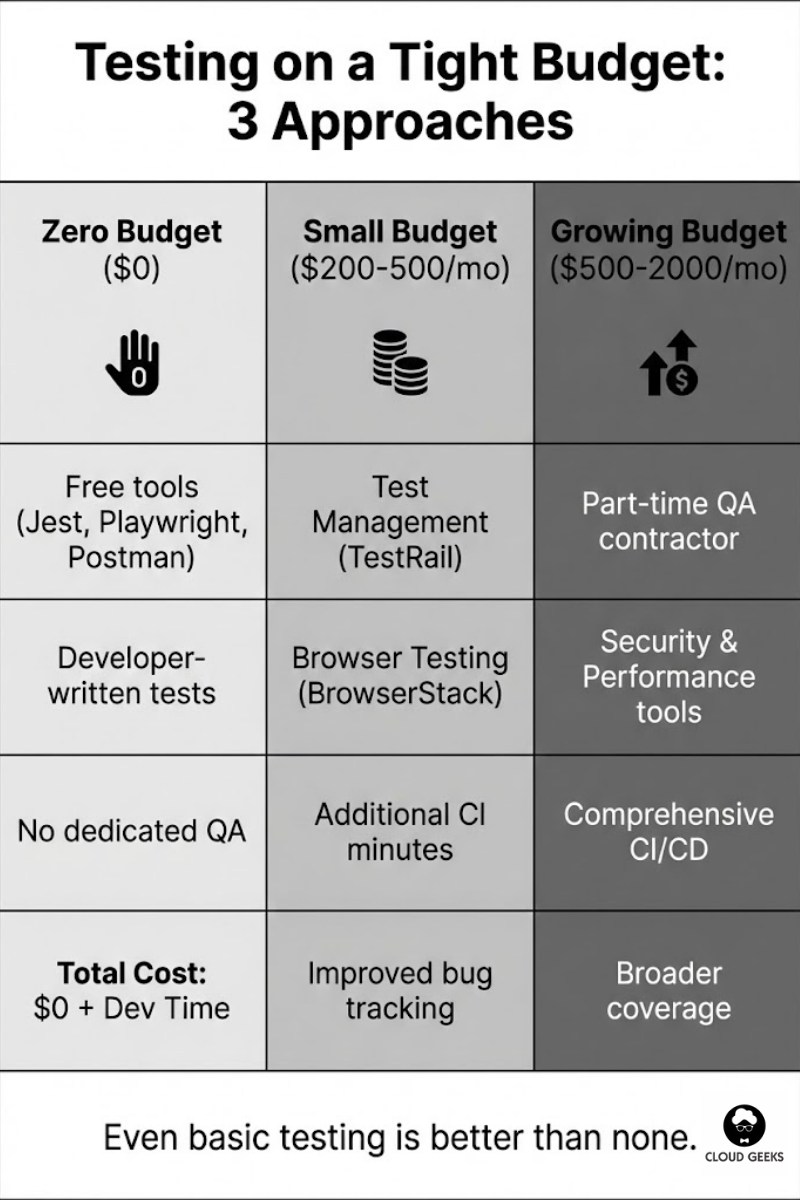
Zero Budget Approach
Free tools:
- Jest, pytest, unittest (testing frameworks)
- Playwright (E2E testing)
- GitHub Actions (2,000 free minutes/month)
- Postman (free tier)
Developer-written tests:
- Developers write tests for their own code
- Code review includes test review
- No dedicated QA headcount needed
Total cost: $0 + developer time
Small Budget Approach ($200-500/month)
Add:
- Test management tool (TestRail or similar): ~$100/month
- Additional CI minutes: ~$50/month
- Browser testing service (BrowserStack): ~$100/month
- Bug tracking (Linear or Jira): ~$50/month
Benefits:
- Better test organisation
- Cross-browser testing
- Improved bug tracking
Growing Budget Approach ($500-2,000/month)
Add:
- Part-time QA contractor: 10-20 hours/week
- Security scanning tool: ~$100/month
- Performance testing tool: ~$100/month
- More comprehensive CI/CD pipeline
Benefits:
- Dedicated testing perspective
- Broader test coverage
- Security and performance validation
Common Testing Mistakes
Mistake 1: Testing Only the Happy Path
Easy to test: User logs in successfully Harder but important: What happens with wrong password, locked account, expired session?
Fix: For every feature, list 3-5 ways it could fail. Test those.
Mistake 2: Flaky Tests
Tests that sometimes pass and sometimes fail destroy trust in testing.
Fix: Investigate and fix flaky tests immediately. If you can’t fix them, delete them.
Mistake 3: Slow Test Suites
If tests take 30 minutes, developers won’t run them locally.
Fix: Keep unit tests fast. Run slow tests in CI only.
Mistake 4: Testing Implementation, Not Behaviour
// Bad: Tests implementation details
test('calls database save method', () => {
  expect(db.save).toHaveBeenCalled();
});

// Good: Tests behaviour
test('order appears in order history after creation', async () => {
  await createOrder(testData);
  const orders = await getOrderHistory(userId);
  expect(orders).toContainEqual(expect.objectContaining({
    product_id: testData.product_id
  }));
});
Mistake 5: No Tests for Bug Fixes
Every bug that reaches production should get a test that would have caught it.
Process:
- Bug reported
- Write failing test that reproduces bug
- Fix bug until test passes
- Bug can never recur
Getting Started This Week
Day 1: Install testing framework for your language Day 2: Write 3 unit tests for your most critical function Day 3: Set up CI to run tests on every push Day 4: Write tests for your most important API endpoint Day 5: Document your testing approach for the team
Conclusion
Quality assurance isn’t a luxury for big companies. It’s a cost-saving measure that Australian SMBs can’t afford to skip.
The key insights:
- Bugs caught early cost 10-100x less than bugs found in production
- Automated testing scales without adding headcount
- Start small and grow—even basic testing is better than none
- Focus on critical paths first: payments, authentication, core business logic
- Make testing part of the development process, not an afterthought
You don’t need dedicated QA staff. You don’t need expensive tools. You need a commitment to quality and 15 minutes to set up a testing framework.
Start this week. Your future self—and your customers—will thank you.
Ready to improve your software quality? Contact CloudGeeks for help implementing effective testing processes that fit your budget and team.
Related Articles
- RESTful APIs for Australian Business Applications: A Practical Guide
- Automating Australian Business Operations with CI/CD
- Payment Gateway Integration for Australian E-Commerce: Stripe vs PayPal
- Rate Limiting Strategies to Protect Your Australian Business APIs
- Choosing the Right Database for Your Australian Business: SQL vs NoSQL
Need a web presence to complement your cloud setup? Our web team at Cosmos Web Tech designs fast, secure websites for Australian businesses.
Ashish Ganda is the founder of Ganda Tech Services, a Sydney-based technology consultancy helping Australian businesses grow through cloud, web, and mobile solutions.