
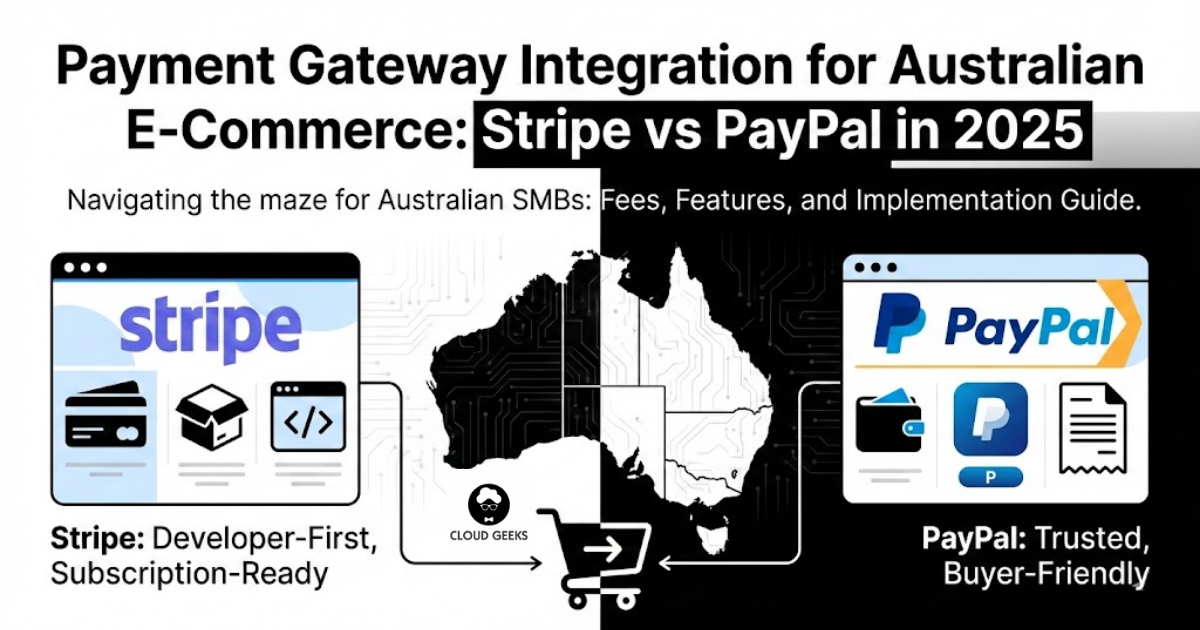
Payment Gateway Integration for Australian E-Commerce: Stripe vs PayPal in 2025

Accepting payments online should be simple. In practice, Australian e-commerce businesses face a maze of options: Stripe, PayPal, Square, Afterpay, bank-direct solutions, and more. Each has different fees, features, and trade-offs.
For most Australian SMBs, the choice comes down to Stripe or PayPal—or using both. This guide provides a detailed comparison with real pricing, practical integration advice, and recommendations based on your specific situation.
The Australian Payment Landscape in 2025
Before comparing providers, understand the context:
Payment methods Australians use:
- Credit/debit cards: 52%
- Digital wallets (Apple Pay, Google Pay): 28%
- Buy Now Pay Later (Afterpay, Zip): 12%
- PayPal: 8%
What this means: Card payments dominate, but digital wallets are growing rapidly. Offering multiple payment methods improves conversion.
Regulatory environment:
- ASIC oversees payment systems
- Payment Card Industry Data Security Standard (PCI DSS) compliance required
- Strong Customer Authentication becoming standard
Stripe vs PayPal: Direct Comparison
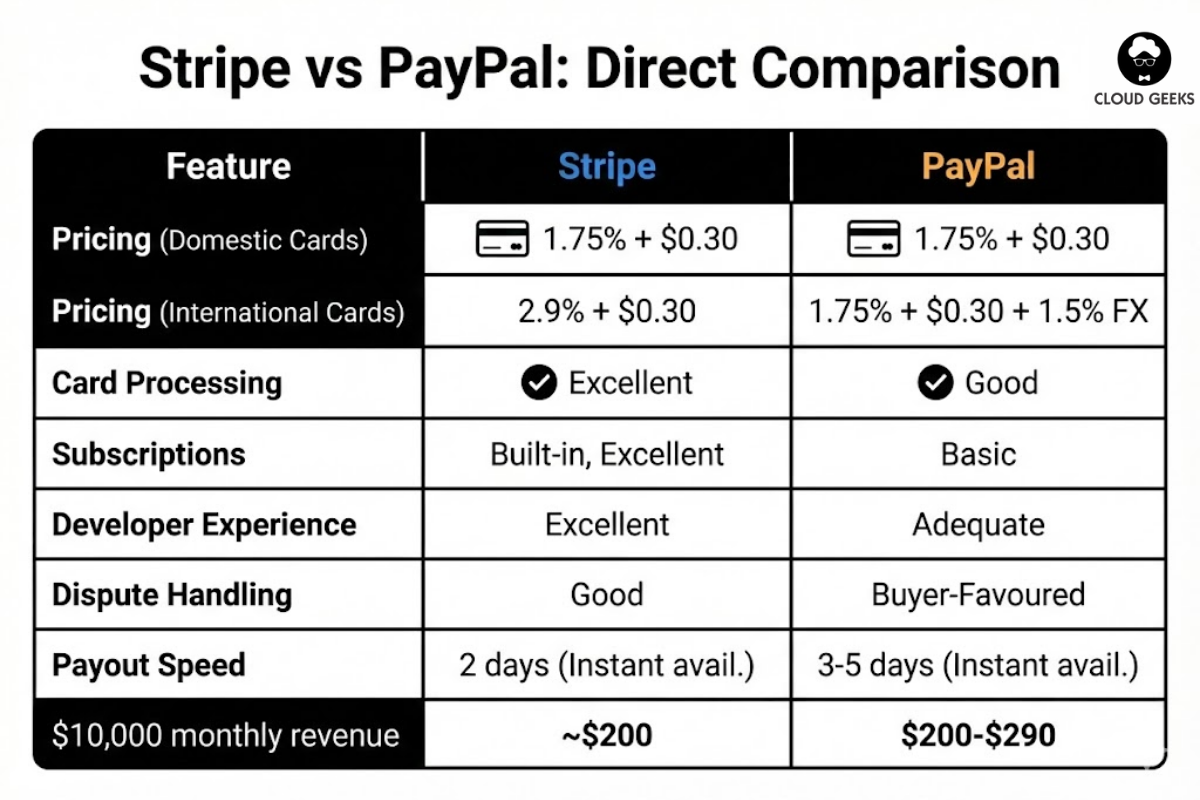
Pricing for Australian Businesses
Stripe Australia:
| Transaction Type | Fee |
|---|---|
| Domestic cards | 1.75% + $0.30 |
| International cards | 2.9% + $0.30 |
| Amex | 2.9% + $0.30 |
| Apple/Google Pay | Same as card |
| Recurring payments | Same as card |
| Payouts | Free (1-2 business days) |
| Instant payouts | 1% (minimum $2) |
PayPal Australia:
| Transaction Type | Fee |
|---|---|
| PayPal payments | 2.6% + $0.30 |
| Card payments (PayPal Checkout) | 1.75% + $0.30 |
| International | +1.5% currency conversion |
| Payouts to bank | Free (3-5 business days) |
| Instant transfer | 1% (max $10) |
Cost comparison for $100 sale:
| Scenario | Stripe | PayPal |
|---|---|---|
| Domestic Visa/Mastercard | $2.05 | $2.05 |
| PayPal balance payment | N/A | $2.90 |
| International card | $3.20 | $3.55 |
| $10,000 monthly revenue | ~$200 | $200-290 |
Bottom line on fees: For card payments, Stripe and PayPal’s card processing are comparable. PayPal’s wallet payments cost more. International transactions favour Stripe.
Feature Comparison
| Feature | Stripe | PayPal |
|---|---|---|
| Card processing | Excellent | Good |
| PayPal wallet | No | Yes |
| Apple Pay | Yes | Yes |
| Google Pay | Yes | Yes |
| Afterpay | Via integration | Via integration |
| Subscriptions | Built-in, excellent | Basic |
| Invoicing | Yes | Yes |
| Developer experience | Excellent | Adequate |
| Dispute handling | Good | Buyer-favoured |
| No-code options | Payment Links | PayPal Buttons |
| Australian support | Email, chat | Phone, email |
| Payout speed | 2 days (instant available) | 3-5 days (instant available) |
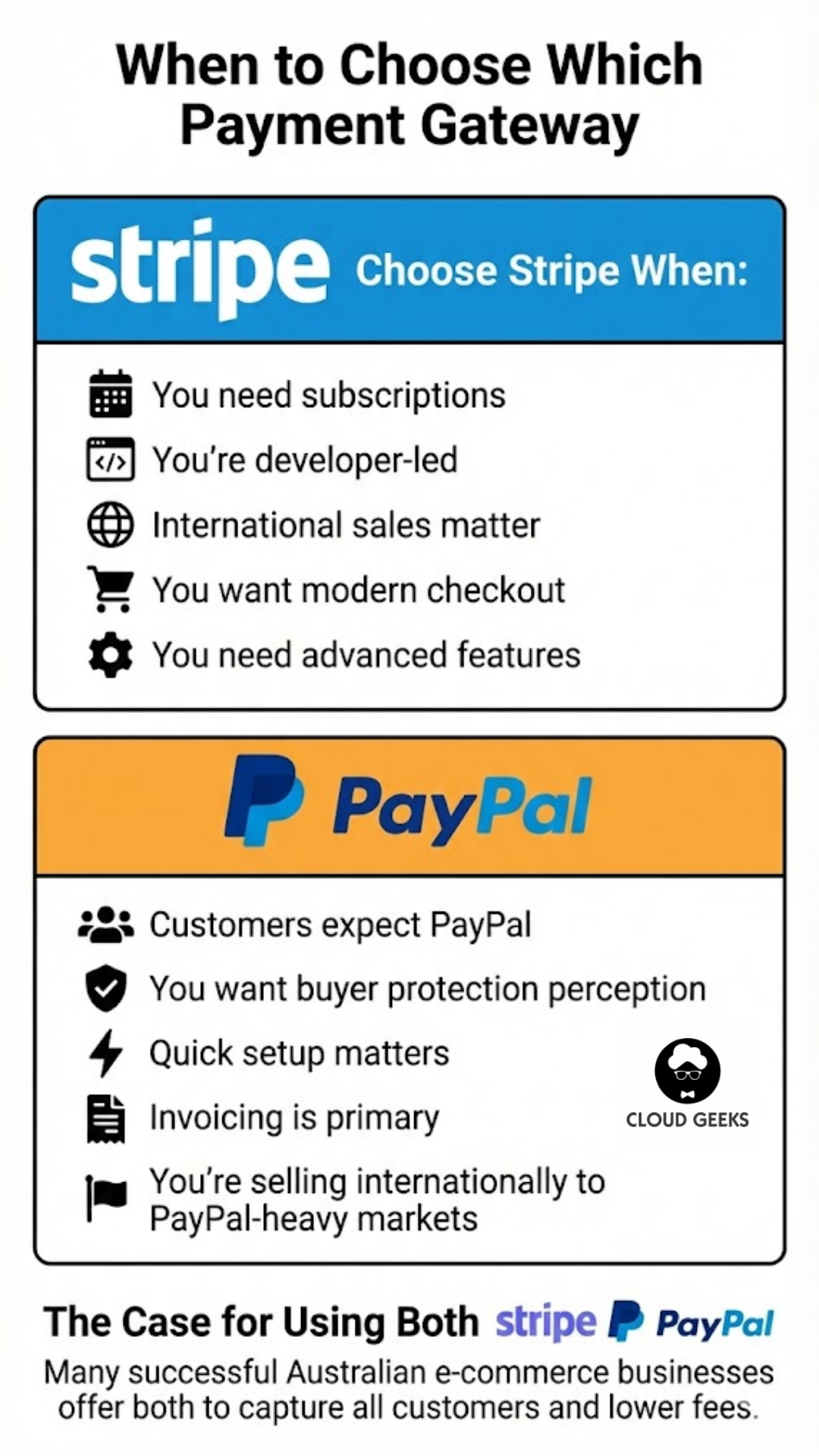
When to Choose Stripe
Stripe is better when:
-
You need subscriptions: Stripe Billing handles recurring payments beautifully—trials, upgrades, downgrades, prorated charges, all built-in.
-
You’re developer-led: Stripe’s API, documentation, and developer tools are industry-leading. Building custom checkout experiences is straightforward.
-
International sales matter: Stripe’s international card rates are better, and multi-currency support is cleaner.
-
You want modern checkout: Stripe Checkout and Payment Links provide polished, conversion-optimised experiences with minimal effort.
-
You need advanced features: Connect for marketplaces, Radar for fraud detection, Terminal for in-person payments.
When to Choose PayPal
PayPal is better when:
-
Customers expect PayPal: Some demographics (older buyers, international customers) trust and prefer PayPal.
-
You want buyer protection perception: PayPal’s buyer protection is well-known; some customers only buy where PayPal is accepted.
-
Quick setup matters: PayPal buttons can be live in minutes with no code.
-
Invoicing is primary: PayPal’s invoicing works well for service businesses.
-
You’re selling internationally to PayPal-heavy markets: Some countries have very high PayPal adoption.
The Case for Using Both
Many successful Australian e-commerce businesses offer both:
Checkout options:
[Credit/Debit Card] [PayPal] [Afterpay]
Benefits:
- Capture customers who prefer PayPal
- Lower fees on card transactions (use Stripe for cards)
- Reduced cart abandonment
Implementation:
- Use Stripe for card processing
- Add PayPal as an alternative payment method
- Let customers choose their preference
Integration Options
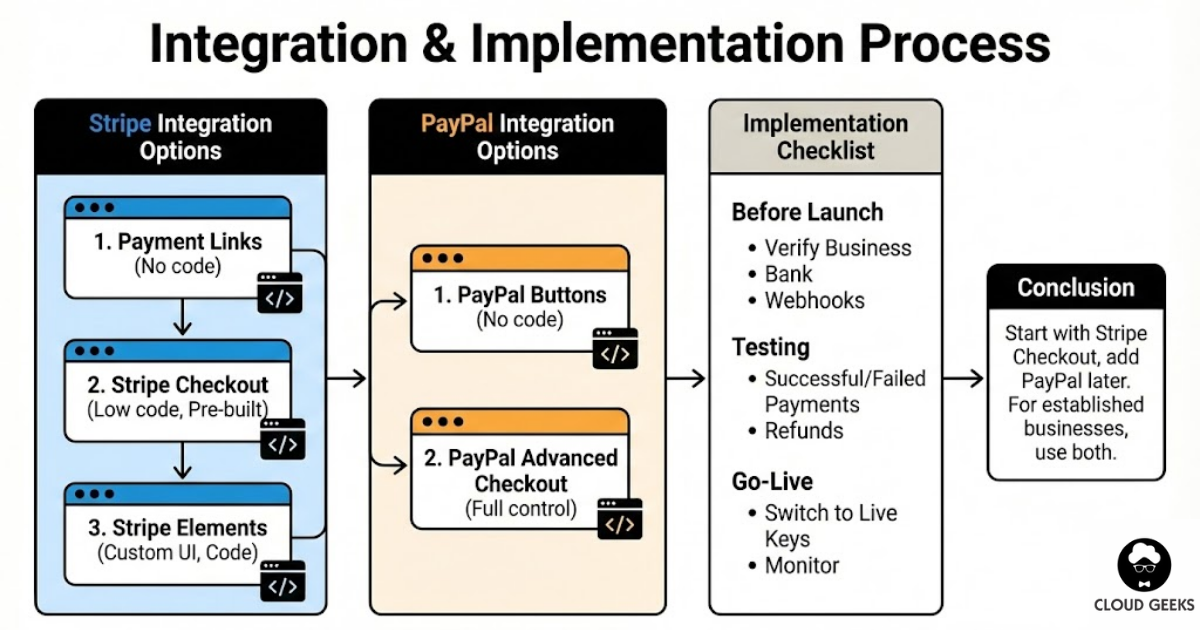
Stripe Integration
Option 1: Stripe Payment Links (No code)
Create a payment link in the Stripe dashboard. Share via email, social media, or embed on website.
Best for: Quick payments, invoicing, testing
Option 2: Stripe Checkout (Low code)
Pre-built, Stripe-hosted checkout page:
const session = await stripe.checkout.sessions.create({
  payment_method_types: ['card'],
  line_items: [{
    price_data: {
      currency: 'aud',
      product_data: {
        name: 'Product Name',
      },
      unit_amount: 5000, // $50.00 in cents
    },
    quantity: 1,
  }],
  mode: 'payment',
  success_url: 'https://example.com.au/success',
  cancel_url: 'https://example.com.au/cancel',
});

// Redirect to session.url
Best for: Most e-commerce sites wanting quick, reliable checkout
Option 3: Stripe Elements (Custom UI)
Embed Stripe’s payment form components in your own design:
<form id="payment-form">
  <div id="card-element"></div>
  <button type="submit">Pay $50.00</button>
</form>

<script>
const stripe = Stripe('pk_live_...');
const elements = stripe.elements();
const cardElement = elements.create('card');
cardElement.mount('#card-element');

form.addEventListener('submit', async (e) => {
  e.preventDefault();
  const {paymentMethod, error} = await stripe.createPaymentMethod({
    type: 'card',
    card: cardElement,
  });

  if (error) {
    // Show error
  } else {
    // Send paymentMethod.id to your server
  }
});
</script>
Best for: Businesses wanting full control over checkout experience
Option 4: Platform Integrations
Pre-built integrations for popular platforms:
- WooCommerce: Official Stripe plugin
- Shopify: Native Stripe integration
- Magento: Stripe module available
- BigCommerce: Built-in Stripe support
PayPal Integration
Option 1: PayPal Buttons (No code)
Copy-paste button code from PayPal dashboard:
<div id="paypal-button-container"></div>
<script src="https://www.paypal.com/sdk/js?client-id=YOUR_CLIENT_ID¤cy=AUD"></script>
<script>
paypal.Buttons({
createOrder: function(data, actions) {
return actions.order.create({
purchase_units: [{
amount: {
value: '50.00'
}
}]
});
},
onApprove: function(data, actions) {
return actions.order.capture().then(function(details) {
alert('Transaction completed by ' + details.payer.name.given_name);
});
}
}).render('#paypal-button-container');
</script>Best for: Adding PayPal to existing checkout quickly
Option 2: PayPal Advanced Checkout
For full control with card processing:
// Server-side: Create order
const order = await paypal.orders.create({
  intent: 'CAPTURE',
  purchase_units: [{
    amount: {
      currency_code: 'AUD',
      value: '50.00'
    }
  }]
});

// Client-side: Render hosted fields
paypal.HostedFields.render({
  createOrder: () => order.id,
  styles: { /* custom styles */ },
  fields: {
    number: { selector: '#card-number' },
    cvv: { selector: '#cvv' },
    expirationDate: { selector: '#expiry' }
  }
});
Subscription Implementation
Stripe Subscriptions (Recommended):
// Create a customer
const customer = await stripe.customers.create({
  email: '[email protected]',
  payment_method: 'pm_card_visa',
  invoice_settings: {
    default_payment_method: 'pm_card_visa',
  },
});

// Create subscription
const subscription = await stripe.subscriptions.create({
  customer: customer.id,
  items: [{ price: 'price_monthly_plan' }],
  payment_behavior: 'default_incomplete',
  expand: ['latest_invoice.payment_intent'],
});
Stripe handles:
- Automatic recurring charges
- Retry logic for failed payments
- Proration for plan changes
- Customer portal for self-service
- Dunning emails
PayPal Subscriptions:
PayPal subscriptions work but are less flexible. Stick with Stripe for subscription businesses.
Security and Compliance
PCI DSS Compliance
With Stripe: Using Stripe Checkout or Elements means card data never touches your servers. You fill out a simple Self-Assessment Questionnaire (SAQ-A), the easiest compliance level.
With PayPal: Similarly, PayPal handles card data. Compliance is straightforward.
If handling card data yourself: Don’t. Use hosted solutions. Full PCI compliance is expensive and complex.
Fraud Prevention
Stripe Radar:
- Machine learning fraud detection included
- Customisable rules
- 3D Secure authentication
- Additional $0.05 per screened transaction for Radar for Fraud Teams
PayPal:
- Built-in fraud detection
- Seller protection for eligible transactions
- Higher chargeback rates reported by some merchants
Recommendations:
- Enable 3D Secure for cards (reduces fraud liability)
- Review Stripe Radar rules for your business
- Monitor chargeback rates monthly
Handling Refunds and Disputes
Stripe
Refunds:
- Full or partial refunds via dashboard or API
- Transaction fees not returned
- Processed in 5-10 business days to customer
Disputes:
- You receive email notification
- 7 days to respond with evidence
- Stripe provides guidance on evidence
- $25 fee if dispute lost (fee returned if won)
PayPal
Refunds:
- Full or partial via dashboard
- Some fees returned (policy varies)
- Faster to customer account
Disputes:
- Known for buyer-friendly resolution
- Sellers often report frustration
- Important to provide tracking information
Protecting yourself:
- Always use tracking for physical goods
- Document digital delivery
- Respond promptly to disputes
- Keep clear refund policies
Australian-Specific Considerations
GST Handling
Both Stripe and PayPal fees are GST-inclusive for Australian businesses. You can claim GST credits on these fees.
Invoice example:
Stripe fees: $200.00 (includes $18.18 GST)
GST credit claimable: $18.18
Surcharging
Australian law allows (with restrictions) passing payment costs to customers:
- Must disclose surcharges clearly
- Cannot exceed your actual cost
- Different rules for different card types
Implementation with Stripe:
// Calculate surcharge
const baseAmount = 10000; // $100.00
const surchargeRate = 0.015; // 1.5%
const surcharge = Math.round(baseAmount * surchargeRate);
const totalAmount = baseAmount + surcharge;

// Create payment with surcharge disclosed
Note: Surcharging can reduce conversion. Test carefully.
Bank Account Setup
Stripe:
- Requires Australian bank account (BSB + account number)
- Supports most Australian banks
- Verification takes 1-2 business days
PayPal:
- Links to Australian bank accounts
- Can also withdraw to PayPal debit card
Choosing the Right Solution
For New E-Commerce Stores
Recommendation: Start with Stripe Checkout
- Quick setup
- Professional appearance
- Best conversion rates
- Add PayPal later based on customer requests
For Subscription Businesses
Recommendation: Stripe Billing
- Purpose-built for subscriptions
- Customer portal included
- Excellent dunning management
- Handles complex pricing models
For Service Businesses / Invoicing
Recommendation: Consider both
- PayPal invoicing for PayPal-preferring clients
- Stripe invoicing for card-paying clients
- Or use dedicated invoicing software (Xero, MYOB) with payment links
For Marketplaces
Recommendation: Stripe Connect
- Built for platforms with multiple sellers
- Handles splits, payouts, onboarding
- Compliance handled by Stripe
For High-Risk or International-Heavy
Recommendation: Talk to specialists
- Some industries have limited options
- High international volumes may benefit from specialised providers
- Consider providers like Adyen or Checkout.com
Implementation Checklist
Before Launch
- Business verification completed
- Bank account connected and verified
- Test transactions successful
- Webhook endpoints configured and tested
- Error handling implemented
- Receipt emails configured
- Refund process documented
- Fraud rules reviewed
Testing
- Successful payment flow
- Failed payment handling
- 3D Secure flow
- Refund process
- Subscription creation (if applicable)
- Subscription cancellation
- Webhook delivery
- Mobile checkout experience
Go-Live
- Switch to live API keys
- Verify live webhook endpoints
- Monitor first transactions
- Check settlement to bank account
- Review fraud alerts
Conclusion
For most Australian e-commerce businesses in 2025, Stripe is the better primary choice:
- Better developer experience
- Superior subscription handling
- Competitive pricing
- Faster payouts
Add PayPal as a secondary option if:
- Your customers request it
- You sell to international markets with high PayPal adoption
- You want to capture every possible sale
The best approach for established businesses is often both: Stripe for cards and digital wallets, PayPal for customers who prefer it. This maximises conversion while minimising fees.
For new businesses, start with Stripe Checkout. It’s the fastest path to accepting payments professionally. Add complexity only when you have data showing you need it.
Ready to implement payment processing for your Australian e-commerce business? Contact CloudGeeks for help with integration, compliance, and optimising your checkout experience.
Related Articles
- RESTful APIs for Australian Business Applications: A Practical Guide
- Quality Assurance for Australian Software Projects: Testing on a Budget
- Building a Cybersecurity-First Culture in the Age of AI
- Data Sovereignty 101: Keeping Your AI Australian
- Speed Up Your Australian Business Website: Caching and CDN Strategies
Looking for a website that matches your enterprise-grade infrastructure? Cosmos Web Tech specialises in responsive web design and SEO for Australian businesses.
Ganda Tech Services brings together cloud infrastructure, web development, and mobile app expertise to help Australian businesses thrive in the digital economy.