
Speed Up Your Australian Business Website: Caching and CDN Strategies for 2025

Every second your website takes to load costs you customers. Studies consistently show that 40% of visitors abandon sites that take longer than 3 seconds to load. For Australian businesses, geography makes this worse—if your server is in the US, every request travels 15,000 kilometres each way.
Caching and Content Delivery Networks (CDNs) solve this problem. They store copies of your content closer to users, reducing load times from seconds to milliseconds. For Australian websites, proper CDN configuration isn’t optional—it’s essential.
This guide covers practical caching and CDN strategies that Australian businesses can implement today.
Why Speed Matters for Australian Businesses
The Performance-Revenue Connection
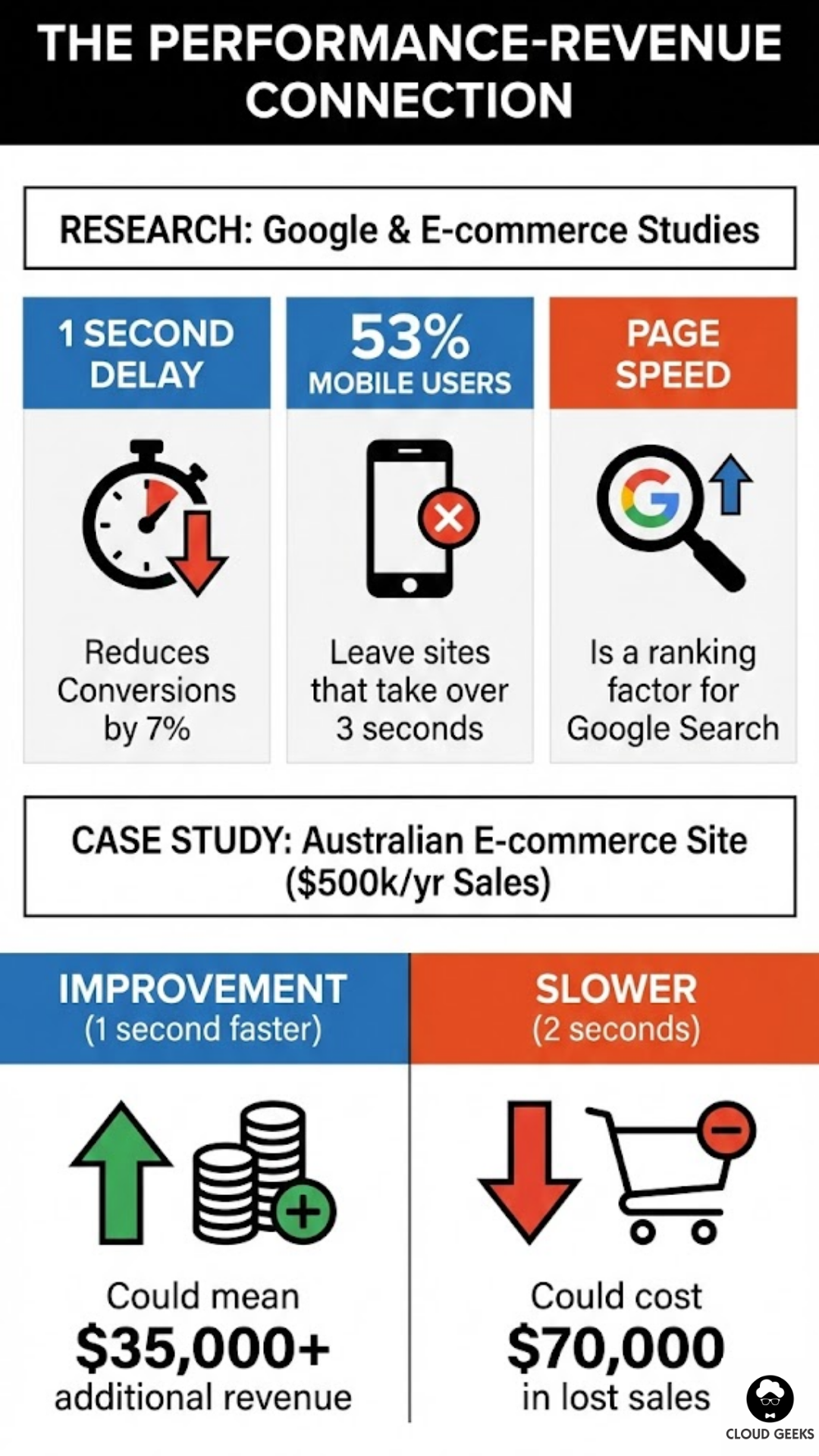
Research from Google and various e-commerce studies shows:
- 1 second delay reduces conversions by 7%
- 53% of mobile users leave sites that take over 3 seconds
- Page speed is a ranking factor for Google Search
For an Australian e-commerce site doing $500,000/year in sales:
- 1 second improvement could mean $35,000+ additional revenue
- 2 seconds slower could cost $70,000 in lost sales
The Australian Geography Problem
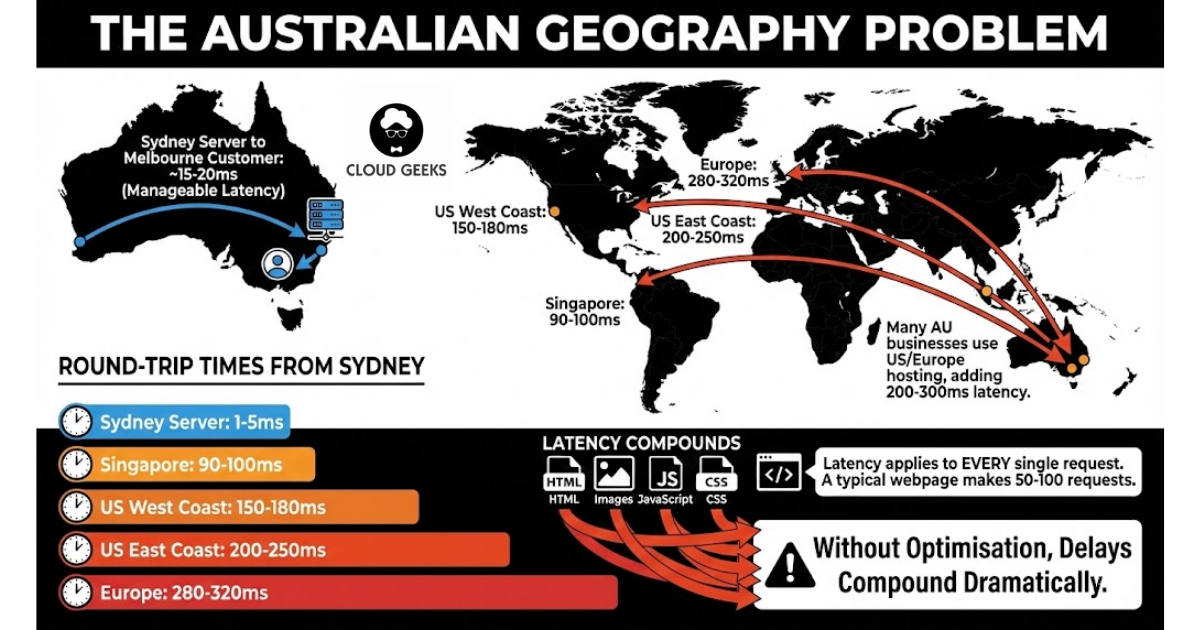
If your website hosts in Sydney and serves Melbourne customers, latency is manageable (15-20ms). But many Australian businesses use hosting in the US or Europe, adding 200-300ms of latency before any content loads.
Round-trip times from Sydney:
- Sydney server: 1-5ms
- Singapore: 90-100ms
- US West Coast: 150-180ms
- US East Coast: 200-250ms
- Europe: 280-320ms
That latency applies to every single request—HTML, images, JavaScript, CSS. A typical webpage makes 50-100 requests. Without optimisation, those delays compound dramatically.
Understanding Caching
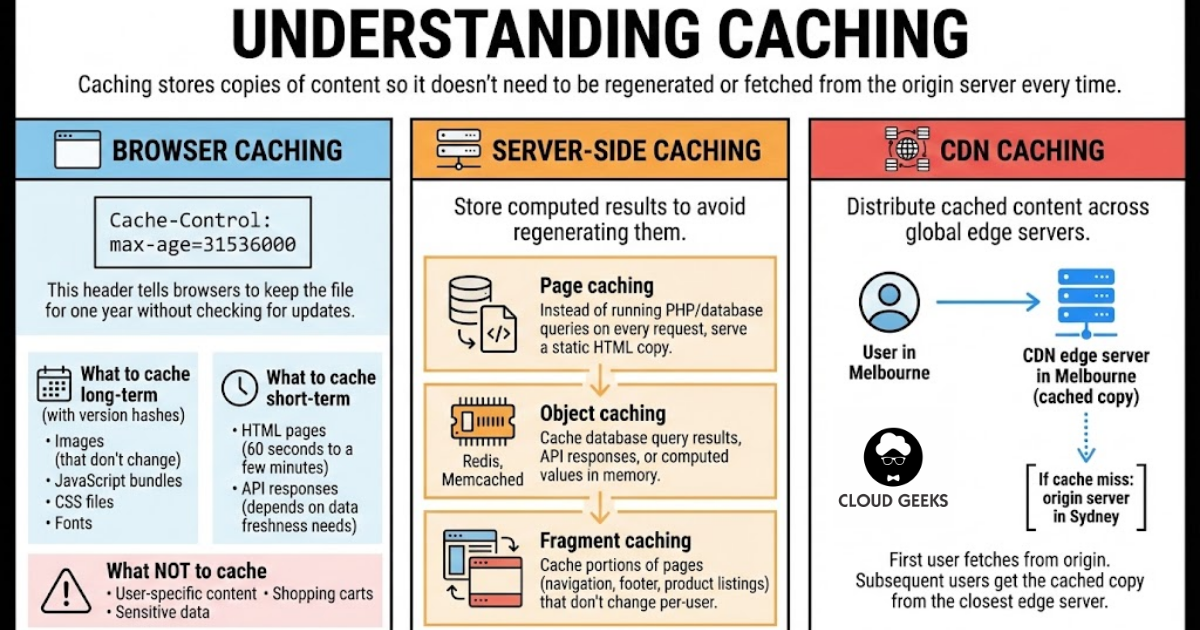
Caching stores copies of content so it doesn’t need to be regenerated or fetched from the origin server every time.
Browser Caching
Tell browsers to store files locally:
Cache-Control: max-age=31536000This header tells browsers to keep the file for one year without checking for updates.
What to cache long-term:
- Images (that don’t change)
- JavaScript bundles (with version hashes)
- CSS files (with version hashes)
- Fonts
What to cache short-term:
- HTML pages (60 seconds to a few minutes)
- API responses (depends on data freshness needs)
What not to cache:
- User-specific content
- Shopping carts
- Sensitive data
Server-Side Caching
Store computed results to avoid regenerating them:
Page caching: Instead of running PHP/database queries on every request, serve a static HTML copy.
Object caching: Cache database query results, API responses, or computed values in memory (Redis, Memcached).
Fragment caching: Cache portions of pages (navigation, footer, product listings) that don’t change per-user.
CDN Caching
Distribute cached content across global edge servers.
User in Melbourne
       ↓
CDN edge server in Melbourne (cached copy)
       ↓
[If cache miss: origin server in Sydney]
First user fetches from origin. Subsequent users get the cached copy from the closest edge server.
CDN Options for Australian Businesses
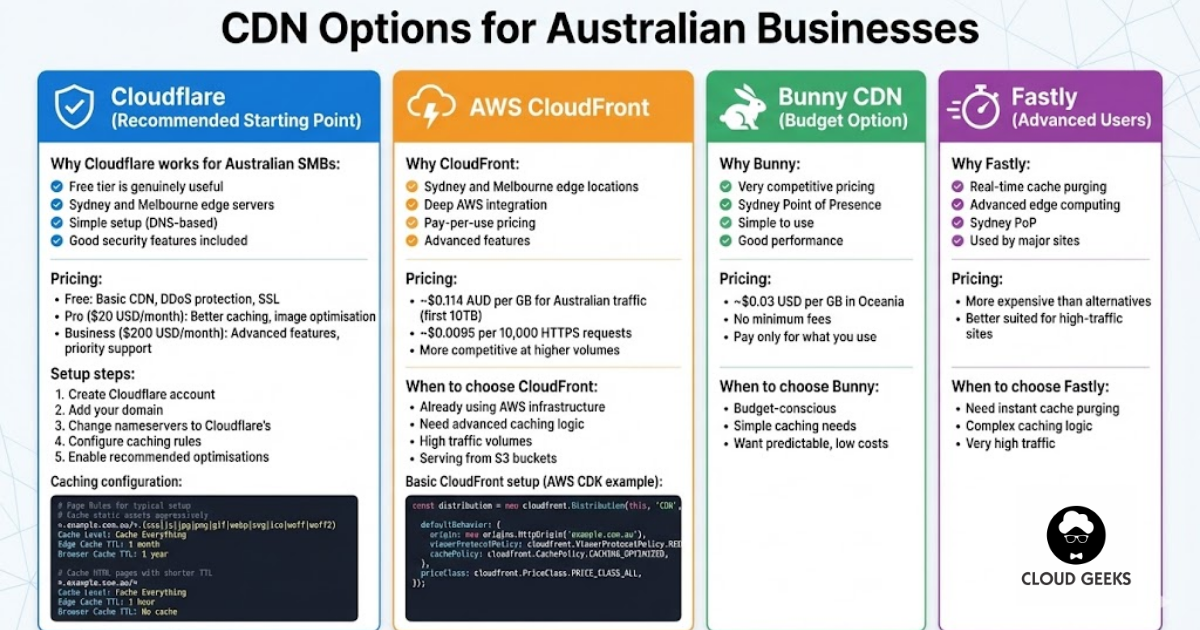
Cloudflare (Recommended Starting Point)
Why Cloudflare works for Australian SMBs:
- Free tier is genuinely useful
- Sydney and Melbourne edge servers
- Simple setup (DNS-based)
- Good security features included
Pricing:
- Free: Basic CDN, DDoS protection, SSL
- Pro ($20 USD/month): Better caching, image optimisation
- Business ($200 USD/month): Advanced features, priority support
Setup steps:
- Create Cloudflare account
- Add your domain
- Change nameservers to Cloudflare’s
- Configure caching rules
- Enable recommended optimisations
Caching configuration:
# Page Rules for typical setup

# Cache static assets aggressively
*.example.com.au/*.(css|js|jpg|png|gif|webp|svg|ico|woff|woff2)
Cache Level: Cache Everything
Edge Cache TTL: 1 month
Browser Cache TTL: 1 year

# Cache HTML pages with shorter TTL
*.example.com.au/*
Cache Level: Cache Everything
Edge Cache TTL: 1 hour
Browser Cache TTL: No cache
AWS CloudFront
Why CloudFront:
- Sydney and Melbourne edge locations
- Deep AWS integration
- Pay-per-use pricing
- Advanced features
Pricing:
- ~$0.114 AUD per GB for Australian traffic (first 10TB)
- ~$0.0095 per 10,000 HTTPS requests
- More competitive at higher volumes
When to choose CloudFront:
- Already using AWS infrastructure
- Need advanced caching logic
- High traffic volumes
- Serving from S3 buckets
Basic CloudFront setup:
# AWS CDK example
const distribution = new cloudfront.Distribution(this, 'CDN', {
  defaultBehavior: {
    origin: new origins.HttpOrigin('example.com.au'),
    viewerProtocolPolicy: cloudfront.ViewerProtocolPolicy.REDIRECT_TO_HTTPS,
    cachePolicy: cloudfront.CachePolicy.CACHING_OPTIMIZED,
  },
  priceClass: cloudfront.PriceClass.PRICE_CLASS_ALL,
});
Bunny CDN (Budget Option)
Why Bunny:
- Very competitive pricing
- Sydney Point of Presence
- Simple to use
- Good performance
Pricing:
- ~$0.03 USD per GB in Oceania
- No minimum fees
- Pay only for what you use
When to choose Bunny:
- Budget-conscious
- Simple caching needs
- Want predictable, low costs
Fastly (Advanced Users)
Why Fastly:
- Real-time cache purging
- Advanced edge computing
- Sydney PoP
- Used by major sites
Pricing:
- More expensive than alternatives
- Better suited for high-traffic sites
When to choose Fastly:
- Need instant cache purging
- Complex caching logic
- Very high traffic
Practical Caching Strategies
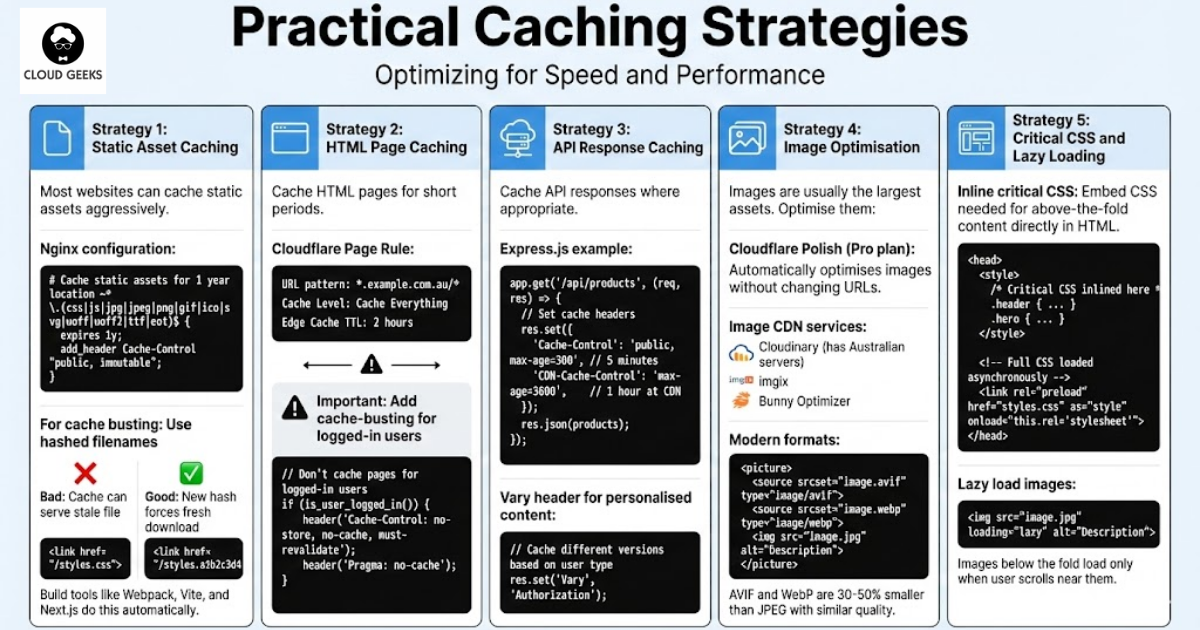
Strategy 1: Static Asset Caching
Most websites can cache static assets aggressively.
Nginx configuration:
# Cache static assets for 1 year
location ~* \.(css|js|jpg|jpeg|png|gif|ico|svg|woff|woff2|ttf|eot)$ {
    expires 1y;
    add_header Cache-Control "public, immutable";
}
For cache busting: Use hashed filenames
{/* Bad: Cache can serve stale file */}
<link href="/styles.css">

{/* Good: New hash forces fresh download */}
<link href="/styles.a1b2c3d4.css">
Build tools like Webpack, Vite, and Next.js do this automatically.
Strategy 2: HTML Page Caching
Cache HTML pages for short periods:
Cloudflare Page Rule:
URL pattern: *.example.com.au/*
Cache Level: Cache Everything
Edge Cache TTL: 2 hours
Important: Add cache-busting for logged-in users
// Don't cache pages for logged-in users
if (is_user_logged_in()) {
    header('Cache-Control: no-store, no-cache, must-revalidate');
    header('Pragma: no-cache');
}
Strategy 3: API Response Caching
Cache API responses where appropriate:
// Express.js example
app.get('/api/products', (req, res) => {
  // Set cache headers
  res.set({
    'Cache-Control': 'public, max-age=300', // 5 minutes
    'CDN-Cache-Control': 'max-age=3600',     // 1 hour at CDN
  });

  res.json(products);
});
Vary header for personalised content:
// Cache different versions based on user type
res.set('Vary', 'Authorization');
Strategy 4: Image Optimisation
Images are usually the largest assets. Optimise them:
Cloudflare Polish (Pro plan): Automatically optimises images without changing URLs.
Image CDN services:
- Cloudinary (has Australian servers)
- imgix
- Bunny Optimizer
Modern formats:
<picture>
  <source srcset="image.avif" type="image/avif">
  <source srcset="image.webp" type="image/webp">
  <img src="image.jpg" alt="Description">
</picture>
AVIF and WebP are 30-50% smaller than JPEG with similar quality.
Strategy 5: Critical CSS and Lazy Loading
Inline critical CSS: Embed CSS needed for above-the-fold content directly in HTML.
<head>
  <style>
    /* Critical CSS inlined here */
    .header { ... }
    .hero { ... }
  </style>
  {/* Full CSS loaded asynchronously */}
  <link rel="preload" href="styles.css" as="style" onload="this.rel='stylesheet'">
</head>
Lazy load images:
<img src="image.jpg" loading="lazy" alt="Description">Images below the fold load only when user scrolls near them.
Measuring Performance
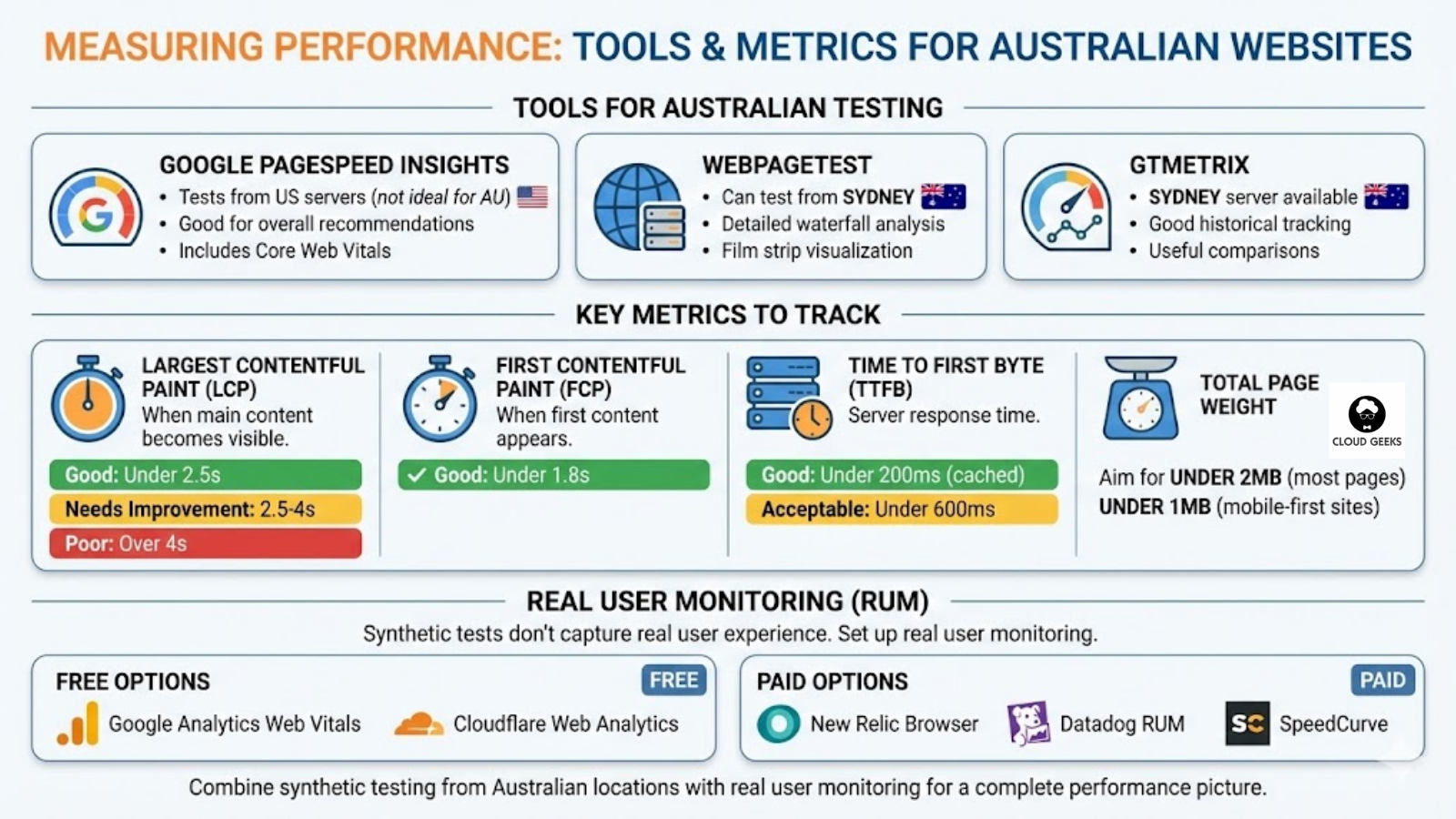
Tools for Australian Testing
Google PageSpeed Insights:
- Tests from US servers (not ideal for AU-specific testing)
- Good for overall recommendations
- Includes Core Web Vitals
WebPageTest:
- Can test from Sydney
- Detailed waterfall analysis
- Film strip visualization
GTmetrix:
- Sydney server available
- Good historical tracking
- Useful comparisons
Key Metrics to Track
Largest Contentful Paint (LCP): When the main content becomes visible.
- Good: Under 2.5 seconds
- Needs improvement: 2.5-4 seconds
- Poor: Over 4 seconds
First Contentful Paint (FCP): When first content appears.
- Good: Under 1.8 seconds
Time to First Byte (TTFB): Server response time.
- Good: Under 200ms for cached
- Acceptable: Under 600ms
Total Page Weight:
- Aim for under 2MB for most pages
- Under 1MB for mobile-first sites
Real User Monitoring
Synthetic tests don’t capture real user experience. Set up real user monitoring:
Free options:
- Google Analytics Web Vitals
- Cloudflare Web Analytics
Paid options:
- New Relic Browser
- Datadog RUM
- SpeedCurve
Implementation Guide
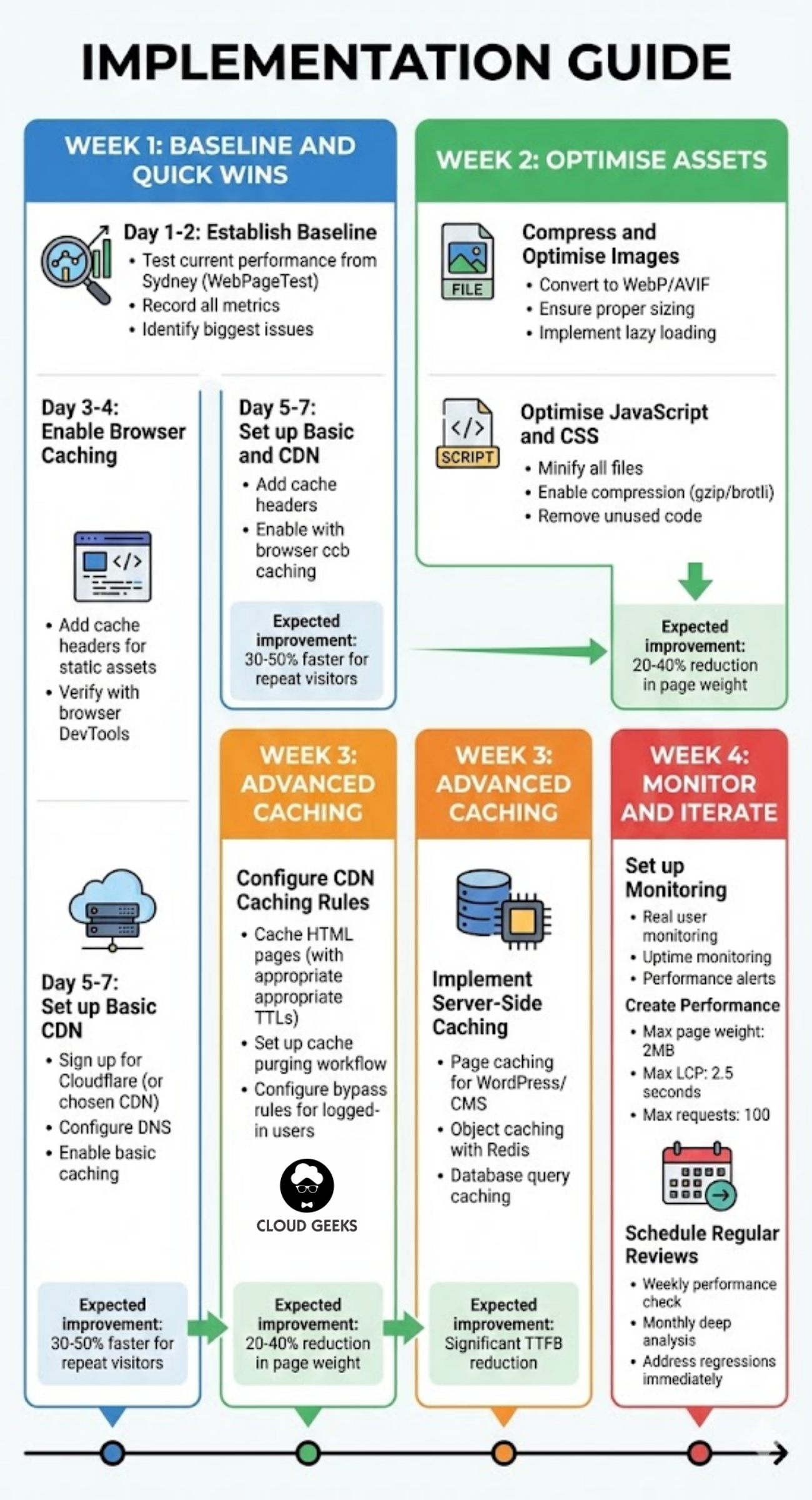
Week 1: Baseline and Quick Wins
Day 1-2: Establish baseline
- Test current performance from Sydney (WebPageTest)
- Record all metrics
- Identify biggest issues
Day 3-4: Enable browser caching
- Add cache headers for static assets
- Verify with browser DevTools
Day 5-7: Set up basic CDN
- Sign up for Cloudflare (or chosen CDN)
- Configure DNS
- Enable basic caching
Expected improvement: 30-50% faster for repeat visitors
Week 2: Optimise Assets
Compress and optimise images:
- Convert to WebP/AVIF where supported
- Ensure proper sizing (don’t serve 2000px image in 200px container)
- Implement lazy loading
Optimise JavaScript and CSS:
- Minify all files
- Enable compression (gzip/brotli)
- Remove unused code
Expected improvement: 20-40% reduction in page weight
Week 3: Advanced Caching
Configure CDN caching rules:
- Cache HTML pages (with appropriate TTLs)
- Set up cache purging workflow
- Configure bypass rules for logged-in users
Implement server-side caching:
- Page caching for WordPress/CMS
- Object caching with Redis
- Database query caching
Expected improvement: Significant TTFB reduction
Week 4: Monitor and Iterate
Set up monitoring:
- Real user monitoring
- Uptime monitoring
- Performance alerts
Create performance budget:
- Maximum page weight: 2MB
- Maximum LCP: 2.5 seconds
- Maximum requests: 100
Schedule regular reviews:
- Weekly performance check
- Monthly deep analysis
- Address regressions immediately
Common Mistakes
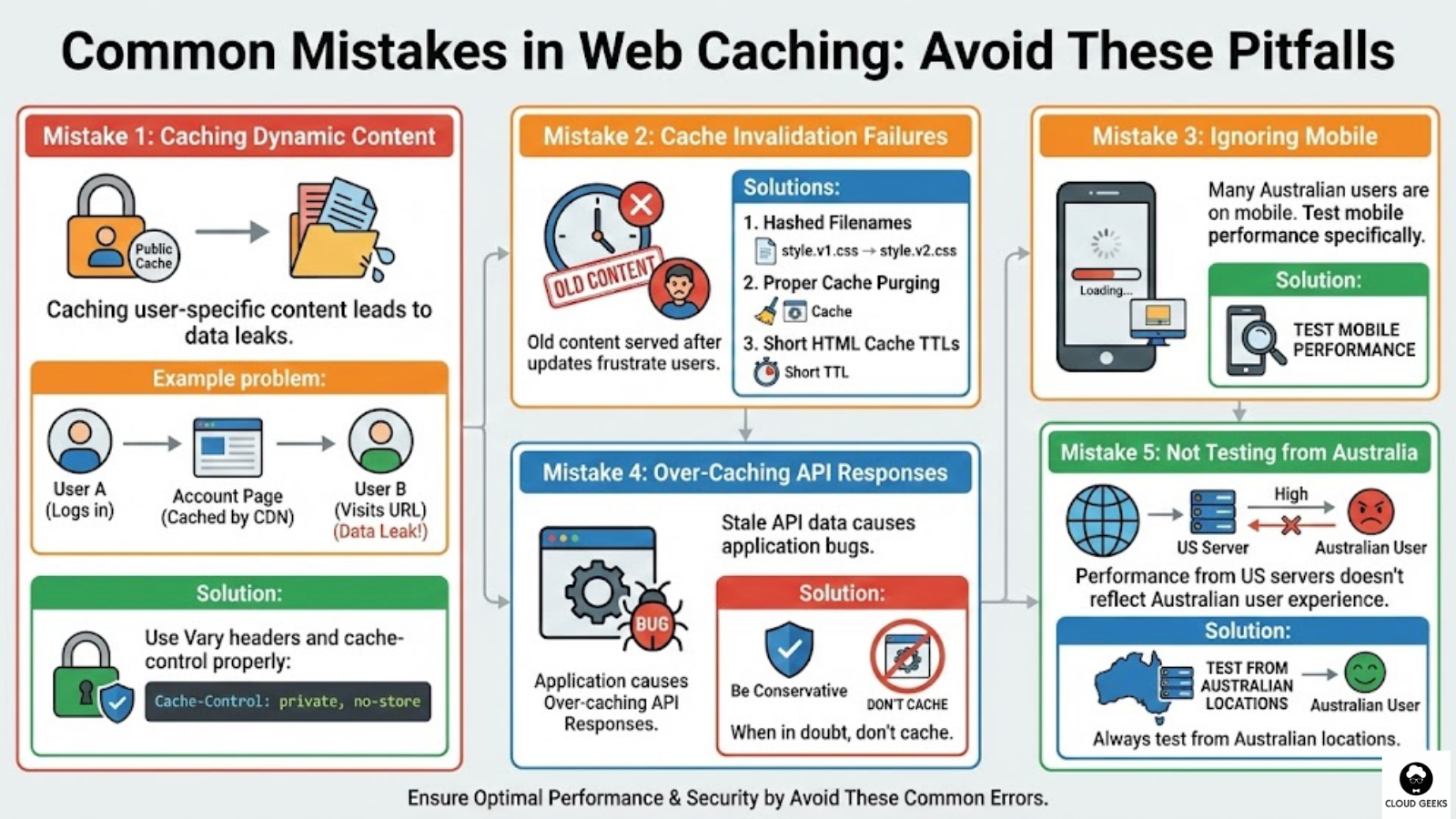
Mistake 1: Caching Dynamic Content
Caching user-specific content leads to data leaks.
Example problem:
User A logs in → sees their account page → CDN caches it
User B visits same URL → sees User A's account page
Solution: Use Vary headers and cache-control properly:
Cache-Control: private, no-storeMistake 2: Cache Invalidation Failures
Old content served after updates frustrate users.
Solutions:
- Use hashed filenames for assets
- Set up proper cache purging
- Keep HTML cache TTLs short
Mistake 3: Ignoring Mobile
Many Australian users are on mobile. Test mobile performance specifically.
Mistake 4: Over-Caching API Responses
Stale API data causes application bugs.
Solution: Be conservative with API caching. When in doubt, don’t cache.
Mistake 5: Not Testing from Australia
Performance from US servers doesn’t reflect Australian user experience.
Solution: Always test from Australian locations.
Cost Analysis
Small Business Website (10,000 visitors/month)
Cloudflare Free:
- Cost: $0
- Handles typical traffic easily
- Good starting point
Estimated bandwidth: ~20GB/month (covered by free tier)
Medium Business Website (100,000 visitors/month)
Cloudflare Pro:
- Cost: $20 USD/month (~$30 AUD)
- Image optimisation included
- Better caching options
Estimated bandwidth: ~200GB/month
E-commerce (500,000 visitors/month)
CloudFront or Cloudflare Business:
- CloudFront: ~$50-100 AUD/month at this scale
- Cloudflare Business: $200 USD/month
Estimated bandwidth: ~1TB/month
Conclusion
Website speed is a competitive advantage, not a luxury. For Australian businesses, the geographic challenges make caching and CDN implementation essential.
The good news: getting started is free with Cloudflare’s free tier, and even the paid options are affordable compared to the revenue impact of slow websites.
Start with the basics:
- Enable browser caching for static assets
- Set up a CDN with Australian edge servers
- Optimise your images
- Monitor performance from Australian locations
Build from there. Each improvement compounds. A website that loads in 1.5 seconds instead of 4 seconds will convert more visitors, rank better in search, and provide a better experience for Australian customers.
Need help optimising your Australian website’s performance? Contact CloudGeeks for a free performance audit and recommendations tailored to your specific situation.
Related Articles
- Cloud Migration ROI: Calculating the Real Costs for Australian SMBs
- Multi-Cloud Strategy for Australian Businesses: AWS vs Azure vs GCP in 2025
- RESTful APIs for Australian Business Applications: A Practical Guide
- How Australian SMBs Can Save 50-70% on Cloud Development Costs
- Quality Assurance for Australian Software Projects: Testing on a Budget
Looking beyond the technical to the strategic? Ash Ganda writes about how CTOs and business leaders can drive digital transformation.
Part of the Ganda Tech Services family, Cloud Geeks delivers specialist IT and cloud solutions for Australian small and medium businesses.