
Choosing the Right Database for Your Australian Business: SQL vs NoSQL in 2025
Every application needs somewhere to store data. For Australian businesses building software, choosing the right database is one of the most important technical decisions you’ll make—and one of the hardest to change later.
The debate often comes down to SQL versus NoSQL. But that framing misses the point. The real question is: what problems does your business need to solve, and which database best fits those problems?
This guide cuts through the hype to help Australian SMBs make practical database decisions based on their actual needs, budget, and team capabilities.
Understanding the Basics
Before comparing options, let’s establish what we’re talking about.
SQL Databases (Relational)
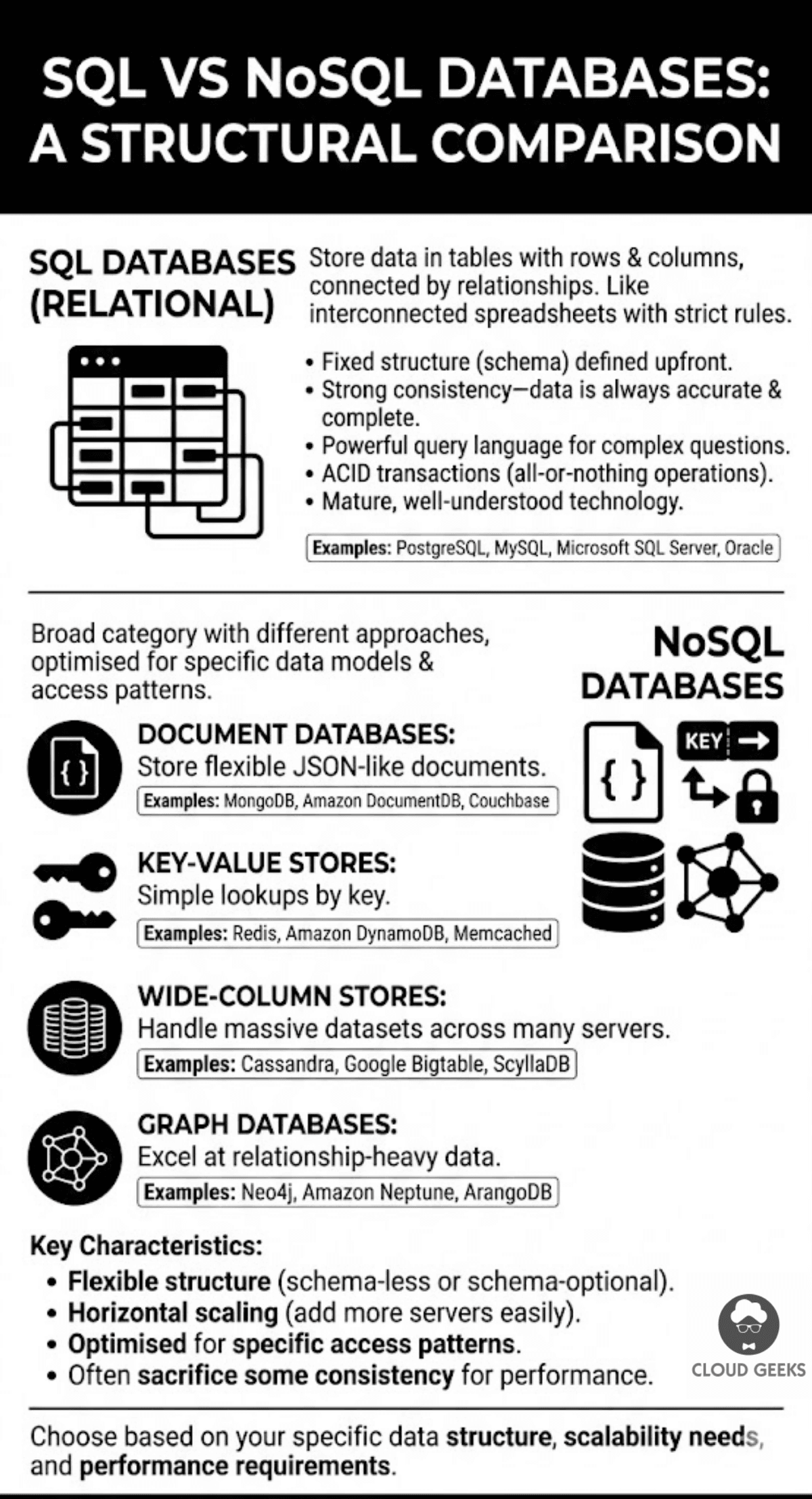
SQL databases store data in tables with rows and columns, connected by relationships. Think of them like interconnected spreadsheets with strict rules about what data can go where.
Examples: PostgreSQL, MySQL, Microsoft SQL Server, Oracle
Key characteristics:
- Fixed structure (schema) defined upfront
- Strong consistency—data is always accurate and complete
- Powerful query language for complex questions
- ACID transactions (all-or-nothing operations)
- Mature, well-understood technology
NoSQL Databases
NoSQL is a broad category covering several different approaches:
Document databases store flexible JSON-like documents:
- Examples: MongoDB, Amazon DocumentDB, Couchbase
Key-value stores are simple lookups by key:
- Examples: Redis, Amazon DynamoDB, Memcached
Wide-column stores handle massive datasets across many servers:
- Examples: Cassandra, Google Bigtable, ScyllaDB
Graph databases excel at relationship-heavy data:
- Examples: Neo4j, Amazon Neptune, ArangoDB
Key characteristics:
- Flexible structure (schema-less or schema-optional)
- Horizontal scaling (add more servers easily)
- Optimised for specific access patterns
- Often sacrifice some consistency for performance
When SQL is the Right Choice
SQL databases have been around for 50 years for good reason. They’re the right choice more often than the NoSQL hype suggests.
Your Data Has Clear Relationships
If you’re building:
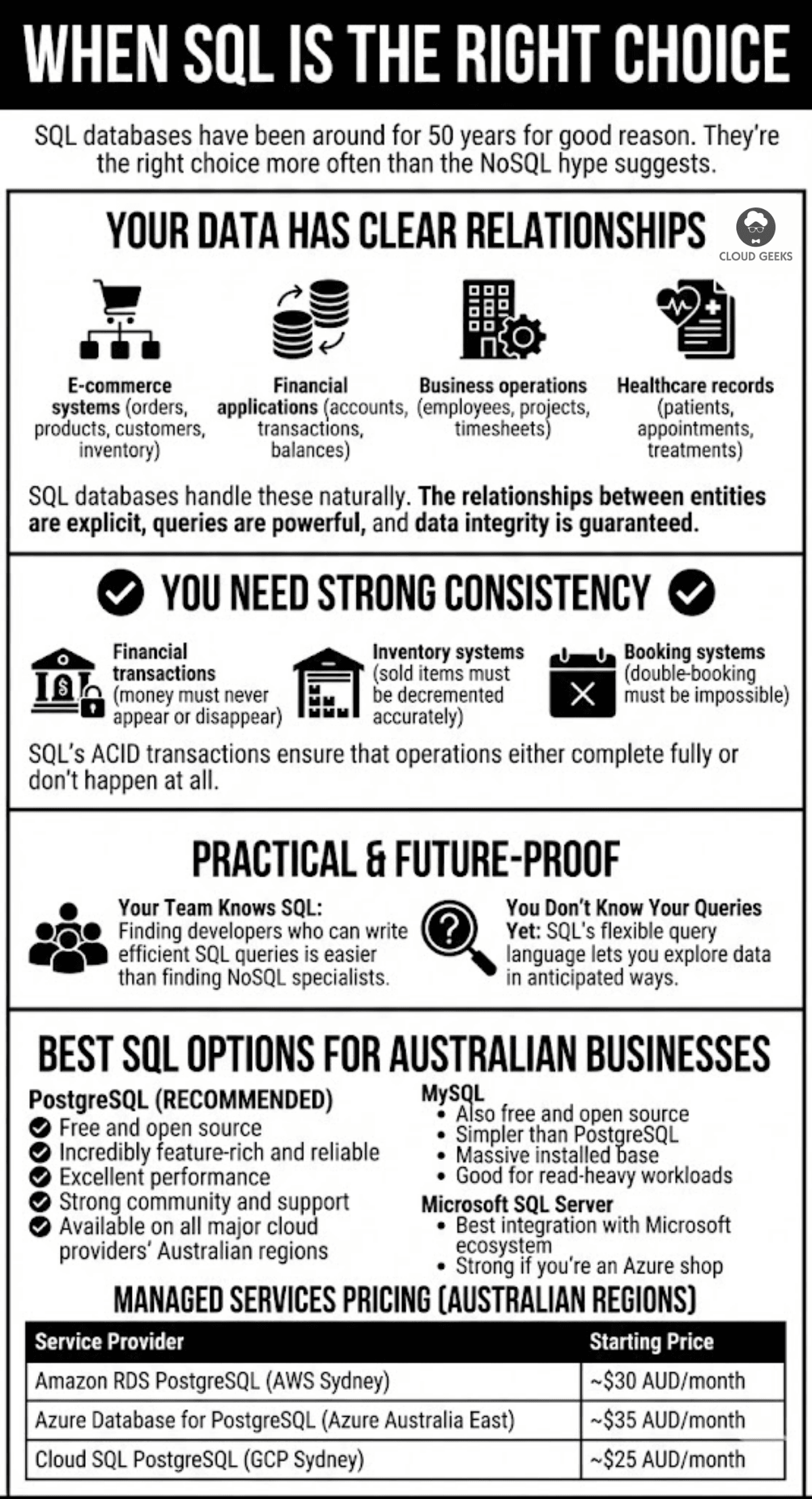
- E-commerce systems (orders, products, customers, inventory)
- Financial applications (accounts, transactions, balances)
- Business operations (employees, projects, timesheets)
- Healthcare records (patients, appointments, treatments)
SQL databases handle these naturally. The relationships between entities are explicit, queries are powerful, and data integrity is guaranteed.
You Need Strong Consistency
When you absolutely cannot have incorrect or partial data:
- Financial transactions (money must never appear or disappear)
- Inventory systems (sold items must be decremented accurately)
- Booking systems (double-booking must be impossible)
SQL’s ACID transactions ensure that operations either complete fully or don’t happen at all.
Your Team Knows SQL
Practical consideration: SQL knowledge is widespread. Finding developers who can write efficient SQL queries is easier than finding specialists in specific NoSQL technologies.
You Don’t Know Your Queries Yet
Early-stage products often don’t know exactly what questions they’ll need to ask of their data. SQL’s flexible query language lets you explore data in ways you didn’t anticipate when designing the schema.
Best SQL Options for Australian Businesses
PostgreSQL (Our recommendation for most cases)
- Free and open source
- Incredibly feature-rich and reliable
- Excellent performance
- Strong community and support
- Available on all major cloud providers’ Australian regions
MySQL
- Also free and open source
- Simpler than PostgreSQL
- Massive installed base
- Good for read-heavy workloads
Microsoft SQL Server
- Best integration with Microsoft ecosystem
- Strong if you’re an Azure shop
- Licensing can be expensive
Managed services pricing (Australian regions):
| Service | Provider | Starting Price |
|---|---|---|
| Amazon RDS PostgreSQL | AWS Sydney | ~$30 AUD/month |
| Azure Database for PostgreSQL | Azure Australia East | ~$35 AUD/month |
| Cloud SQL PostgreSQL | GCP Sydney | ~$25 AUD/month |
When NoSQL is the Right Choice
NoSQL databases solve specific problems that SQL databases handle poorly. Choose NoSQL when you have these specific needs.
High-Volume, Simple Access Patterns
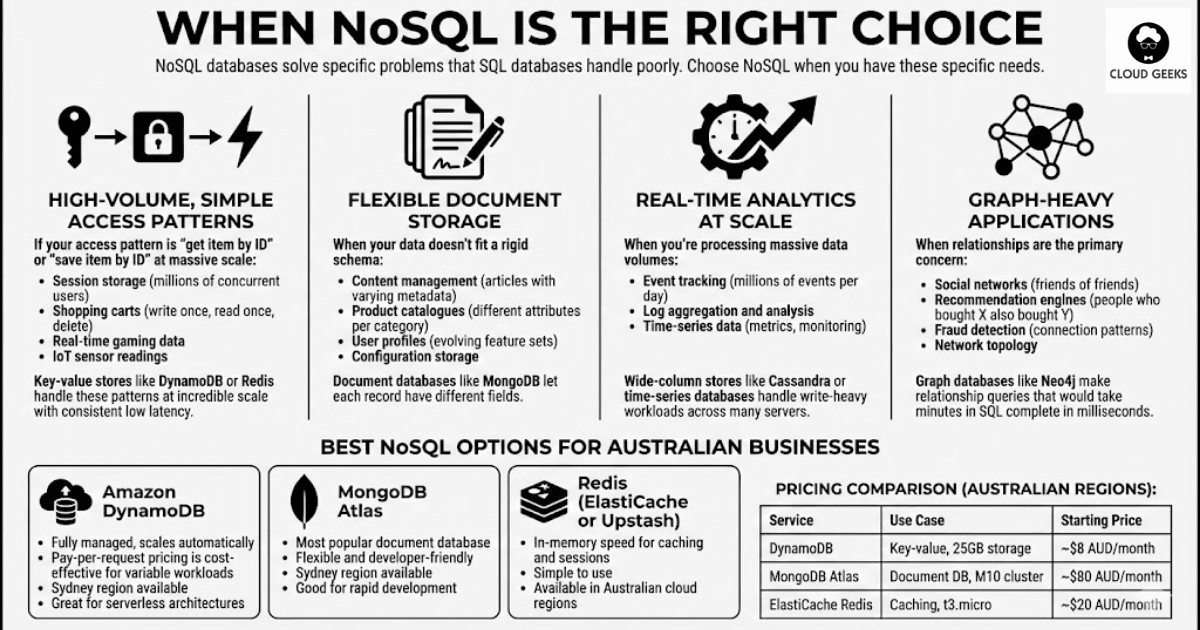
If your access pattern is “get item by ID” or “save item by ID” at massive scale:
- Session storage (millions of concurrent users)
- Shopping carts (write once, read once, delete)
- Real-time gaming data
- IoT sensor readings
Key-value stores like DynamoDB or Redis handle these patterns at incredible scale with consistent low latency.
Flexible Document Storage
When your data doesn’t fit a rigid schema:
- Content management (articles with varying metadata)
- Product catalogues (different attributes per category)
- User profiles (evolving feature sets)
- Configuration storage
Document databases like MongoDB let each record have different fields.
Real-Time Analytics at Scale
When you’re processing massive data volumes:
- Event tracking (millions of events per day)
- Log aggregation and analysis
- Time-series data (metrics, monitoring)
Wide-column stores like Cassandra or time-series databases handle write-heavy workloads across many servers.
Graph-Heavy Applications
When relationships are the primary concern:
- Social networks (friends of friends)
- Recommendation engines (people who bought X also bought Y)
- Fraud detection (connection patterns)
- Network topology
Graph databases like Neo4j make relationship queries that would take minutes in SQL complete in milliseconds.
Best NoSQL Options for Australian Businesses
Amazon DynamoDB
- Fully managed, scales automatically
- Pay-per-request pricing is cost-effective for variable workloads
- Sydney region available
- Great for serverless architectures
MongoDB Atlas
- Most popular document database
- Flexible and developer-friendly
- Sydney region available
- Good for rapid development
Redis (ElastiCache or Upstash)
- In-memory speed for caching and sessions
- Simple to use
- Available in Australian cloud regions
Pricing comparison (Australian regions):
| Service | Use Case | Starting Price |
|---|---|---|
| DynamoDB | Key-value, 25GB storage | ~$8 AUD/month |
| MongoDB Atlas | Document DB, M10 cluster | ~$80 AUD/month |
| ElastiCache Redis | Caching, t3.micro | ~$20 AUD/month |
The Hybrid Approach: Using Both
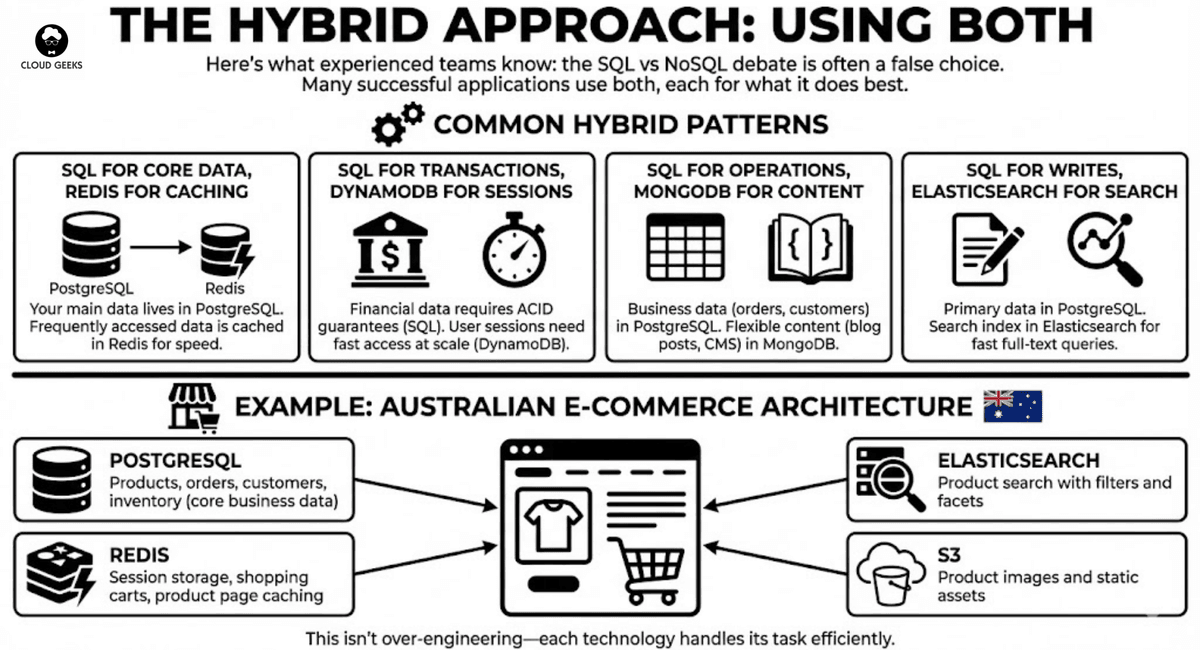
Here’s what experienced teams know: the SQL vs NoSQL debate is often a false choice. Many successful applications use both, each for what it does best.
Common Hybrid Patterns
SQL for core data, Redis for caching: Your main data lives in PostgreSQL. Frequently accessed data is cached in Redis for speed.
SQL for transactions, DynamoDB for sessions: Financial data requires ACID guarantees (SQL). User sessions need fast access at scale (DynamoDB).
SQL for operations, MongoDB for content: Business data (orders, customers) in PostgreSQL. Flexible content (blog posts, CMS) in MongoDB.
SQL for writes, Elasticsearch for search: Primary data in PostgreSQL. Search index in Elasticsearch for fast full-text queries.
Example: Australian E-Commerce Architecture
A growing Sydney e-commerce business might use:
- PostgreSQL: Products, orders, customers, inventory (core business data)
- Redis: Session storage, shopping carts, product page caching
- Elasticsearch: Product search with filters and facets
- S3: Product images and static assets
This isn’t over-engineering—each technology handles its task efficiently.
Making the Decision: A Practical Framework
Step 1: Define Your Requirements
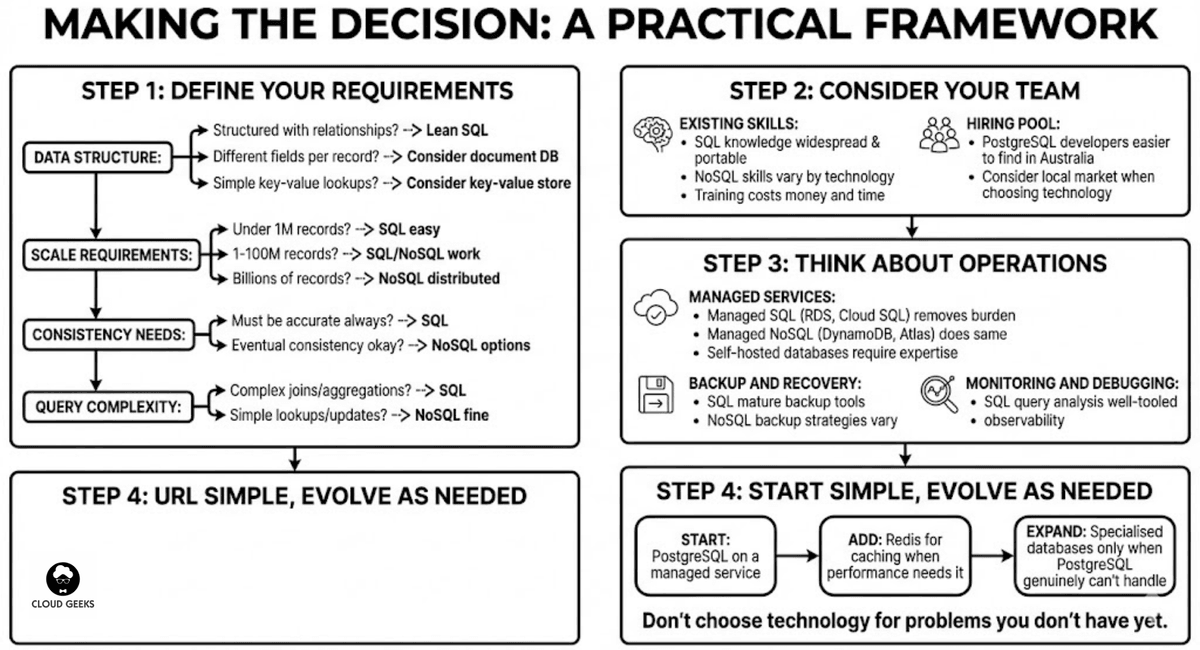
Answer these questions:
Data structure:
- Is your data clearly structured with relationships? → Lean SQL
- Do different records have different fields? → Consider document DB
- Is it simple key-value lookups? → Consider key-value store
Scale requirements:
- Under 1 million records? → SQL handles this easily
- 1-100 million records? → SQL or NoSQL both work
- Billions of records? → NoSQL distributed systems
Consistency needs:
- Must be accurate at all times? → SQL
- Eventual consistency acceptable? → NoSQL options open up
Query complexity:
- Complex joins and aggregations? → SQL
- Simple lookups and updates? → NoSQL is fine
Step 2: Consider Your Team
Existing skills:
- SQL knowledge is widespread and portable
- NoSQL skills vary by technology
- Training costs money and time
Hiring pool:
- PostgreSQL developers are easier to find in Australia than Cassandra specialists
- Consider the local market when choosing technology
Step 3: Think About Operations
Managed services:
- Managed SQL (RDS, Cloud SQL) removes operational burden
- Managed NoSQL (DynamoDB, Atlas) does the same
- Self-hosted databases require expertise
Backup and recovery:
- SQL databases have mature backup tools
- NoSQL backup strategies vary by technology
Monitoring and debugging:
- SQL query analysis is well-tooled
- Some NoSQL databases have less mature observability
Step 4: Start Simple, Evolve as Needed
For most Australian SMBs, this is the path:
Start: PostgreSQL on a managed service Add: Redis for caching when performance needs it Expand: Specialised databases only when PostgreSQL genuinely can’t handle the job
Don’t choose technology for problems you don’t have yet.
Cost Comparison: Real Australian Scenarios
Scenario 1: Small SaaS Application
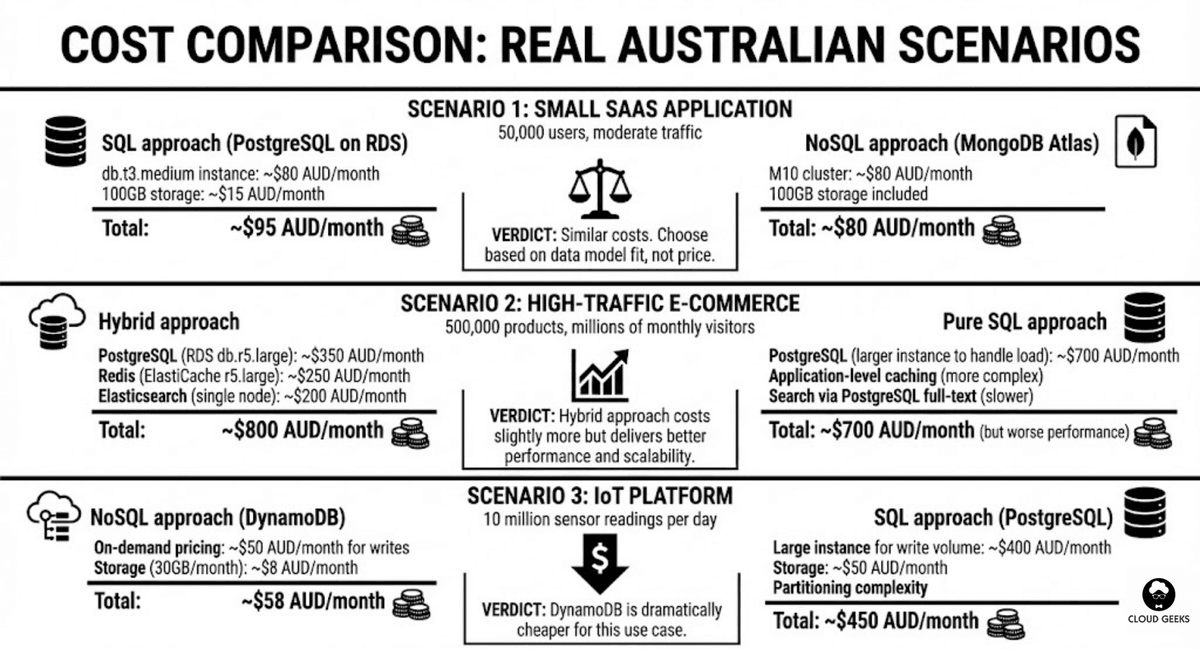 50,000 users, moderate traffic
SQL approach (PostgreSQL on RDS):
- db.t3.medium instance: ~$80 AUD/month
- 100GB storage: ~$15 AUD/month
- Total: ~$95 AUD/month
NoSQL approach (MongoDB Atlas):
- M10 cluster: ~$80 AUD/month
- 100GB storage included
- Total: ~$80 AUD/month
Verdict: Similar costs. Choose based on data model fit, not price.
Scenario 2: High-Traffic E-Commerce
500,000 products, millions of monthly visitors
Hybrid approach:
- PostgreSQL (RDS db.r5.large): ~$350 AUD/month
- Redis (ElastiCache r5.large): ~$250 AUD/month
- Elasticsearch (single node): ~$200 AUD/month
- Total: ~$800 AUD/month
Pure SQL approach:
- PostgreSQL (larger instance to handle load): ~$700 AUD/month
- Application-level caching (more complex)
- Search via PostgreSQL full-text (slower)
- Total: ~$700 AUD/month (but worse performance)
Verdict: Hybrid approach costs slightly more but delivers better performance and scalability.
Scenario 3: IoT Platform
10 million sensor readings per day
NoSQL approach (DynamoDB):
- On-demand pricing: ~$50 AUD/month for writes
- Storage (30GB/month): ~$8 AUD/month
- Total: ~$58 AUD/month
SQL approach (PostgreSQL):
- Large instance for write volume: ~$400 AUD/month
- Storage: ~$50 AUD/month
- Partitioning complexity
- Total: ~$450 AUD/month
Verdict: DynamoDB is dramatically cheaper for this use case.
Australian Data Sovereignty Considerations
When choosing databases for Australian businesses, consider:
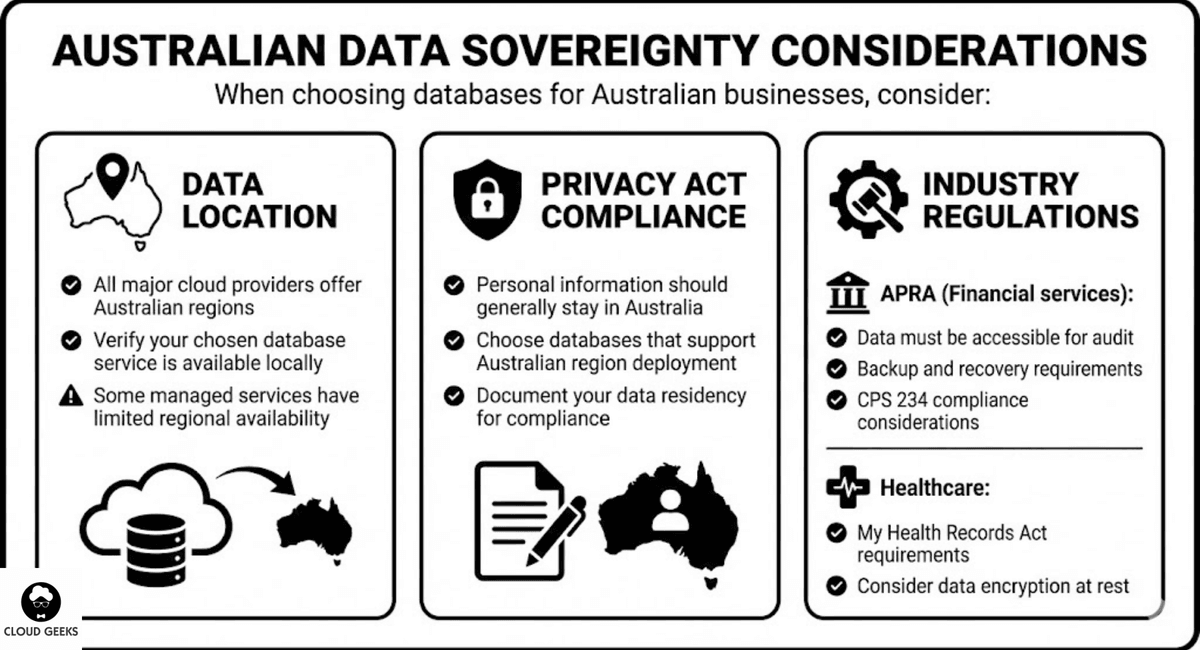
Data Location
- All major cloud providers offer Australian regions
- Verify your chosen database service is available locally
- Some managed services have limited regional availability
Privacy Act Compliance
- Personal information should generally stay in Australia
- Choose databases that support Australian region deployment
- Document your data residency for compliance
Industry Regulations
APRA (Financial services):
- Data must be accessible for audit
- Backup and recovery requirements
- CPS 234 compliance considerations
Healthcare:
- My Health Records Act requirements
- Consider data encryption at rest
Common Mistakes to Avoid
Mistake 1: Choosing NoSQL Because It’s “Modern”
NoSQL isn’t automatically better or faster. It’s different. Choose it for specific problems, not because it’s trendy.
Mistake 2: Over-Engineering Early
A startup with 1,000 users doesn’t need a distributed database cluster. Start with a single PostgreSQL instance. Scale when you need to.
Mistake 3: Ignoring Query Patterns
If you’ll need to join data from different collections frequently, document databases will fight you. That’s a relationship—use a relational database.
Mistake 4: Underestimating Migration Costs
Changing databases later is expensive. Invest time in the initial decision. But don’t be paralysed—any choice is reversible with enough effort.
Mistake 5: Forgetting Operations
That cutting-edge database might have great features, but can you run it reliably? Can you hire people who know it? Can you debug it at 3 AM?
Getting Started
For New Projects
- Default to PostgreSQL unless you have specific reasons not to
- Use a managed service (RDS, Cloud SQL, Azure Database)
- Add Redis for caching when needed
- Consider NoSQL only for specific, identified problems
For Existing Projects
- Measure current database performance and costs
- Identify specific pain points
- Evaluate if a different database solves those pain points
- Consider hybrid approaches before wholesale migration
Conclusion
The database decision matters, but it’s not as dramatic as the SQL vs NoSQL debates suggest. For most Australian SMBs:
- PostgreSQL handles 90% of use cases well
- Add Redis for caching when performance needs it
- Consider NoSQL for specific problems: massive scale, flexible schemas, or graph relationships
- Hybrid approaches often work best for growing businesses
Don’t optimise for problems you don’t have. Don’t choose technology because it’s exciting. Choose the boring, reliable option that fits your current needs, and evolve as you grow.
Your database should be a foundation you can build on, not a distraction from building your business.
Need help choosing the right database architecture for your Australian business? Contact CloudGeeks for a free consultation on your data strategy and infrastructure needs.
Related Articles
- RESTful APIs for Australian Business Applications: A Practical Guide
- Multi-Cloud Strategy for Australian Businesses: AWS vs Azure vs GCP
- Speed Up Your Australian Business Website: Caching and CDN Strategies
- Cloud Migration ROI: Calculating Real Costs for Australian SMBs
- Azure vs AWS for Australian Businesses: Complete Comparison
Want your team to manage cloud operations from their phones? Awesome Apps creates mobile dashboards and management tools for Australian SMBs.
Ashish Ganda is the founder of Ganda Tech Services, a Sydney-based technology consultancy helping Australian businesses grow through cloud, web, and mobile solutions.