
MalCare vs Wordfence for Australian Small Business: Honest Comparison from a Sydney Agency
The verdict in 30 seconds
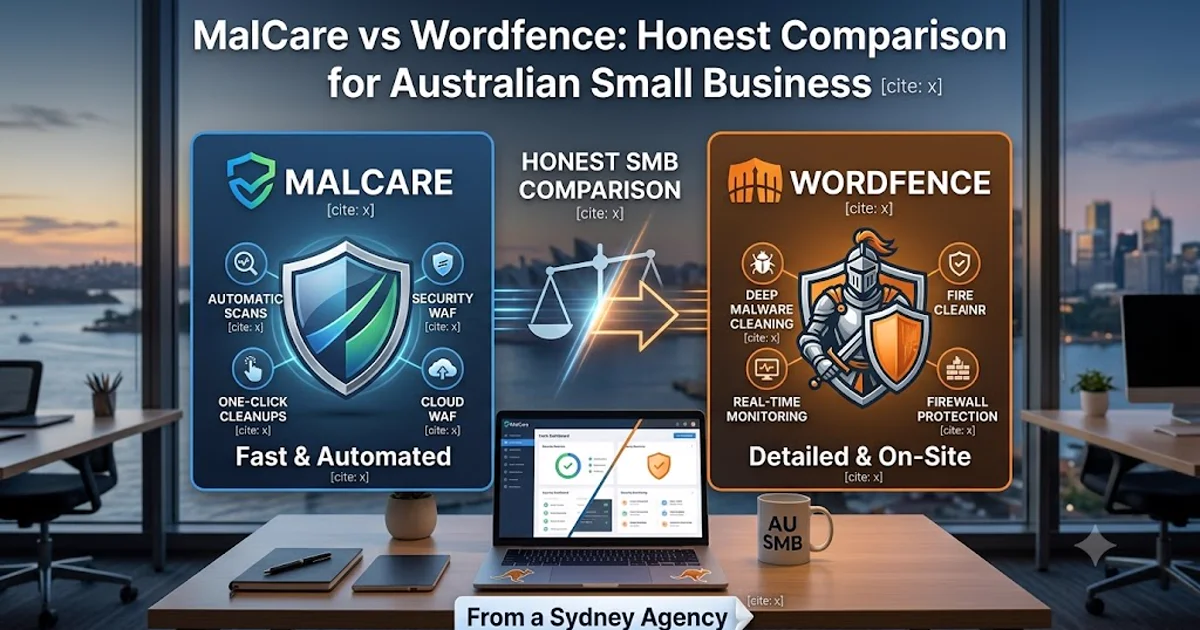
Both MalCare and Wordfence are legitimate, well-engineered WordPress security plugins — the choice between them comes down to two questions: how technical is the site owner, and how much does plugin performance overhead matter on your hosting. Wordfence wins for technically-comfortable owners who want the deepest threat intelligence (4M+ install base feeds their real-time signatures) and don’t mind some server-side scanning load. MalCare wins for non-technical SMB owners who want set-and-forget protection without their site slowing under continuous scans. We deploy both at Cosmos Web Tech depending on the client.
Why MalCare vs Wordfence is the WordPress security question
If you’re running an Australian SMB WordPress site and have ruled out hosting-agnostic cloud WAFs like Sucuri, your decision narrows to two plugins: MalCare or Wordfence . Everything else in the WordPress security space (iThemes/Solid Security, Sucuri Plugin, Anti-Malware Security, Patchstack) is either feature-thinner, less actively maintained, or operates at a different tier entirely.
The architectural difference between the two matters more than most reviews admit:
- Wordfence is a server-side plugin. Scanning happens inside WordPress, on your hosting’s CPU and RAM. The advantage: full local access to files, database, and request stream. The cost: scanning eats hosting resources, sometimes visibly slows the site during deep scans.
- MalCare is a cloud-assisted plugin. The plugin captures site state locally, then sends it to MalCare’s servers for the heavy malware analysis. Your hosting only has to handle a lightweight uploader. The advantage: site stays fast even with continuous deep scans. The cost: your data leaves your server (anonymised), and if MalCare’s cloud has issues, you have no scanning.
That architectural choice cascades into every other difference between the two.
Pricing — Australian SMB lens
Both plugins price in USD and bill annually. AUD figures below use ~1.55 FX (check current rates).
Wordfence
| Plan | USD / year | AUD approx | Best for |
|---|---|---|---|
| Free | $0 | $0 | Brochure sites, hobby projects |
| Premium | ~$119/site | ~$185 | Single SMB site with revenue |
| Care | ~$490/site | ~$760 | Premium + same-day expert response |
| Response | ~$980/site | ~$1,520 | Premium + 1-hour incident SLA |
The Wordfence Free tier is genuinely powerful — full firewall, malware scanner, 2FA, login security. The Premium tier mainly adds real-time threat signature feed (Free gets a 30-day delay), country blocking, and faster scans. Most SMBs we work with are fine on Premium ($185/yr AUD).
MalCare
| Plan | USD / year | AUD approx | Best for |
|---|---|---|---|
| Basic | ~$99/site | ~$155 | Scan + alert + one-click cleanup |
| Plus | ~$149/site | ~$230 | Above + WAF + login protection |
| Pro | ~$299/yr | ~$465 | 5 sites bundled at Plus features |
MalCare has no meaningful free tier — there’s a trial scan, but ongoing protection requires a paid plan. The Plus tier ($230/yr AUD) is the natural comparison point against Wordfence Premium ($185/yr AUD) — MalCare costs ~$45/yr more for one-click cleanup included. Wordfence’s auto-cleanup is much weaker; if you get hacked on Wordfence Premium, you’re either DIY-cleaning or paying for Care.
Honest pricing call: At the single-site comparable tier (Wordfence Premium vs MalCare Plus), MalCare is slightly more expensive but includes proper cleanup. Wordfence Premium is cheaper but cleanup is a separate ~$370/yr upgrade to Care. For sites that have been hacked before, MalCare Plus is the better value.
Architecture and performance — what actually slows your site
This is the difference that matters most for Australian SMB hosts running on budget hosting.
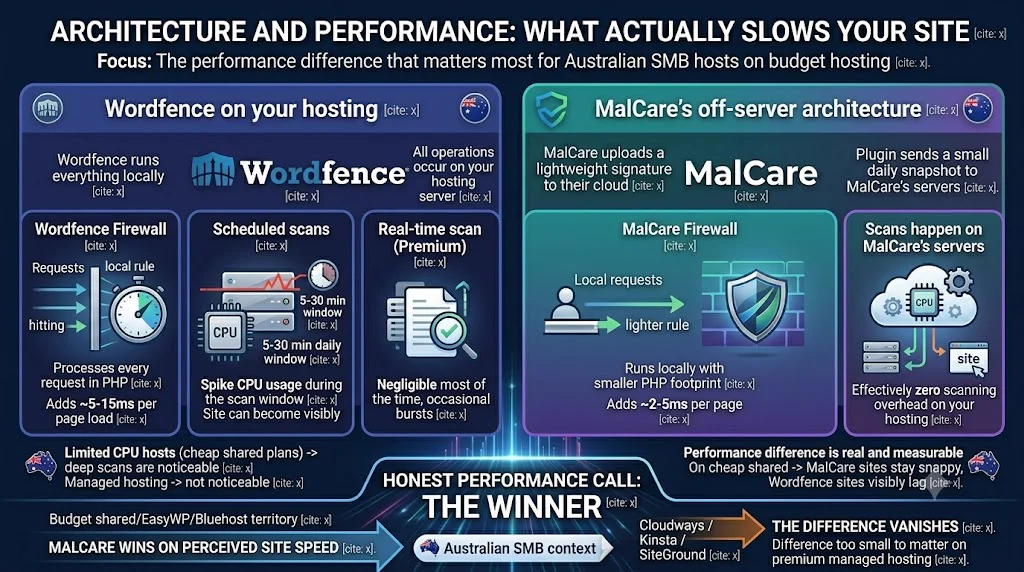
Wordfence on your hosting
Wordfence runs everything locally:
- Firewall processes every request in PHP. Adds ~5-15ms per page load.
- Scheduled scans spike CPU usage during the scan window — typically 5-30 minutes daily. On shared hosting with limited CPU, the site can become visibly slower during scans.
- Real-time scan (Premium) constantly checks new files. Negligible most of the time, occasional bursts.
- Login security + 2FA + brute-force protection is lightweight.
If your host has limited CPU (most cheap shared plans), Wordfence’s deep scans are noticeable. On managed hosting like Kinsta or Cloudways with dedicated CPU, you’ll never notice.
MalCare’s off-server architecture
MalCare uploads a lightweight signature of your site to their cloud:
- Firewall runs locally (like Wordfence) but with a smaller PHP footprint. Adds ~2-5ms per page.
- Scans happen on MalCare’s servers, not yours. The plugin only sends a small daily snapshot. Effectively zero scanning overhead on your hosting.
- Login + WAF + bot protection is lightweight.
The performance difference is real and measurable: on cheap shared hosting where the CPU is the bottleneck, MalCare-protected sites stay snappy during scan windows while Wordfence-protected sites visibly lag. On premium managed hosting, the difference is too small to matter.
Honest performance call: if your hosting is budget shared/EasyWP/Bluehost territory, MalCare wins on perceived site speed. On Cloudways / Kinsta / SiteGround, the difference vanishes.
Threat intelligence — whose signatures are smarter
This is where Wordfence is genuinely ahead.
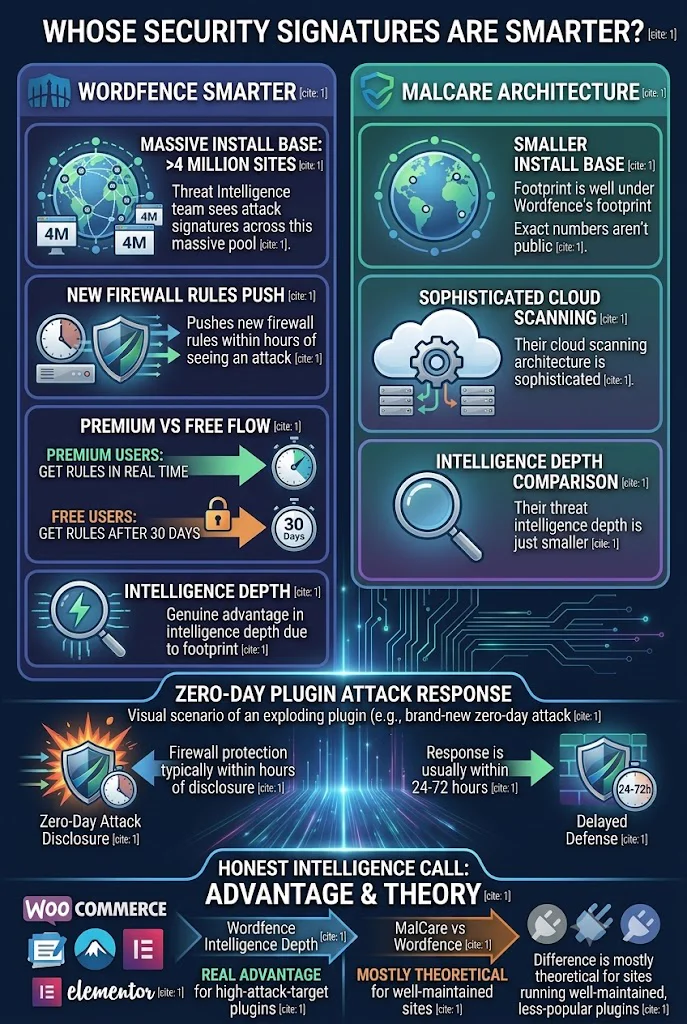
- Wordfence’s install base is over 4 million sites. Their Threat Intelligence team sees attack signatures across that pool and pushes new firewall rules within hours. Premium users get the rules in real time; Free users get them after 30 days.
- MalCare’s install base is smaller — exact numbers aren’t public, but well under Wordfence’s footprint. Their cloud scanning architecture is sophisticated, but their threat intelligence depth is just smaller.
For a brand-new zero-day attack on a popular WordPress plugin, Wordfence Premium users typically get firewall protection within hours of disclosure. MalCare’s response is usually within 24-72 hours.
If your site uses common high-attack-target plugins (WooCommerce, Contact Form 7, Elementor), Wordfence’s intelligence depth is a real advantage. For sites running well-maintained, less-popular plugins, the difference is mostly theoretical.
Malware scan and cleanup — the part that matters when it matters
Both plugins scan continuously. The difference is what happens when malware is found.
Wordfence cleanup workflow
- Free + Premium: scan detects malware, alerts you. You’re responsible for cleanup, typically via manual file inspection or restoring from backup. No auto-cleanup.
- Care (~$490/yr): same scan, but a Wordfence engineer will clean the site for you, typically same business day.
- Response (~$980/yr): same plus a 1-hour cleanup SLA, 24/7.
If you’re DIY-comfortable, Wordfence Premium is fine — the Threat Intelligence team’s detection is excellent. If you want hands-on help, you’re at the $760-$1,520/yr AUD tier.
MalCare cleanup workflow
- All paid plans: detected malware can be cleaned with one-click auto-cleanup for most common infections. Plugin runs a cleanup routine that removes known malicious files and database entries.
- Complex infections that auto-clean can’t handle: manual cleanup is available as a paid add-on, typically USD $99-$249 per incident.
- No SLA on manual cleanups — turnaround is usually 24-48 hours but isn’t contractually guaranteed.
MalCare’s one-click auto-clean is genuinely impressive when it works — which is most common WordPress infections (suspicious admin users, backdoor PHP files, injected ads/spam). For sophisticated targeted attacks, you’ll need the paid manual cleanup add-on.
Honest cleanup call: if you’ve been hacked once and don’t want the worry, MalCare Plus is the better budget option. If you want gold-standard cleanup-on-call, Wordfence Care is the upgrade — but at ~$760/yr AUD that’s a real budget jump.
Setup and ongoing UX
Wordfence
Plugin install + activation = 60 seconds. Initial configuration walks through a setup wizard covering firewall mode, scan schedule, 2FA, and alert email. Premium tier requires entering the license key.
Day-to-day UX is busier — the dashboard shows ongoing scan status, blocked IPs, recent traffic. Alert emails can be frequent unless tuned (especially the daily summary). Some SMB clients have called it “noisy.”
The plugin updates frequently (sometimes weekly) which is good for security and slightly annoying for site owners who get plugin-update reminders constantly.
MalCare
Plugin install + activation + account creation + site connection = 3-5 minutes. The first scan happens on MalCare’s servers; you wait 15-30 minutes for results.
Day-to-day UX is quieter — the WordPress dashboard widget shows scan status, but most activity lives on the MalCare.com dashboard rather than inside your WP admin. SMB clients who don’t want to think about security like this approach.
Plugin updates are less frequent (monthly or less) which makes for a calmer feel.
Support
Both have decent support; both have different cultures.
- Wordfence support is responsive and technically deep for paid customers. Free users get community forum support which is reasonable. Response times typically under 24 hours on Premium tickets, faster on Care/Response.
- MalCare support is responsive but smaller team. Best access is via in-app chat for Plus customers. Response times typically under 24 hours; complex issues escalate slowly.
For most SMBs this difference is academic — both handle “my plugin broke” or “I think I was hacked” with reasonable speed.
What we deploy at Cosmos Web Tech (for transparency)
We’re not pretending one is universally better. Here’s what we actually run on client sites:
| Client situation | Plugin | Why |
|---|---|---|
| Brochure site, no payments | Wordfence Free | Free, deep threat intel, plenty for the threat model |
| Lead-gen site, technical owner, want depth | Wordfence Premium | Real-time signatures, dashboard control, deep configuration |
| Lead-gen site, non-technical owner, want quiet | MalCare Plus | Off-server scanning, one-click clean, fewer alerts |
| WooCommerce site under AUD $100k/yr revenue | MalCare Plus + Sucuri Pro | Lightweight plugin + cloud WAF in front |
| WooCommerce site above AUD $100k/yr revenue | Wordfence Care + Sucuri Business Firewall | Best-in-class human response + network WAF |
The honest decision matrix
| If you… | Pick |
|---|---|
| Want the absolute most powerful free option | Wordfence Free |
| Are technical and value threat-intelligence depth | Wordfence Premium |
| Are non-technical and want set-and-forget | MalCare Plus |
| Run on cheap shared hosting and care about site speed | MalCare — off-server scanning matters here |
| Have been hacked once and don’t want a repeat | MalCare Plus (one-click clean) or Wordfence Care (human cleanup) |
| Run a multi-site portfolio (5+ sites) | MalCare Pro — 5 sites for $465/yr is the cheapest portfolio coverage |
The verdict
For an Australian SMB with one revenue WordPress site:
- If the owner is technical: Wordfence Premium at AUD ~$185/yr. The threat intelligence depth pays off.
- If the owner is non-technical or values quiet: MalCare Plus at AUD ~$230/yr. The off-server scanning + one-click cleanup is the better experience.
Neither is wrong. We deploy both, depending on which trade-off fits the client.
If you’re stuck, default to MalCare Plus — the off-server architecture is more forgiving of cheap hosting, the one-click cleanup is genuinely valuable when something goes wrong, and the calmer UX matches what most SMBs actually want from security software. Wordfence becomes the better answer when budget is tight (Premium is cheaper) or when you’re going to dig into the configuration anyway.
Pick one of these:
Try MalCare Try Wordfence PremiumBoth offer trial periods or money-back windows. Install one, run it for two weeks, decide.
Related on Cloud Geeks Insights:
- Sucuri Website Firewall review — the cloud-WAF alternative that sits in front of any plugin
- Hacked WordPress site cleanup guide — what to do when prevention failed
- Kinsta review — premium managed WordPress hosting that bundles some security
- Cloudways review — managed cloud hosting compatible with both MalCare and Wordfence
The author runs Ganda Tech Services and Cosmos Web Tech, which deploys client WordPress sites with security plugins matched to the client’s technical comfort and hosting tier. We hold affiliate relationships with Wordfence and MalCare — disclosed at the top of this post.