
Hacked WordPress Site? An Honest Guide to Cleanup Services — Sucuri vs Wordfence Care vs MalCare

The verdict in 30 seconds
If your WordPress site is actively hacked right now and you need it cleaned today, call Sucuri on the Platform Pro plan — they’re the fastest non-WordPress-specific cleanup service in Australia, with a 6-hour response SLA on Pro and 30-min on Business. If you’re already running Wordfence Premium and want the cheapest cleanup route, Wordfence Care is $490/yr and covers unlimited incidents. If you’re a non-technical owner of a single WordPress site and want one product that handles everything without you ever touching the code, MalCare is the gentlest option. We’ll break down all three honestly.
If you’ve just discovered the hack — do this first
Before you spend money on a cleanup service, do these five things in the next 30 minutes:
- Take the site offline if it’s serving malware to visitors. A 503 maintenance page is better than a malware warning. Switch DNS to a “we’re back soon” page, or pause the site at your CDN level. Browsers and Google blacklist faster than you’d believe.
- Change every password. WordPress admin, hosting account, database, FTP/SFTP, and any third-party services connected by API key. Assume every credential touching the site is compromised.
- Snapshot the site as-is. Don’t fix anything yet. Copy the full filesystem and database to a safe location. Cleanup teams need to see the malware to understand the infection vector — wiping it first costs you the forensic trail.
- Pull recent access logs. Most hosts retain 7-30 days of HTTP and FTP logs. Download them before they rotate. The first unauthorised request is what tells you the entry point.
- Don’t restore from a backup yet. If the backup is from the last 30 days, it’s probably also compromised — most WordPress hacks sit dormant for 2-4 weeks before activating. Restoring blindly resets the visible damage and reinfects the site the same evening.
Now you have time to choose a cleanup service properly.
The three honest options
Option 1 — Sucuri Platform (~USD $200-$500/yr)
Sucuri’s Website Security Platform is a cleanup + monitoring product (separate from their Website Firewall, which we reviewed in a previous post). The Platform plans look like this:
| Plan | USD / year | AUD approx | Response SLA | Includes |
|---|---|---|---|---|
| Platform Basic | ~$200 | ~$310 | 12 hours | Cleanup + scanning + monitoring + blacklist removal |
| Platform Pro | ~$300 | ~$465 | 6 hours | Above + Pro Firewall |
| Platform Business | ~$500 | ~$775 | 30 minutes | Above + Business Firewall |
What’s included on every plan:
- Unlimited cleanups for the year — once you’re a customer, every infection in the next 365 days is handled at no extra cost.
- Blacklist removal — they submit removal requests to Google Safe Browsing, Norton, McAfee, and the major blocklists on your behalf.
- Post-clean hardening — they fix the entry vector after cleanup, not just the symptom.
- Works on any CMS — WordPress, Joomla, Magento, Drupal, custom PHP. Not WordPress-only.
The Sucuri cleanup team has the deepest history with non-WordPress infections of any of the three services here. If your site is Magento, Joomla, or a custom PHP build, this is the obvious choice.
For a hacked AU SMB WordPress site we’d pay Sucuri Platform Pro — the 6-hour SLA gets a Monday-morning incident cleaned by lunch, and you get the Pro Firewall protecting the site afterward so it doesn’t happen again.
Option 2 — Wordfence Care / Response (~USD $490 / $980 per year)
Wordfence offers two paid hands-on plans:
- Wordfence Care — ~$490/yr (~AUD $760). Same-business-day response. One-on-one help with security, configuration, and incident response. Unlimited site cleans.
- Wordfence Response — ~$980/yr (~AUD $1,520). One-hour response time, 24/7/365. Best-in-class for emergencies.
What you’re paying for, honestly:
- The deepest WordPress-specific expertise of any of the three services. Wordfence are the people who maintain the largest free WordPress security plugin and have seen more WordPress hacks than anyone.
- Real-time signature feeds from their threat intelligence team flow into your installed Wordfence plugin within hours of new threats appearing in the wild.
- One-hour response on Response plan is the fastest commercial cleanup SLA we’re aware of.
Trade-offs:
- WordPress-only. Not a fit for Magento, Joomla, custom PHP.
- Plugin-based architecture — the security runs inside WordPress, not in front of it. Means an attack still reaches your server (where the plugin can stop it), versus Sucuri’s cloud WAF stopping it at the edge.
- Wordfence Response at AUD $1,500/yr is genuinely expensive — only justifiable if every minute of downtime is costing serious revenue.
The right pick for a single WordPress site with technical comfort and a real budget for security. We use Wordfence Care for clients running a single high-value WordPress install where the WP-specific expertise pays off.
Option 3 — MalCare (~USD $99-$299/yr per site)
MalCare takes a different approach — it’s a cloud-assisted plugin where the actual scanning happens on MalCare’s servers, not yours. Your site stays fast even with continuous deep scans running.

| Plan | USD / year | AUD approx | Coverage |
|---|---|---|---|
| Basic | ~$99/site | ~$155 | 1 site, scan + one-click cleanup |
| Plus | ~$149/site | ~$230 | 1 site, all features incl. WAF |
| Pro | ~$299/site | ~$465 | 5 sites |
What MalCare gets right:
- Off-server scanning — runs heavy malware analysis on their cloud, not your hosting. Site stays fast.
- One-click cleanup — non-technical owners click a button; cleanup happens automatically for most common infections.
- Real-time signature feed comparable to Wordfence.
- Smart firewall that learns from cross-site attack patterns.
- Honest about its limits — for complex infections, you can request a manual cleanup as a paid add-on (~USD $99-$249 per incident).
Trade-offs:
- WordPress-only — same constraint as Wordfence.
- Manual cleanup is paid add-on, not unlimited like Sucuri or Wordfence Care. A site that gets hit twice in a year could cost more than expected.
- Smaller team than Sucuri or Wordfence — fewer eyes on new threat patterns.
The right pick for a non-technical SMB owner with a single WordPress site who wants security that doesn’t require them to think about it. We recommend MalCare to clients who want to set-and-forget and don’t want to be involved in incident response themselves.
Side-by-side comparison
| Sucuri Platform Pro | Wordfence Care | MalCare Plus | |
|---|---|---|---|
| Annual cost (USD) | ~$300 | ~$490 | ~$149 per site |
| AUD approx | ~$465 | ~$760 | ~$230 |
| Response SLA | 6 hours | Same business day | Not specified; manual cleanup as add-on |
| Unlimited cleanups | Yes | Yes | Auto-cleanup yes; manual no |
| Architecture | Cloud WAF + cleanup team | Plugin + cleanup team | Cloud-assisted plugin + auto-clean |
| Non-WordPress sites | Yes | No | No |
| Blacklist removal | Included | Included | Manual / add-on |
| Includes ongoing WAF | Yes (Pro Firewall) | No (plugin only) | Yes (basic) |
| Includes ongoing monitoring | Yes | Yes | Yes |
| Best for | Multi-site portfolios, non-WP, payments | Single WP site, technical owner | Non-technical owner, set-and-forget |
What cleanup actually includes (and what it doesn’t)
Every cleanup service follows roughly the same five-phase pattern — detection through to a verified restored site. Here’s the workflow with each service’s strengths mapped in:
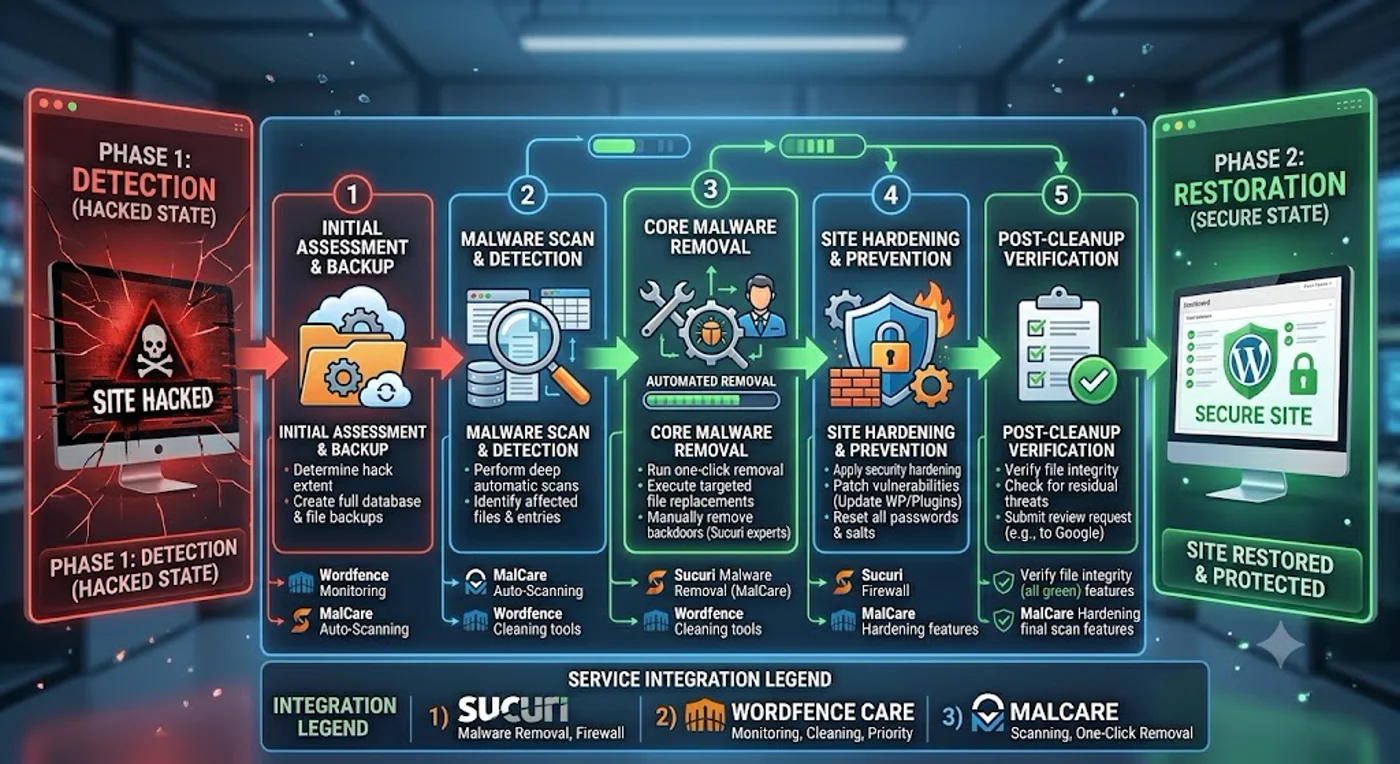
Most cleanup services cover roughly the same scope. What you should expect:
- Removing malicious files and database entries. This is the visible work — backdoor PHP files deleted, malicious admin users removed, infected
wp_optionsrows cleaned. - Closing the entry vector. Whatever vulnerability let the attacker in (outdated plugin, weak admin password, compromised hosting account) gets identified and closed.
- Hardening configuration. Disabling file editing in WordPress admin, locking down
wp-config.php, fixing file permissions, enabling 2FA on admin accounts. - Submitting blacklist removal requests to Google Safe Browsing, Norton, McAfee, and similar. This is the part that takes weeks if you do it yourself.
- A post-incident report describing what was found and how it was fixed.
What cleanup services usually don’t cover:
- Lost content or commerce data. If the attacker deleted product images, customer reviews, or order history, the cleanup team can’t restore that — it needs to come from a backup taken before the incident.
- SEO recovery. If Google deindexed your site because of the malware, cleanup gets you off the blacklist but doesn’t restore rankings. That takes months.
- Reputation damage with customers. Some customer relationships are permanently affected by a security incident. No cleanup service fixes that.
Blacklist removal — the part most owners underestimate
When Google Safe Browsing flags your site, every Chrome and Firefox visitor sees a red interstitial saying “Deceptive site ahead.” Every email you send from that domain hits spam folders. Every Facebook share gets blocked.
Getting off the Google blacklist requires:
- A clean site verified through Google Search Console.
- A reconsideration request submitted with a description of what was fixed.
- A 24-72 hour wait while Google rescans.
Doing it yourself is technical but doable. The reason cleanup services emphasise blacklist removal is that it’s a real ongoing cost — if your in-house clean wasn’t actually clean, you’ll get re-listed, and Google’s tolerance for repeat offenders is low. The cleanup team’s incentive is to keep you off the blacklist for the rest of your subscription, so they’re motivated to do it properly.
The DIY math — when is paying for cleanup not worth it?
A capable WordPress developer can clean a typical infection in 4-12 hours of focused work, at an Australian agency hourly rate of ~AUD $150-250. That’s AUD $600-3,000 per incident.
Subscription cleanup pays back in two scenarios:
- You expect more than one incident in the year. If you’ve been hacked once already, your odds of being hit again in the next 12 months are well above average. Unlimited cleanups become real value at the second incident.
- You need it cleaned fast. A freelance developer is rarely available within 6 hours of a Monday-morning emergency. Cleanup services with SLAs are.
DIY is the right call if you’re confident in your developer’s WordPress security depth, the site isn’t generating active revenue, and you have time to fix it carefully.
What we actually recommend for Australian SMBs
| Scenario | Pick |
|---|---|
| You’ve been hacked once and want to stop it happening again | Sucuri Platform Pro — cleanup + WAF in one product |
| You run a single WordPress site, you’re technical, budget for security is real | Wordfence Care — deepest WP expertise |
| Your site genuinely cannot tolerate more than an hour of compromise | Wordfence Response — fastest SLA on the market |
| Non-technical owner, single site, want to never think about this again | MalCare Plus — cheapest, lightest, set-and-forget |
| Magento, Joomla, custom PHP, or multi-CMS portfolio | Sucuri Platform Pro — only one that covers non-WordPress |
For most AU SMBs we work with — a single WordPress site running on managed hosting like Cloudways or Kinsta — the Sucuri Platform Pro plan is the right answer. The 6-hour SLA is fast enough, the cleanup + Pro Firewall combination handles the most likely incident types, and the price is well inside SMB budgets at around AUD $40/month.
The verdict
If your site is hacked right now, call a cleanup service today. The cost of waiting another 24 hours — in customer trust, in SEO rankings, in email deliverability — is almost always higher than the cost of any of the three services reviewed here.
If your site isn’t hacked but you want to be ready in case it ever is, Sucuri Platform Pro is the best balance of coverage, SLA, and price for an Australian SMB.
Get Sucuri Platform — start cleanup todayIf you’d rather go WordPress-native: Wordfence Care . If you want the lightest, most non-technical option: MalCare . All three are legitimate; the right answer depends on the shape of your site, your team, and your tolerance for downtime.
Related on Cloud Geeks Insights: Sucuri Website Firewall review for ongoing protection (vs cleanup), Kinsta review for premium managed WordPress hosting that bundles security, and Cloudways review for managed cloud hosting with optional security add-ons.
The author runs Ganda Tech Services and has personally directed cleanup on more than fifty hacked WordPress sites across two decades of agency work in Sydney. We hold affiliate relationships with Sucuri, Wordfence, and MalCare — disclosed at the top of this post.