
Cloudways Review for Australian Small Business: Managed Cloud Hosting Without the Premium WordPress Tax

The verdict in 30 seconds
Cloudways is the right managed cloud host for Australian small businesses and web agencies that need to run more than one site, want flexibility across stacks (WordPress + Laravel + Magento on the same panel), or want managed cloud at roughly half the price of Kinsta. The Sydney region via DigitalOcean SYD1, generous all-in-the-box caching (Varnish + Memcached + Redis included), and server-level pricing make it the smartest pick for anyone running 3+ small WordPress sites. It is the wrong choice if you want hand-holding support, run a single high-revenue WordPress store, or have zero technical comfort — we’ll name the right alternatives below.
Who Cloudways is, in one paragraph
Cloudways is a managed-cloud layer that sits on top of five underlying providers — DigitalOcean, AWS, Google Cloud, Linode, and Vultr — and gives you a single panel to spin up, configure, and operate stacks across them. The company was acquired by DigitalOcean in August 2022 and now operates as DigitalOcean’s managed-cloud product. They support WordPress, WooCommerce, Magento, Laravel, and custom PHP out of the box, with one-click installs and per-server (not per-site) pricing. For Australian SMBs the relevant region is DigitalOcean SYD1 (Sydney), which is what we use for almost every Cloudways deployment we run for Hills District and Western Sydney clients.
Who this review is for
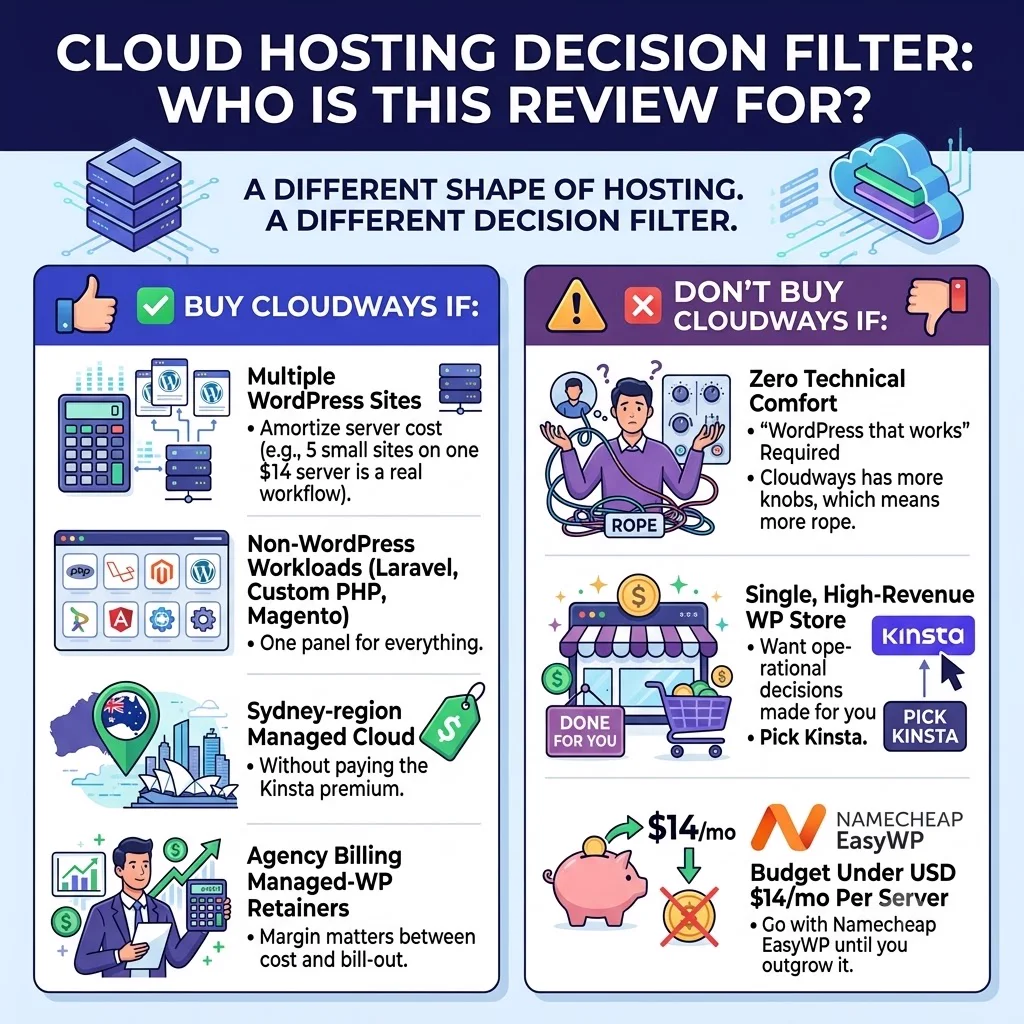
Cloudways is a different shape of hosting from Kinsta. The decision filter looks different too.
Buy Cloudways if any of these are true:
- You run multiple WordPress sites and want to amortise server cost across them (5 small sites on one $14 server is a real workflow).
- You run non-WordPress workloads — Laravel, custom PHP, Magento — alongside WordPress and want one panel for everything.
- You want Sydney-region managed cloud without paying the Kinsta premium.
- You’re an agency billing managed-WP retainers and the margin between cost and bill-out matters.
Don’t buy Cloudways if any of these are true:
- You run a single, high-revenue WordPress store and want every operational decision made for you — pick Kinsta .
- You have zero technical comfort and just want “WordPress that works” — Cloudways has more knobs, which means more rope.
- Your budget is under USD $14/mo per server — go with Namecheap EasyWP until you outgrow it.
Pricing for Australian SMBs — what it actually costs in AUD
This is where Cloudways genuinely differentiates. You pay per server, not per site. The cheapest viable production server is DigitalOcean Standard 1GB at roughly USD $14/month (around AUD $22 at current FX). On that single server you can comfortably run 3-5 small WordPress sites, or 1 small WooCommerce store. Scale up vertically with a click when traffic warrants.
Approximate pricing for the DigitalOcean tier (the one we recommend for most AU SMBs):
| Server | USD / month | AUD approx (at 1.55) | Best for |
|---|---|---|---|
| DO Standard 1GB | ~$14 | ~$22 | 1-5 small sites, dev/staging |
| DO Standard 2GB | ~$28 | ~$43 | 1 small WooCommerce, 5-10 brochure sites |
| DO Standard 4GB | ~$50 | ~$78 | 1 mid-traffic WooCommerce, agency portfolio |
| DO Premium 4GB (NVMe + Intel) | ~$64 | ~$99 | Same as above, ~30% faster I/O |
| DO Standard 8GB | ~$92 | ~$143 | High-traffic site, content-heavy WordPress |
Two things worth knowing:
- Add-ons stack up. Cloudways CDN, premium support, application credits, and per-account features bill separately. Budget about USD $5-15/month on top of the server base for a production AU site.
- USD pricing with the same FX exposure as Kinsta. If the AUD weakens 5%, so does your hosting bill.
There’s no annual discount — Cloudways is genuinely month-to-month. That’s an advantage if you’re an agency that churns clients, and a non-issue if you’re a stable SMB.
Performance in Australia — what actually happens
Cloudways on DigitalOcean SYD1 puts your origin server in the same Sydney availability zone as half the AU SaaS ecosystem. Round-trip times for users in the major capitals look like this in practice (your mileage will vary by network):
- Sydney metro: ~10ms
- Melbourne: ~14ms
- Brisbane: ~22ms
- Perth: ~50ms
- Auckland: ~28ms (worth knowing if you have NZ customers)
The default LAMP stack ships with Varnish + Memcached + Redis already configured, plus their own Breeze caching plugin for WordPress. That’s a notable difference from Kinsta, where Redis is a paid add-on. For a typical small-business WordPress site, the cached TTFB sits around 100-180ms from a Sydney visitor — slower than Kinsta + Cloudflare Enterprise, but close enough that 95% of SMB use cases won’t notice.
If you need edge caching closer to non-Sydney visitors, you can either add the Cloudways CDN (their own, billed per GB) or front the site with Cloudflare’s free or Pro plan (which is what we do — costs $0 to $20/mo and is more flexible). Putting Cloudflare in front of Cloudways is the configuration we recommend for any production AU site.
Features that matter (for a small business, not a brochure)
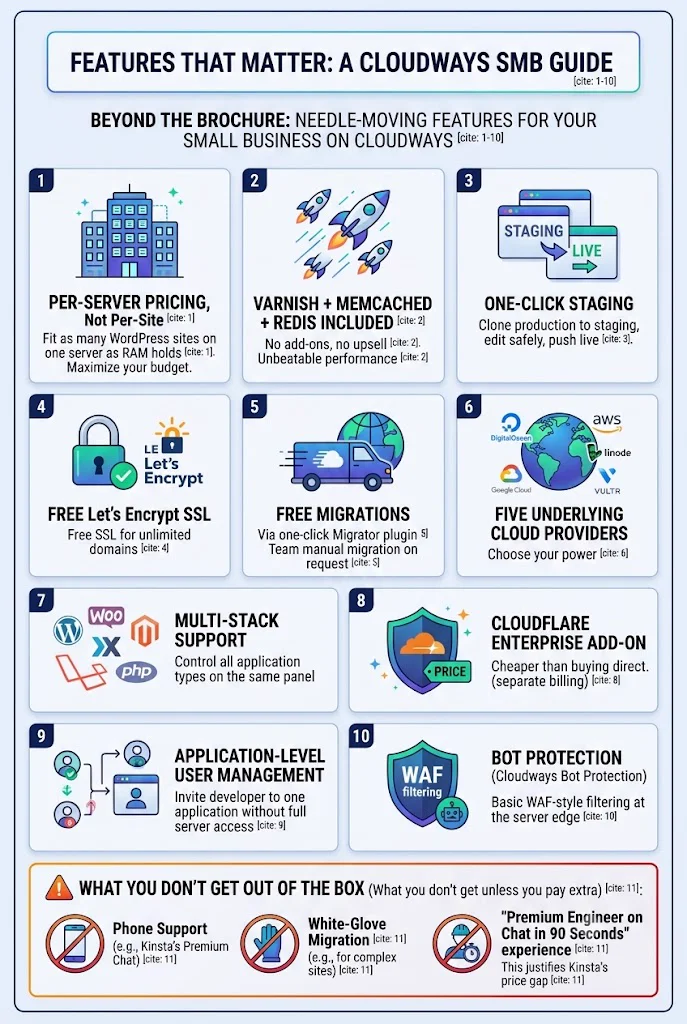
The features that move the needle on Cloudways:
- Per-server pricing, not per-site. Fit as many WordPress sites on one server as the RAM holds.
- Varnish + Memcached + Redis included. No add-ons, no upsell. This is the single biggest difference from Kinsta on price.
- One-click staging. Clone production to staging, edit, push live. Same flow as Kinsta.
- Free SSL via Let’s Encrypt for unlimited domains.
- Free migrations via the Cloudways Migrator plugin (one-click), or their team will handle the first migration manually on request.
- Five underlying cloud providers — DigitalOcean, AWS, Google Cloud, Linode, Vultr. For most AU SMBs the answer is DigitalOcean SYD1; for compliance-heavy workloads you may want AWS ap-southeast-2.
- Multi-stack — WordPress, WooCommerce, Magento, Laravel, custom PHP, all on the same panel.
- Cloudflare Enterprise add-on (separate billing). Cheaper than buying CF Enterprise direct.
- Application-level user management — invite a developer to one application without giving them full server access.
- Bot Protection (Cloudways Bot Protection) — basic WAF-style filtering at the server edge.
What you don’t get out of the box: phone support, white-glove migration, or the “premium engineer on chat in 90 seconds” experience that justifies Kinsta’s price gap.
What the migration actually feels like
Most Cloudways migrations happen via the Cloudways WordPress Migrator plugin — install it on the source site, paste your Cloudways server details, hit start. Typical move time is 30 minutes to 4 hours depending on database size. We’ve moved sites of 20GB+ this way; the only time it’s failed was when the source host blocked outbound port 22.
For agencies, the workflow is: spin up a new application on an existing server, run the Migrator, point DNS. Whole thing is 1-2 hours of elapsed time and ~15 minutes of active attention.
For SMBs without technical help, the Cloudways team will do the first migration for you free on request — but unlike Kinsta, you have to ask. It’s not a default feature.
Support quality — the honest gap
This is where Cloudways trades on price. The support is competent but not the Kinsta-tier experience.
- 24/7 live chat available, first response usually within 2-5 minutes.
- First-line is offshored and script-driven. For complex tickets, expect to get bounced to “Level 2” — sometimes within the same chat, sometimes via email follow-up.
- No phone support.
- Premium Support add-on exists (~USD $100/mo) which gets you faster routing to senior engineers and dedicated communication channels. Worth it for agencies; usually not for single-site SMBs.
- The DigitalOcean community knowledge base is genuinely good, and most Cloudways problems have been documented somewhere on it.
The honest summary: Cloudways support is fine for technically-comfortable users and agency teams. It is not fine for SMB owners who want every issue answered by a senior engineer within 2 minutes — that’s the experience you pay extra for on Kinsta.
What we don’t love
- First-line support quality. Fine for technical users; rough for non-technical SMB owners.
- Add-on creep. Cloudways CDN, premium support, application credits — they bill separately and stack.
- No cPanel and no familiar control panel. Their custom panel is fine after a day; jarring on day one if you’re used to cPanel.
- USD pricing with no AUD billing. FX exposure same as Kinsta.
- Multi-site on one server cuts both ways. A runaway plugin on Site A can drag down Sites B-E sharing the same RAM. Use Cloudways’ built-in resource monitoring or shard noisy sites to their own servers.
- DigitalOcean acquisition has slowed product velocity. New features ship less frequently than they did pre-2022.
How Cloudways stacks against the alternatives we actually recommend
| If your site is… | Recommended host | Why |
|---|---|---|
| Single revenue WordPress site, AU audience, want zero ops | Kinsta | Premium support + Cloudflare Enterprise + Sydney DC |
| Multi-stack, multi-site, agency, or AUD $25-100/mo budget | Cloudways | Server pricing, all-stack flexibility, Sydney via DO SYD1 |
| Pre-revenue or under AUD $25/mo budget | Namecheap EasyWP | Honest cheap option; upgrade path is real |
| Any of the above + serious security needs | Sucuri Website Firewall | Sits in front of any host; WAF + DDoS + malware scan |
A note on running Cloudways alongside Cloudflare: this is our default stack for AU SMB clients. Cloudways DO SYD1 origin + Cloudflare free or Pro in front. You get sub-second AU TTFB, edge caching for international visitors, and Cloudflare’s WAF basics — all for the cost of the Cloudways server plus $0-$20/mo for Cloudflare. It’s the cheapest legitimate path to a fast, well-protected production AU site under $50/mo.
For sites handling payments or PII, add a dedicated managed firewall like Sucuri on top. Cloudflare’s WAF is good; a dedicated incident-response team is better. A full Sucuri review is coming on this site next.
The verdict
Buy Cloudways if you’re an agency, you run multiple sites, you mix WordPress with other stacks, or you want managed cloud at half the Kinsta price and can live with the support trade-off. The Sydney DO SYD1 region, the all-in-the-box caching stack, and the per-server pricing make it the smartest pick across the entire mid-tier hosting bracket for Australian SMBs.
Don’t buy Cloudways if you’re running a single high-revenue site and you want every issue handled by a senior engineer on chat in 90 seconds. That’s Kinsta’s price proposition; pay the premium.
If you’re in the buy lane, the easiest path is:
Try Cloudways — 3-day free trial, no credit cardThe free trial is genuinely no-credit-card. Spin up a DO SYD1 server, install WordPress, run the Migrator on a copy of your live site, and stress-test it. If it isn’t right for you, the server is destroyed when the trial ends — no charge.
Coming next on Cloud Geeks Insights: the head-to-head Kinsta vs Cloudways comparison (which is the post most SMBs actually want), a Sucuri Website Firewall review with Cloudflare WAF comparison, and a hacked-site rescue review covering Sucuri vs Wordfence vs MalCare. Subscribe in the sidebar to catch them.
The author runs Ganda Tech Services, parent company of Cosmos Web Tech, which deploys client WordPress and Laravel applications on the hosts recommended in this article. Our default production stack for Australian SMBs is Cloudways DO SYD1 + Cloudflare + Sucuri.