
Sucuri Website Firewall Review for Australian Small Business: Honest Verdict vs Cloudflare and Wordfence

The verdict in 30 seconds
Sucuri Website Firewall is the right pick for Australian small businesses who want WAF + DDoS protection + malware cleanup in one managed product, sit any kind of host (WordPress, Magento, custom PHP, anything DNS-pointable) behind it, and have someone to call when the site is on fire. It costs around USD $10-$40/month depending on cleanup-response SLA. The honest competition: Cloudflare’s free tier covers basic DDoS for $0; Wordfence covers WordPress-specific threats on the server side; MalCare is the gentler WordPress-only option. We’ll show exactly when each one wins.
What Sucuri actually is
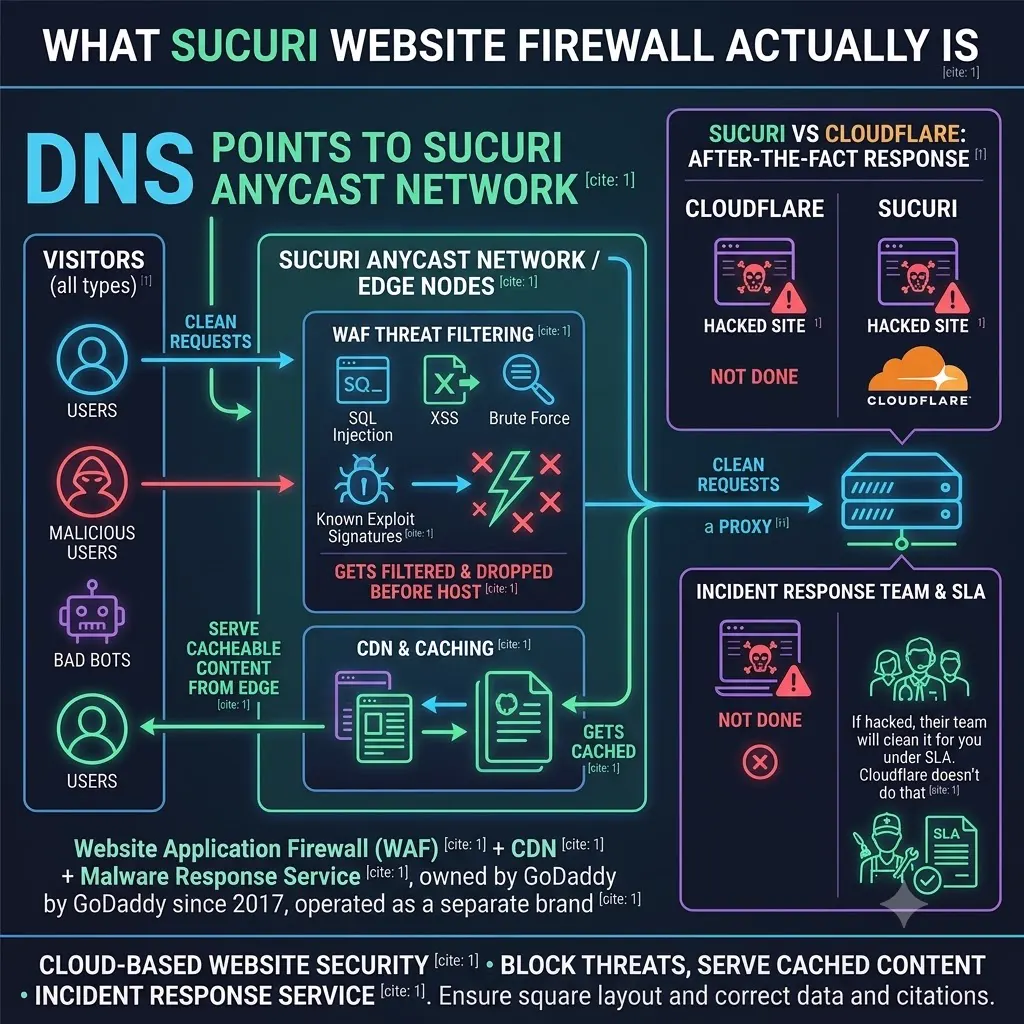
Sucuri is a cloud-based Website Application Firewall (WAF) plus CDN plus malware-response service, owned by GoDaddy since 2017 and operated as a separate brand. You point your domain’s DNS at Sucuri’s anycast network; every visitor request hits a Sucuri edge node first, gets filtered and cached, and then proxies through to your origin server. Anything malicious — SQL injection, XSS, brute force, bad-bot traffic, known-exploit signatures — gets dropped before it reaches your host. Anything cacheable gets served from the edge.
It’s the same architectural pattern as Cloudflare, but with a sharper focus on after-the-fact response — if your site does get hacked, Sucuri’s incident response team will clean it for you under SLA. Cloudflare doesn’t do that.
Who this review is for
Buy Sucuri if any of these are true:
- Your site handles payments or personal data (e-commerce, healthcare, professional services) and a malware incident would be reportable under the OAIC’s Notifiable Data Breaches scheme.
- You want one managed product covering WAF, DDoS, CDN, malware scan, and cleanup — instead of stitching three tools together.
- You’ve been hacked before and want a contractual cleanup SLA so it doesn’t take a week again.
- You run non-WordPress workloads (Magento, custom PHP, Joomla) where Wordfence isn’t an option.
Don’t buy Sucuri if any of these are true:
- You run a simple WordPress brochure site with no payments and a tight budget — Cloudflare Free + a Wordfence Free install will cover 90% of attacks at $0.
- You want the largest edge network for global visitors — Cloudflare’s ~330 POPs outpoint Sucuri’s network for raw latency.
- Your only concern is WordPress-specific malware on a single site — MalCare or Wordfence Premium covers that at a lower price point.
Plans and pricing for Australian SMBs
Sucuri runs three main plans on the Website Firewall product:
| Plan | USD / year | AUD approx (at 1.55) | Cleanup response SLA |
|---|---|---|---|
| Basic Firewall | Within 12 hours | ||
| Pro Firewall | Within 6 hours | ||
| Business Firewall | Within 30 minutes |
A few things to know:
- Sucuri bills annually. No monthly billing on the firewall product. Calculate cashflow accordingly.
- The plan ladder is essentially about response speed, not features. WAF, CDN, DDoS, monitoring, and unlimited cleanups are on every tier. What you’re really paying for at the Pro and Business tier is how fast a human starts working on your incident.
- Cleanups are unlimited. Once you’re on a plan, you can request cleanup as many times as your site needs it within the year. No per-incident surcharge.
- Same FX exposure as the other USD-priced services we review.
Check current Sucuri pricing →
For most AU SMBs we work with, the right plan is Pro Firewall — the 6-hour cleanup SLA is fast enough that a Monday-morning incident is resolved before lunch, and the price gap to Business doesn’t pay back unless your site is the revenue engine for an entire business.
Performance in Australia
Sucuri’s anycast network has POPs in roughly 10-15 cities globally, including Sydney. Australian visitors typically hit the Sydney POP with a round-trip in the 10-30ms range, which is fine but not exceptional.
What that means in practice:
- For cached page assets (images, CSS, JS), Sucuri delivers similar performance to Cloudflare on AU-only audiences — the Sydney POP is the bottleneck for both.
- For uncached origin requests (WordPress admin, checkout, dynamic content), Sucuri adds about 30-60ms of proxy latency on top of your origin’s response time. That’s a real cost.
- For non-AU visitors, Cloudflare’s 330+ POPs win — Sucuri has fewer edge locations, so a visitor from São Paulo hits a more distant Sucuri POP than they would a Cloudflare POP.
The honest summary: Sucuri’s network is engineered for security, not edge performance. If you want the world’s lowest TTFB, Cloudflare or AWS CloudFront beats Sucuri. If you want a security product that also happens to do CDN, Sucuri is fine and you won’t notice the difference on an AU-focused site.
What you get on the WAF side
A managed cloud WAF sits between your visitors and your origin server, filtering attacks before they ever reach your hosting. Here’s the architecture in one diagram:
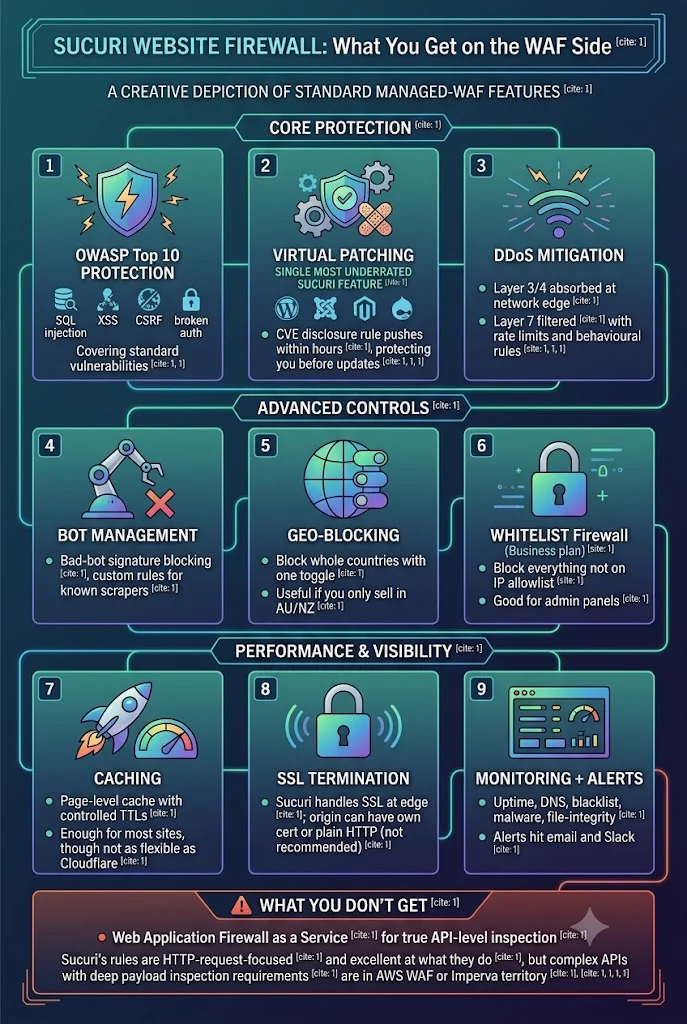
The Sucuri Website Firewall covers the standard managed-WAF feature set:
- OWASP Top 10 protection — SQL injection, XSS, CSRF, broken auth, the classics.
- Virtual patching for known WordPress, Joomla, Magento, and Drupal vulnerabilities. When a CVE is disclosed, Sucuri pushes a rule across their network within hours, protecting you even if you haven’t updated yet. This is the single most underrated Sucuri feature.
- DDoS mitigation — Layer 3/4 absorbed at the network edge; Layer 7 filtered with rate limits and behavioural rules.
- Bot management — bad-bot signature blocking, custom rules for known scrapers.
- Geo-blocking — block whole countries with one toggle. Useful if you only sell in AU/NZ.
- Whitelist-mode firewall (Business plan) — block everything that isn’t on your IP allowlist. Good for admin panels.
- Caching — page-level cache with TTLs you control. Not as flexible as Cloudflare’s cache rules, but enough for most sites.
- SSL termination — Sucuri handles SSL at the edge; your origin can run on its own cert or even plain HTTP (we don’t recommend the latter).
- Monitoring + alerts — uptime, DNS, blacklist, malware, file-integrity. Alerts hit email and Slack.
What you don’t get: Web Application Firewall as a Service for true API-level inspection. Sucuri’s rules are HTTP-request-focused and excellent at what they do, but if you have a complex API with deep payload inspection requirements, you’re in AWS WAF or Imperva territory.
Malware scan and cleanup — the differentiator
This is where Sucuri pulls away from Cloudflare. Sucuri’s plans include:
- Continuous remote malware scanning of your origin (the SiteCheck engine).
- Server-side scanning via their agent (Pro+ plans).
- Unlimited hack cleanups with response SLAs tied to your plan.
- Blacklist removal if your domain gets flagged by Google Safe Browsing, Norton, etc.
If your site is hacked, you open a ticket, give them temporary FTP/SSH access, and their incident-response team cleans the malware, hardens the install, and submits blacklist removal requests on your behalf. On the Business Firewall plan, a human is on the case within 30 minutes — fastest in the industry.
A dedicated post on the hack-cleanup product (and how it compares to Wordfence Care and MalCare’s rescue service) is coming up next on this site. The short version: Sucuri cleanup is the gold standard for non-WordPress sites and for sites where downtime is genuinely expensive.
How Sucuri compares to the honest competition
This is the section most reviews skip. Here’s a real side-by-side, from running all four on different client sites:
Sucuri vs Cloudflare WAF
| Sucuri Pro (~$240/yr) | Cloudflare Pro (~$25/mo / $300/yr) | |
|---|---|---|
| WAF coverage | OWASP + virtual patching for CMSes | OWASP + Cloudflare-managed ruleset |
| Edge network | ~10-15 POPs incl. Sydney | ~330 POPs |
| DDoS | Included, all layers | Included, all layers |
| Malware scan + cleanup | Included, unlimited | Not included |
| Free tier | None | Generous free tier (no WAF, but CF Free + DDoS) |
| AU performance | Sydney POP, ~30-60ms proxy overhead | Sydney POP, ~10-30ms proxy overhead |
| Best for | Sites where cleanup matters more than speed | Speed-first sites + larger budget for cleanup elsewhere |
Honest call: if you’re picking on raw WAF + network performance, Cloudflare Pro wins. If you want cleanup-included peace of mind in one product, Sucuri wins. We deploy Cloudflare Free + Sucuri Pro on revenue client sites for the best-of-both: Cloudflare for the edge network speed, Sucuri for the cleanup SLA. Yes, two CDN layers is unconventional; it works because they sit at different DNS levels and the cost is reasonable.
Cloudflare’s affiliate program is invite-only and limited — we won’t pretend to have an affiliate link there. Sign up direct at cloudflare.com.
Sucuri vs Wordfence
| Sucuri Pro (~$240/yr) | Wordfence Premium (~$119/yr) | |
|---|---|---|
| Architecture | Cloud-based, sits in front of origin | Server-side plugin inside WordPress |
| Stops attack before reaching origin? | Yes | No — attack reaches server, then plugin filters |
| WordPress vulnerability scans | Yes (virtual patching) | Yes (real-time signature feed) |
| Malware scanning | Continuous, server + remote | Continuous, server only |
| Non-WordPress sites | Works on any site | WordPress-only |
| DDoS protection | Network-level | App-level only (limited) |
| Best for | Multi-site portfolios, non-WP sites, payments | Single WordPress sites, tech-comfortable owners |
Honest call: Wordfence is genuinely excellent at what it does — server-side WordPress security. It’s the better choice if you run a single WordPress site, you’re technically comfortable with managing a security plugin, and you don’t need network-level DDoS protection. Sucuri wins for portfolios, non-WordPress workloads, and any site where you want attacks stopped before they reach your server. We run Wordfence on client brochure sites and Sucuri on client e-commerce sites.
Try Wordfence for WordPress-only single-site protection.
Sucuri vs MalCare
| Sucuri | MalCare Plus (~$149/yr per site) | |
|---|---|---|
| Architecture | Cloud WAF in front | Cloud-assisted plugin (scans off-server) |
| Setup complexity | Medium (DNS change) | Low (plugin install) |
| WAF | Yes, network-level | Yes, plugin-level (basic) |
| Malware scan | Continuous | Continuous, lighter on server |
| Cleanup | Unlimited, SLA-bound | One-click cleanup, additional credits per incident |
| Best for | Tech-conservative SMBs who want a cloud product | Non-technical WordPress owners who hate plugins that slow the site down |
Honest call: MalCare is built for non-technical WordPress owners who’ve been burned by Wordfence slowing their site or by Sucuri’s DNS-change setup process. It’s WordPress-only and lighter than both. If your client is the type of person who treats their website like a service they don’t want to touch, MalCare wins on UX. For everyone else, Sucuri or Wordfence wins on depth.
Try MalCare for WordPress security with minimal touch.
What we don’t love about Sucuri
- Annual-only billing on the firewall product. No monthly option. Budget accordingly.
- DNS-change setup is more work than installing a plugin. Mid-tier WordPress owners get nervous about it; it’s a 10-minute job for a developer.
- Proxy adds ~30-60ms of latency on uncached requests. Real but not catastrophic.
- Smaller edge network than Cloudflare. Non-AU performance lags.
- The dashboard is dated. Functional but doesn’t feel as modern as Cloudflare’s UI.
- No free tier. Cloudflare’s free WAF (well, free CDN with basic security) is genuinely capable.
What the security stack actually looks like for our AU SMB clients
For transparency, here’s what we deploy on real client sites:
| Site type | Stack |
|---|---|
| Brochure site, no payments | Cloudflare Free + Wordfence Free + clean hosting |
| Lead-gen site, forms only | Cloudflare Free + Wordfence Premium + managed host |
| E-commerce site, AUD $10k-100k/yr revenue | Cloudflare Pro + Sucuri Pro + managed host |
| E-commerce site, AUD $100k+/yr revenue | Cloudflare Business + Sucuri Business Firewall + premium managed host |
| Non-WordPress (custom PHP, Magento, Joomla) | Sucuri + premium host |
We’re not selling against Cloudflare. We deploy Cloudflare on every site. The question is what sits behind Cloudflare — and for any site with revenue, customer data, or a reputation to lose, the Sucuri layer pays for itself the first time the cleanup SLA matters.
The verdict
Buy Sucuri Pro Firewall if your site touches money, your audience is Australian, and a hacked-site incident would cost you more than $200 — which is basically every revenue site we work with. The combination of network-level WAF, virtual patching, and an actual cleanup SLA is genuinely valuable, and the AUD ~$370/yr price tag is small relative to the cost of an incident.
Buy Sucuri Business Firewall instead if your site is your primary revenue engine and you can’t tolerate more than a 30-minute response window.
Stick with Cloudflare Free + Wordfence Free if you’re running a hobby site, a brochure site, or anything pre-revenue. Both are honestly excellent at $0.
If you’re in the buy lane, the easiest path is:
Get Sucuri Website FirewallSucuri offers a 30-day money-back guarantee. Set it up, run it for three weeks, decide. We’ve never had a client take the refund.
Coming next on Cloud Geeks Insights: the hack-cleanup-only review (Sucuri vs Wordfence Care vs MalCare’s rescue service), a full Cloudflare WAF deep-dive comparing every plan tier, and a “minimum-viable security stack for under $50/month” walkthrough. Subscribe in the sidebar.
The author runs Ganda Tech Services and Cosmos Web Tech, which deploys client websites behind Cloudflare + Sucuri stacks for revenue sites and Cloudflare Free + Wordfence stacks for brochure sites. We hold affiliate relationships with Sucuri, Wordfence, and MalCare — disclosed at the top of this post.