
Microsoft Copilot vs Google Gemini: The Battle for the Australian Office
The battle for AI dominance in the Australian office has two clear frontrunners: Microsoft 365 Copilot and Google Workspace Gemini. For Australian SMBs already embedded in one ecosystem, the choice might seem obvious—but the reality is far more nuanced.
With one Australian business adopting AI every three minutes according to recent AI Spring Australia research, the pressure to choose the right AI assistant has never been higher. Make the wrong choice, and you’re not just wasting subscription fees—you’re potentially locking your team into a less productive future.
At CloudGeeks, we’ve helped dozens of Australian businesses navigate this decision. Here’s our comprehensive comparison based on real-world implementations across Sydney, Melbourne, and beyond.
The Ecosystem Lock-In Reality
Before diving into features, let’s address the elephant in the room: most Australian businesses aren’t starting from scratch. You’re likely already paying for either Microsoft 365 or Google Workspace.
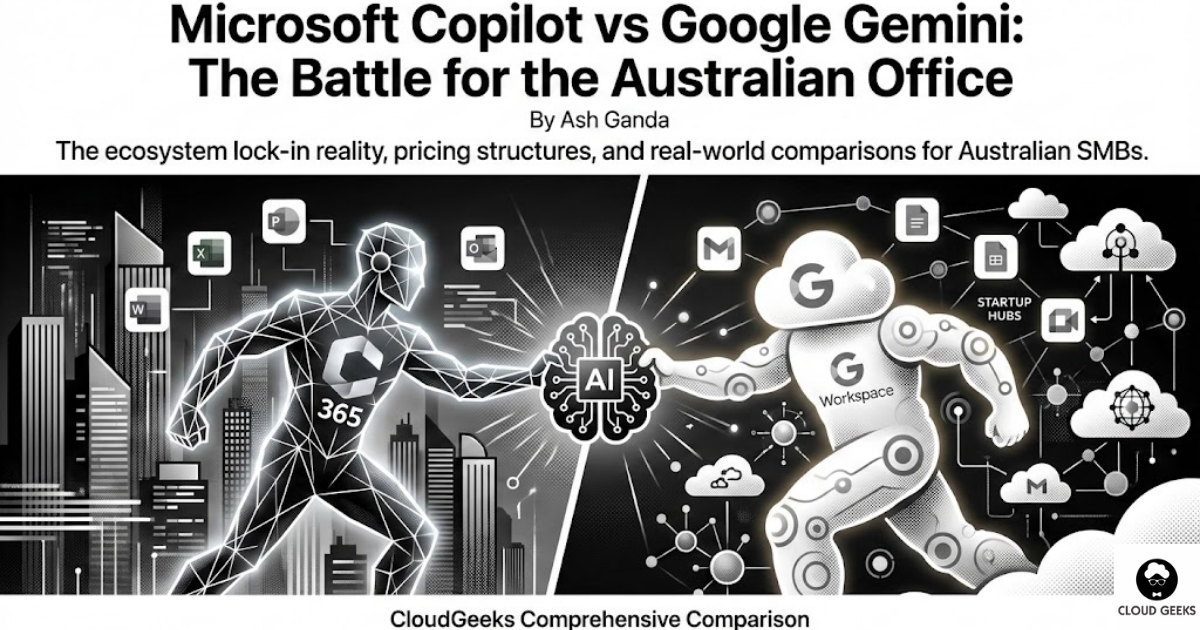
Microsoft 365 Dominance: Approximately 70% of Australian enterprises use Microsoft 365, with strong penetration in professional services, finance, and government-adjacent sectors.
Google Workspace Growth: Google has made significant inroads with startups, creative agencies, and education sectors, with roughly 25% market share among Australian SMBs.
The remaining 5%? They’re either using hybrid setups or legacy systems—and they face the most complex decision.
Microsoft 365 Copilot: The Enterprise Powerhouse
What It Actually Does
Microsoft Copilot integrates directly into Word, Excel, PowerPoint, Outlook, and Teams. It’s not a separate app—it lives inside the tools your team already uses daily.
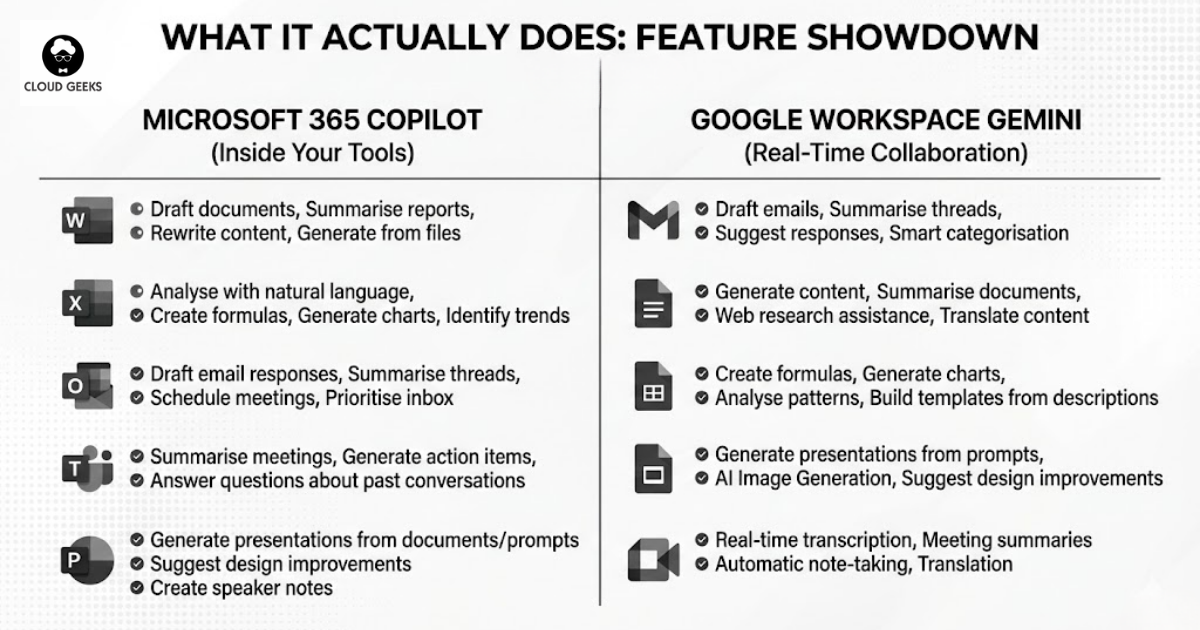
In Word: Draft documents from prompts, summarise lengthy reports, rewrite content for different audiences, and generate content based on other files in your Microsoft Graph.
In Excel: Analyse data using natural language (“What were our top 5 products by revenue last quarter?”), create formulas without knowing Excel syntax, generate charts, and identify trends.
In Outlook: Draft email responses, summarise long email threads, schedule meetings based on email context, and prioritise your inbox.
In Teams: Summarise meetings you missed, generate action items from recordings, and answer questions about past conversations.
In PowerPoint: Generate entire presentations from Word documents or prompts, suggest design improvements, and create speaker notes.
Australian Pricing Structure
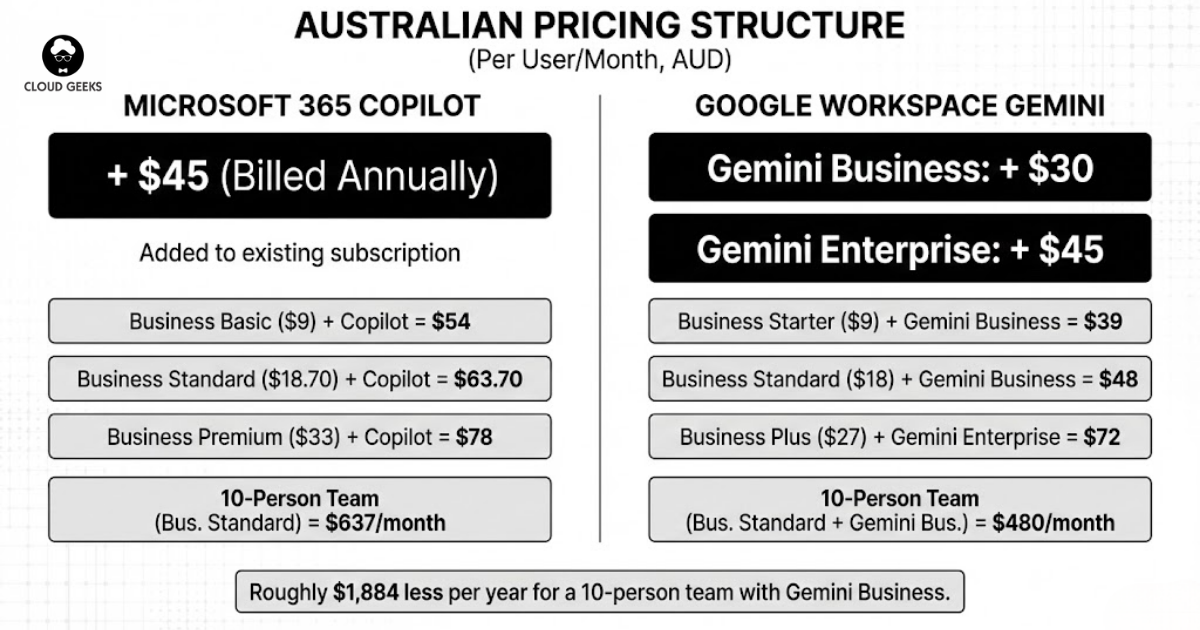
Microsoft 365 Copilot costs $45 AUD per user per month (billed annually), on top of your existing Microsoft 365 subscription. This means:
- Business Basic ($9/user/month) + Copilot = $54/user/month
- Business Standard ($18.70/user/month) + Copilot = $63.70/user/month
- Business Premium ($33/user/month) + Copilot = $78/user/month
For a 10-person team on Business Standard, you’re looking at $637/month or $7,644 annually for the full Copilot experience.
Real Australian Success Story: Capricorn Co-operative
Capricorn Society, a member-owned cooperative serving over 23,000 automotive businesses across Australia and New Zealand, implemented Microsoft Dynamics 365 with AI capabilities to transform their member support operations.
The results were striking:
- 40% reduction in average call handling time
- 25% improvement in first-call resolution rates
- Member satisfaction scores increased by 18 points
- Support staff could handle 30% more inquiries without burnout
For Australian SMBs, this demonstrates that Microsoft’s AI isn’t just for multinational corporations—member-based organisations with complex support needs can see immediate ROI.
Google Workspace Gemini: The Challenger’s Advantage
What It Actually Does
Google’s Gemini (formerly Duet AI) integrates across Gmail, Docs, Sheets, Slides, and Meet. Google’s approach emphasises its search heritage and real-time collaboration strengths.
In Gmail: Draft emails from prompts, summarise threads, suggest responses, and help manage inbox overload with smart categorisation.
In Docs: Generate content, summarise documents, help with research by pulling information from the web, and translate content for international markets.
In Sheets: Create formulas using natural language, generate charts, analyse data patterns, and build templates from descriptions.
In Slides: Generate presentations from prompts, create images using AI, and suggest design improvements.
In Meet: Real-time transcription, meeting summaries, automatic note-taking, and translation for international calls.
Australian Pricing Structure
Google Workspace Gemini pricing in Australia:
- Gemini Business (add-on): $30 AUD per user per month
- Gemini Enterprise (add-on): $45 AUD per user per month
Combined with base Workspace plans:
- Business Starter ($9/user/month) + Gemini Business = $39/user/month
- Business Standard ($18/user/month) + Gemini Business = $48/user/month
- Business Plus ($27/user/month) + Gemini Enterprise = $72/user/month
For that same 10-person team on Business Standard with Gemini Business, you’re looking at $480/month or $5,760 annually—roughly $1,884 less per year than the Microsoft equivalent.
Where Google Excels
Real-Time Collaboration: Google’s simultaneous editing has always been superior. With Gemini, multiple team members can work on a document while AI assists each person contextually.
Search Integration: Gemini can pull information from the web directly into your documents. Need to fact-check a claim or add current statistics? Gemini does this natively.
Image Generation: Google’s image generation in Slides and Docs is more advanced than Microsoft’s current offering, useful for marketing teams creating visual content.
Mobile Experience: Google’s mobile apps with Gemini integration are more polished, important for Australian businesses with field teams or remote workers.
Head-to-Head Comparison for Australian SMBs
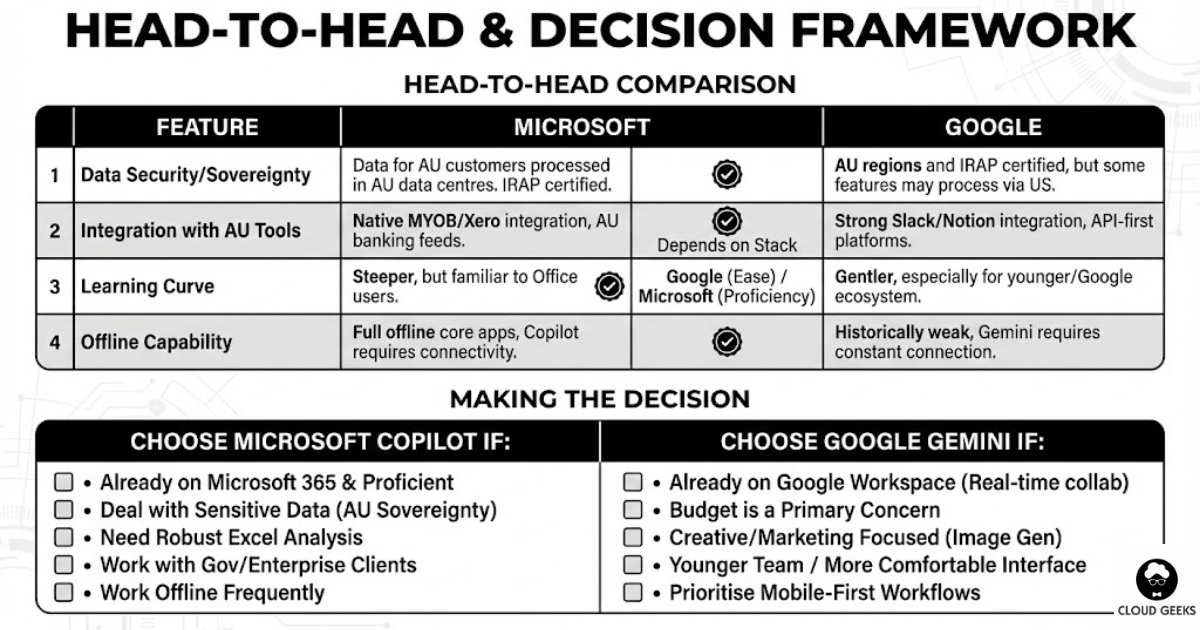
Data Security and Sovereignty
Microsoft: Data for Australian customers is processed in Microsoft’s Australian data centres (Sydney and Melbourne regions). Microsoft has achieved IRAP certification and meets Australian government security requirements.
Google: Google Cloud has Australian regions (Sydney, Melbourne) and has also achieved IRAP certification. However, some Gemini features may process data through US servers for model inference.
Winner: Microsoft, marginally, due to clearer data residency commitments for AI processing.
Integration with Australian Business Tools
Microsoft: Native integration with MYOB (via connectors), Xero (via third-party apps), and Australian banking feeds through Power Automate.
Google: Strong integration with Australian startups’ preferred tools—Slack, Notion, and various API-first platforms. Less native support for traditional Australian accounting software.
Winner: Depends on your existing stack. Microsoft for traditional businesses, Google for modern/startup environments.
Learning Curve
Microsoft: Steeper learning curve, but most Australian office workers already know Word and Excel. Copilot feels like a natural extension.
Google: Gentler learning curve, especially for younger employees or those already in the Google ecosystem. The interface is more intuitive.
Winner: Google for ease of adoption, Microsoft for teams already proficient in Office apps.
Offline Capability
Microsoft: Full offline functionality for core apps, with Copilot features requiring connectivity.
Google: Historically weak offline support, though improving. Gemini features require constant internet connection.
Winner: Microsoft, important for Australian businesses in regional areas with inconsistent connectivity.
Making the Decision: A Framework for Australian SMBs
Choose Microsoft Copilot If:
- You’re already on Microsoft 365 and your team is proficient in Office apps
- You deal with sensitive data requiring clear Australian data sovereignty
- You need robust Excel analysis—Copilot’s Excel capabilities are currently superior
- You work with government or enterprise clients who mandate Microsoft compatibility
- Your team works offline frequently (regional areas, travel, unreliable internet)
Choose Google Gemini If:
- You’re already on Google Workspace and value real-time collaboration
- Budget is a primary concern—Gemini offers better value at lower tiers
- You’re a creative or marketing-focused business needing image generation
- Your team is younger and more comfortable with Google’s interface
- You prioritise mobile-first workflows with field teams or remote workers
Consider a Hybrid Approach If:
Some Australian businesses are experimenting with hybrid setups—using Google Workspace for collaboration and communication, while maintaining Microsoft Office for complex documents and spreadsheets. This can work, but adds complexity and cost.
The Hidden Costs Nobody Talks About
Training Investment
Both platforms require training investment. Budget for:
- 2-4 hours per employee for basic Copilot/Gemini training
- Ongoing “prompt engineering” coaching to maximise ROI
- Change management to overcome resistance from employees suspicious of AI
For a 20-person team, expect to invest $2,000-5,000 in training during the first year.
Productivity Dip Before Gains
Every Australian business we’ve worked with experienced a 2-4 week “adjustment period” where productivity actually decreased as employees learned new workflows. Plan for this—don’t roll out during your busiest season.
The “AI Creep” Factor
Once employees see AI capabilities, they’ll want more. Budget for:
- Requests for additional AI tools
- Higher-tier subscriptions as needs grow
- Integration projects connecting AI to other business systems
Our Recommendation for Australian SMBs
After implementing both platforms across various Australian businesses, here’s our honest assessment:
For most established Australian SMBs: Microsoft 365 Copilot offers the safer choice. The deeper integration with traditional business workflows, clearer data sovereignty, and familiarity of Office apps makes adoption smoother.
For startups and modern businesses: Google Workspace Gemini delivers better value, especially at lower price points. The collaboration features and creative capabilities suit fast-moving teams.
The bottom line: Don’t choose based on hype. Choose based on where your team already lives digitally, what your budget realistically allows, and whether your data sovereignty requirements favour one platform over the other.
Next Steps
Ready to implement AI assistants for your Australian business? Contact CloudGeeks for a personalised assessment. We’ll analyse your current tech stack, team capabilities, and business requirements to recommend the right path forward.
Not ready for the full suite? Start with a pilot program—5-10 users for 3 months—to measure real ROI before committing your entire organisation.
The AI productivity race is here. The question isn’t whether to join—it’s which vehicle will get your business to the finish line faster.
Related Articles
- AI Tools for Australian SMBs: Practical Guide with Real Case Studies
- Meet JAX: How Xero’s AI Agent is Acting as a CFO for Small Businesses
- Beyond Design: How Australian SMBs Are Using Canva’s AI for Operations
- Data Sovereignty 101: Keeping Your AI Australian
- AI on a Budget: How Australian SMBs Can Harness Artificial Intelligence
Mobile apps thrive on solid cloud foundations. Awesome Apps can build a companion app that leverages your existing cloud setup.
Ashish Ganda is the founder of Ganda Tech Services, a Sydney-based technology consultancy helping Australian businesses grow through cloud, web, and mobile solutions.