
Meet JAX: How Xero AI Agent is Acting as a CFO for Small Businesses

For years, Australian small business owners have dreamed of having a CFO—someone to chase late invoices, reconcile accounts, and answer “how much am I actually making?” without scheduling a meeting with their accountant.
Xero’s answer is JAX: Just Ask Xero.
JAX isn’t just another chatbot. It’s an AI agent that actively manages your finances, taking actions on your behalf while you focus on running your business. Combined with Xero’s recent acquisition of Syft Analytics, the platform is transforming from accounting software into something closer to a virtual finance team.
At CloudGeeks, we’ve been helping Australian businesses optimise their Xero implementations for years. JAX represents a fundamental shift in what’s possible—and what you should expect from your accounting software.
What JAX Actually Does
Beyond Chatbot: An AI That Takes Action

Most AI assistants answer questions. JAX does that too, but it goes further by actually performing tasks:
Invoice Management
- “JAX, send a reminder to all invoices overdue by more than 14 days”
- “Draft an invoice for ABC Company for the website project”
- “What’s the total value of unpaid invoices right now?”
Bank Reconciliation
- “JAX, match these bank transactions to invoices”
- “Show me any transactions that need my attention”
- “Why didn’t this payment match automatically?”
Financial Questions
- “How much am I owed?”
- “What were my biggest expenses last month?”
- “Compare this quarter’s revenue to last quarter”
Reporting
- “Generate a profit and loss for the last 6 months”
- “Show me cash flow trends”
- “What’s my gross margin by product line?”
Natural Language, Real Results
The power of JAX is in its natural language understanding. You don’t need to know accounting terminology or navigate complex menus. Ask questions the way you’d ask a colleague:
- “Are we making money?” → Generates profitability analysis
- “Can we afford to hire someone?” → Shows cash flow projections
- “Who hasn’t paid us?” → Lists overdue invoices with amounts and days overdue
The Syft Analytics Acquisition: Why It Matters
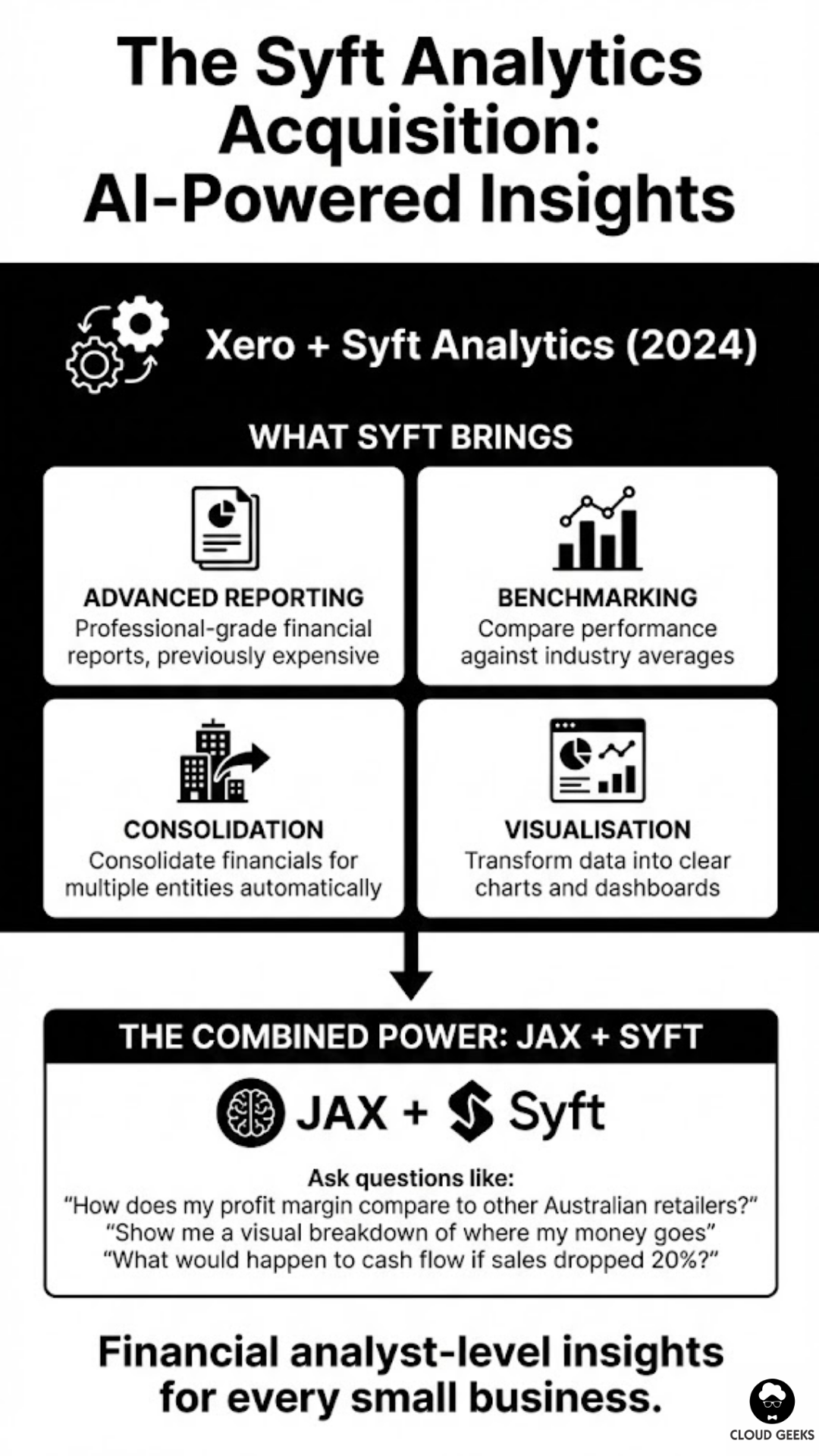
In 2024, Xero acquired Syft Analytics, a financial reporting and analytics platform. This wasn’t just about adding features—it was about making AI-powered financial insights accessible to every small business.
What Syft Brings
Advanced Reporting: Professional-grade financial reports that previously required expensive accounting software or consultants.
Benchmarking: Compare your business performance against industry averages. How does your gross margin stack up against similar Australian businesses?
Consolidation: For businesses with multiple entities, Syft can consolidate financials automatically.
Visualisation: Transform spreadsheet data into charts and dashboards that actually make sense.
The Combined Power
JAX + Syft means you can now ask questions like:
- “How does my profit margin compare to other Australian retailers?”
- “Show me a visual breakdown of where my money goes”
- “What would happen to cash flow if sales dropped 20%?”
These weren’t possible before without hiring a financial analyst.
Practical Use Cases for Australian SMBs
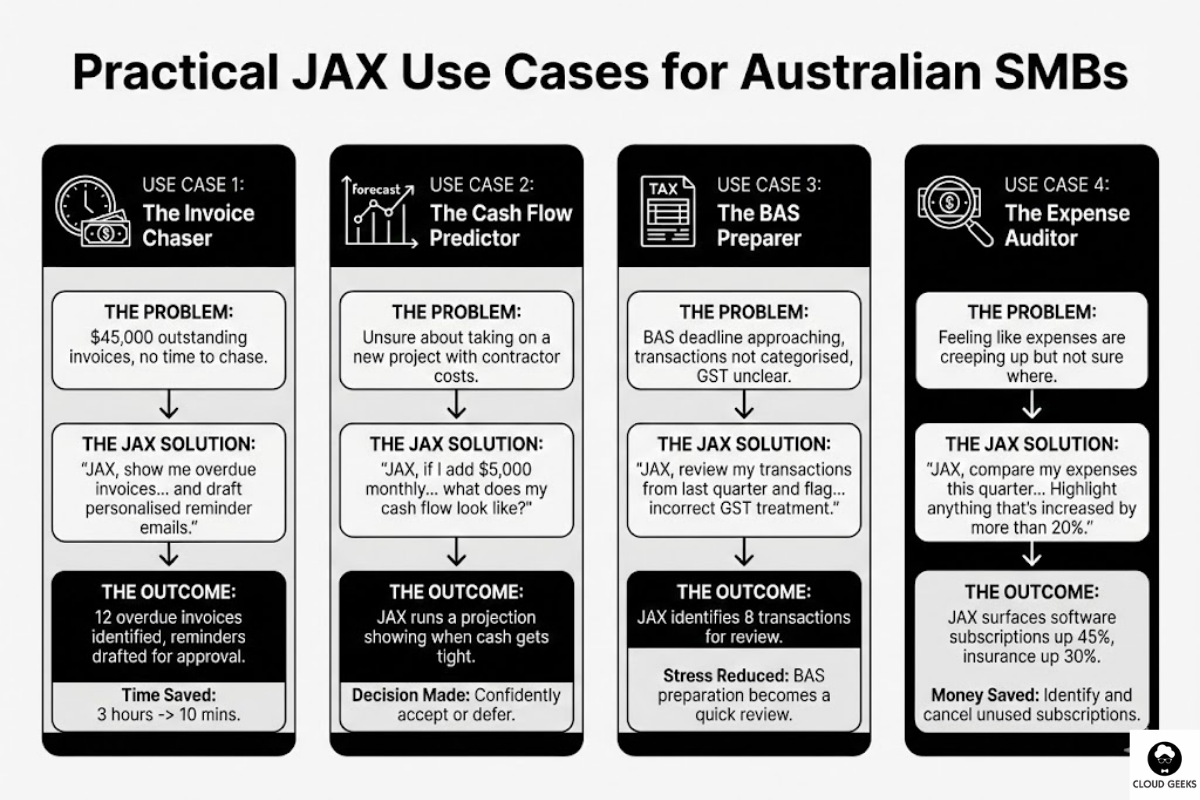
Use Case 1: The Invoice Chaser
The Problem: $45,000 in outstanding invoices, some 60+ days overdue. No time to chase them manually.
The JAX Solution:
"JAX, show me all invoices overdue by more than 30 days,
sorted by amount, and draft personalised reminder emails for each."
The Outcome: JAX identifies 12 overdue invoices, drafts customised reminders referencing the original invoice and relationship history, and queues them for your approval before sending.
Time Saved: 3 hours of manual work reduced to 10 minutes of review.
Use Case 2: The Cash Flow Predictor
The Problem: Unsure whether you can take on a new project that requires hiring a contractor.
The JAX Solution:
"JAX, if I add $5,000 in monthly contractor costs starting next month,
what does my cash flow look like for the next quarter?"
The Outcome: JAX runs a projection based on your historical revenue patterns, existing commitments, and the new cost, showing you exactly when (or if) cash gets tight.
Decision Made: Confidently accept or defer the project based on data, not gut feeling.
Use Case 3: The BAS Preparer
The Problem: BAS deadline approaching, transactions not categorised, GST unclear.
The JAX Solution:
"JAX, review my transactions from last quarter and flag any
that might have incorrect GST treatment."
The Outcome: JAX identifies 8 transactions that need review—a mix of incorrect categories and missing GST. You fix them in minutes instead of discovering errors after lodgement.
Stress Reduced: BAS preparation goes from dreaded task to quick review.
Use Case 4: The Expense Auditor
The Problem: Feeling like expenses are creeping up but not sure where.
The JAX Solution:
"JAX, compare my expenses this quarter to the same quarter last year.
Highlight anything that's increased by more than 20%."
The Outcome: JAX surfaces that software subscriptions are up 45%, insurance up 30%, and subcontractor costs up 25%. Each comes with specifics you can investigate.
Money Saved: Identify and cancel unused subscriptions, renegotiate insurance, review contractor arrangements.
Getting Started with JAX
Prerequisites
JAX is available to Xero subscribers on Growing and Established plans. If you’re on Starter, you’ll need to upgrade (approximately $52 to $75 AUD/month).
Enabling JAX
- Log into Xero
- Navigate to Business menu
- Look for Ask Xero or the JAX icon
- Accept the AI terms of service
- Start asking questions
Your First Week with JAX
Day 1: Ask basic questions
- “What’s my bank balance?”
- “How much am I owed?”
- “What bills are due this week?”
Day 2: Try reconciliation help
- “Show me unreconciled transactions”
- “Why didn’t this transaction match?”
- “Suggest categories for my uncategorised transactions”
Day 3: Explore reporting
- “Generate a profit and loss for last month”
- “What’s my revenue trend over the past year?”
- “Show me my top customers by revenue”
Day 4: Test action capabilities
- “Draft an invoice reminder for [customer name]”
- “Create a draft invoice for [description]”
- “Schedule a report to be emailed to me weekly”
Day 5: Go deeper
- “Compare this month to the same month last year”
- “What’s my average invoice payment time?”
- “Show me expenses by category as a percentage of revenue”
JAX Limitations (And Workarounds)
What JAX Can’t Do (Yet)
Tax Advice: JAX won’t tell you whether something is tax-deductible. That’s still your accountant’s job.
Complex Forecasting: While JAX can do basic projections, sophisticated scenario modelling requires additional tools.
Integration Actions: JAX can’t push data to other systems or trigger workflows in connected apps.
Audit-Grade Accuracy: Always verify JAX’s outputs for financial reporting. AI can make mistakes.
Workarounds
For Tax Questions: Use JAX to pull the data, then share with your accountant for advice.
For Complex Forecasting: Export JAX reports to tools like Fathom or LivePlan for sophisticated modelling.
For Integrations: Use Zapier to trigger workflows based on Xero events, complementing JAX.
Comparing JAX to Alternatives
JAX vs. MYOB’s AI Features
MYOB has introduced AI features but they’re less mature than JAX. MYOB excels at:
- Integration with Australian payroll specifics
- STP (Single Touch Payroll) handling
But falls short on:
- Natural language queries
- Proactive financial insights
- Action-taking capabilities
Verdict: If you’re already on MYOB, watch this space. If choosing fresh, Xero + JAX currently leads.
JAX vs. QuickBooks AI
QuickBooks (Intuit) has powerful AI but is US-focused. Australian quirks like GST, BAS, and superannuation aren’t as well handled.
Verdict: For Australian businesses, Xero + JAX understands local requirements better.
JAX vs. Standalone AI Accounting Tools
Tools like Vic.ai and Stampli offer AI accounting but are enterprise-focused and expensive.
Verdict: For SMBs, JAX provides 80% of the value at a fraction of the cost.
Maximising JAX ROI
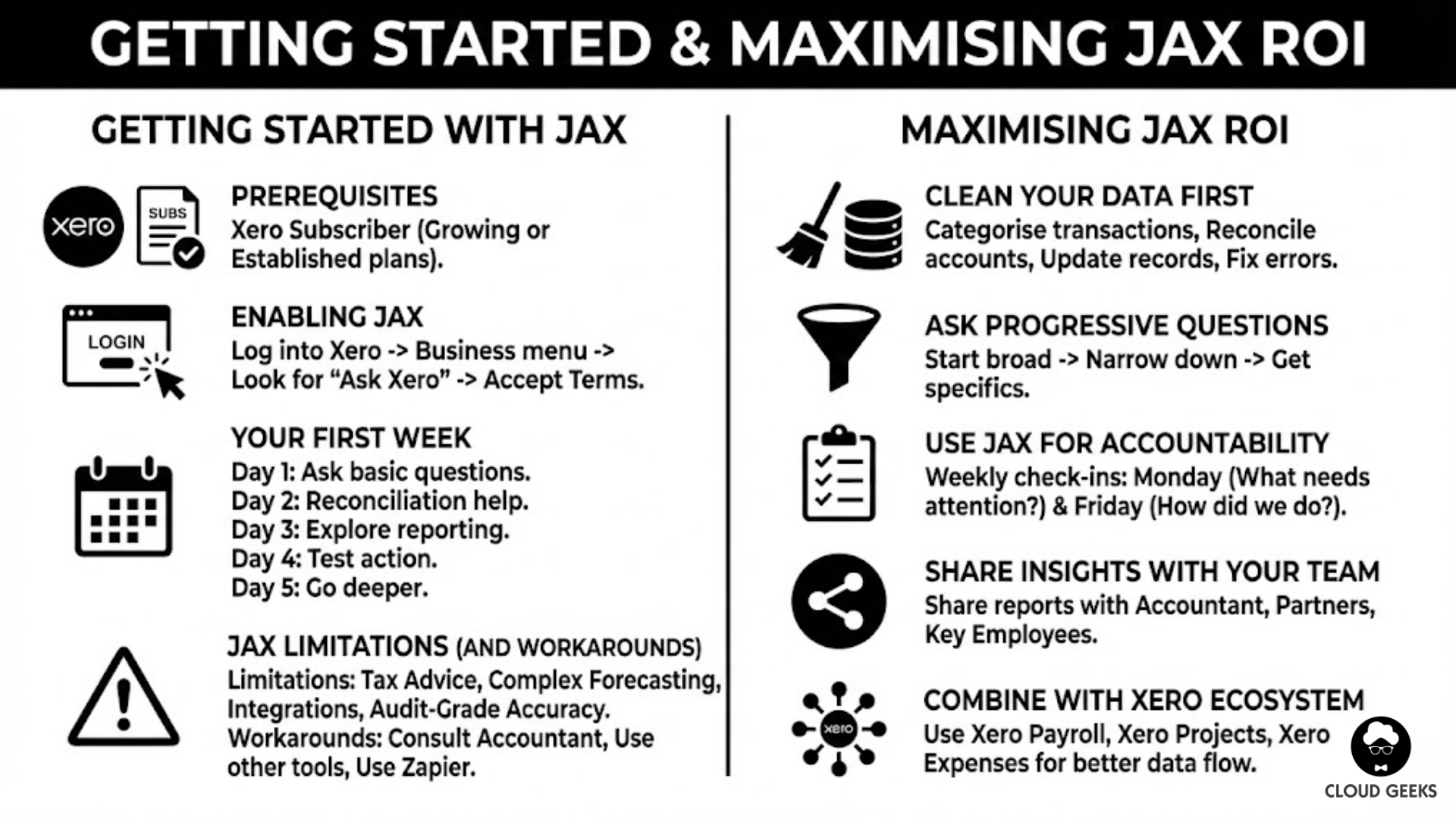
Tip 1: Clean Your Data First
JAX is only as good as your Xero data. Before relying heavily on JAX:
- Categorise all transactions correctly
- Reconcile bank accounts fully
- Update customer/supplier records
- Review and fix any old errors
Tip 2: Ask Progressive Questions
Start broad, then narrow:
- “How’s my cash flow?” (Overview)
- “What’s causing the dip in March?” (Drill down)
- “Show me all transactions from ABC Company in March” (Specifics)
Tip 3: Use JAX for Accountability
Set up weekly JAX check-ins:
- Monday: “What needs my attention this week?”
- Friday: “How did we do this week compared to last week?”
Tip 4: Share Insights with Your Team
JAX-generated reports can be shared with:
- Your accountant (for review and advice)
- Business partners (for transparency)
- Key employees (for alignment on financials)
Tip 5: Combine with Xero Ecosystem
JAX works better when Xero is well-connected:
- Xero Payroll: Payroll costs flow into reports automatically
- Xero Projects: Project profitability becomes askable
- Xero Expenses: Expense patterns are visible to JAX
The Future of AI Accounting
JAX represents the beginning, not the end, of AI in small business finance. Expect:
Predictive Cash Flow: AI that warns you about cash crunches weeks before they happen.
Automated Compliance: AI that handles BAS, STP, and payroll tax automatically.
Strategic Insights: AI that identifies business opportunities, not just reports historical data.
Cross-Platform Intelligence: AI that connects your accounting, CRM, and operations data for unified insights.
Getting Help
JAX handles a lot, but Australian businesses still benefit from:
Accountants: For tax strategy, compliance assurance, and complex advice Bookkeepers: For transaction coding, data cleanup, and regular maintenance Technology Partners: For integrations, customisation, and workflow optimisation
CloudGeeks helps Australian businesses implement and optimise Xero + JAX alongside broader technology strategies. Contact us to discuss how AI accounting fits into your business transformation.
The Bottom Line
For Australian SMBs already on Xero, JAX is essentially a free upgrade that adds CFO-like capabilities. For businesses on other platforms, it’s a compelling reason to consider switching.
The days of dreading your finances are ending. With JAX, you can ask the questions that matter, get answers in seconds, and actually understand your business’s financial health.
Your virtual CFO is ready. Are you?
Related Articles
- AI Tools for Australian SMBs: Practical Guide with Real Case Studies
- AI on a Budget: How Australian SMBs Can Harness Artificial Intelligence
- Microsoft Copilot vs Google Gemini: The Battle for the Australian Office
- Beyond Design: How Australian SMBs Are Using Canva’s AI for Operations
- Cloud Migration ROI: Calculating Real Costs for Australian SMBs
If your team needs on-the-go access to cloud-managed systems, Awesome Apps builds practical mobile solutions for Australian businesses.
Cloud Geeks operates under the Ganda Tech Services umbrella, delivering end-to-end technology solutions for Australian businesses.