
Cloud Phone Systems for Australian Business: VoIP Guide 2026
Introduction
The traditional office phone system—a physical box in the server room with handsets on every desk—is increasingly obsolete for Australian SMBs. Cloud phone systems (VoIP) offer better features, lower costs, and the flexibility modern businesses need.
But the market is crowded with options, from Microsoft Teams Phone to dedicated VoIP providers, from basic calling to full unified communications. Choosing the right solution requires understanding your actual needs and the practical realities of each option.
At CloudGeeks, we’ve helped dozens of Australian businesses transition to cloud phone systems. Here’s what you need to know to make the right choice for your business.
Why Cloud Phone Systems Make Sense for Australian SMBs
The Business Case
Cost Savings
Traditional PBX systems involve:
- Hardware purchase: A$5,000-20,000
- Installation: A$2,000-5,000
- Maintenance contracts: A$500-2,000/year
- Line rental: A$40-80/line/month
- Call charges: Variable
Cloud phone systems typically cost:
- A$15-40/user/month (all-inclusive)
- Minimal upfront hardware investment
- No maintenance contracts
- Calls often included (local, national, mobile)
For a 15-person business, annual savings of A$5,000-15,000 are common.
Flexibility
Cloud phone systems provide:
- Work from anywhere on any device
- Easy scaling up or down
- No hardware to maintain or replace
- Features that would cost thousands on traditional systems
- Integration with business applications
Features
Standard cloud phone system features:
- Auto-attendant (IVR)
- Call queues
- Voicemail to email
- Call recording
- Mobile apps
- Video calling
- CRM integration
- Analytics and reporting
The NBN Reality
Australia’s NBN network is mature enough for reliable business VoIP:
NBN Business Plans Suitable for VoIP
- NBN 50: Adequate for most SMBs (up to 20 concurrent calls)
- NBN 100: Better for call-heavy businesses
- NBN 250/1000: For contact centres or very high volume
Quality Considerations
- Business-grade NBN includes service level agreements
- Fibre connections (FTTP) provide best quality
- Fixed Wireless may have variable performance
- Satellite is generally unsuitable for business VoIP
If your office has reliable NBN, cloud phone systems work well. If connectivity is unreliable, address that first or consider hybrid solutions.
Cloud Phone System Options for Australian SMBs
Option 1: Microsoft Teams Phone
For businesses already using Microsoft 365:
What It Is
- Phone system built into Microsoft Teams
- Replace or supplement traditional phones
- Calling capability added to existing Teams app
Pricing (April 2026)
Microsoft Teams Phone Standard
- A$11/user/month
- Requires existing Microsoft 365 subscription
- Includes domestic calling plan (separate pricing)
- Or bring your own carrier (Direct Routing/Operator Connect)
Domestic Calling Plan
- A$16/user/month (1,200 minutes domestic)
- Or A$33/user/month (3,000 minutes + international)
Total for Teams Phone with Domestic Calling
- A$27-44/user/month on top of Microsoft 365
Pros
- Single app for chat, video, and phone
- Deep Microsoft 365 integration
- Familiar interface for Teams users
- Good mobile experience
- Enterprise-grade reliability
Cons
- Requires Microsoft 365 subscription
- Additional cost beyond base Microsoft 365
- Complex for businesses not already on Teams
- Calling plans can be expensive for high-volume users
Best For
- Businesses already heavily invested in Microsoft 365
- Teams-centric collaboration
- Businesses wanting unified communications platform
Option 2: Dedicated VoIP Providers
Australian-focused VoIP providers with full-featured systems:
8x8
Features
- Complete cloud phone system
- Video conferencing included
- Contact centre capabilities
- CRM integrations
- Australian data hosting
Pricing
- X2: ~A$32/user/month (voice, video, team messaging)
- X4: ~A$52/user/month (plus analytics, supervisor features)
Pros
- Strong feature set
- Good Australian support
- Reliable platform
- Includes video conferencing
Cons
- Interface can be complex
- Higher price point
- Contracts typically annual
RingCentral
Features
- Unified communications platform
- Strong integrations
- Mobile-first design
- Team messaging included
Pricing
- Core: ~A$30/user/month
- Advanced: ~A$35/user/month
- Ultra: ~A$55/user/month
Pros
- Feature-rich
- Good mobile apps
- Wide integration ecosystem
- Reliable platform
Cons
- Can be complex to configure
- Premium pricing
- Some features require higher tiers
Vonage Business
Features
- Flexible VoIP platform
- Good API capabilities
- CRM integrations
- Mobile apps
Pricing
- Mobile: ~A$20/user/month
- Premium: ~A$30/user/month
- Advanced: ~A$40/user/month
Pros
- Competitive pricing
- Flexible plans
- Good for mobile workers
- Strong APIs
Cons
- Video features limited in lower tiers
- Interface less polished than competitors
Option 3: Australian-Focused Providers
Providers with strong Australian presence and support:
Telstra Business Phone
Features
- Cloud-based phone system
- Telstra network integration
- Australian support
- Business-grade reliability
Pricing
- From ~A$25/user/month
- Bundling options with Telstra internet
Pros
- Single vendor for connectivity and phones
- Australian support and presence
- Network integration benefits
- Familiar brand for traditional businesses
Cons
- Higher pricing than pure VoIP providers
- Less feature innovation
- Contract requirements
TPG VoIP Business
Features
- Basic to full-featured options
- Competitive pricing
- Australian network
Pricing
- From ~A$15/user/month for basic
- Full-featured systems higher
Pros
- Competitive pricing
- Good for basic needs
- Bundle with TPG internet
Cons
- Support can be variable
- Features limited compared to specialists
- Interface basic
Commander
Features
- Australian business focus
- Cloud phone system
- Mobile integration
Pricing
- From ~A$20/user/month
Pros
- Australian business specialist
- Good support reputation
- Straightforward pricing
Cons
- Smaller scale than major providers
- Feature set adequate but not leading
Option 4: Google Voice for Workspace
For Google Workspace businesses:
What It Is
- Phone system integrated with Google Workspace
- Calling from Google apps
- Simple deployment
Pricing
- Starter: A$15/user/month (domestic only)
- Standard: A$24/user/month (plus features)
- Premier: A$36/user/month (plus international, advanced features)
Pros
- Simple integration with Workspace
- Easy setup
- Good mobile experience
- Competitive pricing
Cons
- Features less comprehensive than dedicated providers
- Less suitable for complex phone requirements
- Limited Australian presence
Best For
- Google Workspace businesses with simple phone needs
- Mobile-first teams
- Businesses wanting simplicity over features
Features to Evaluate
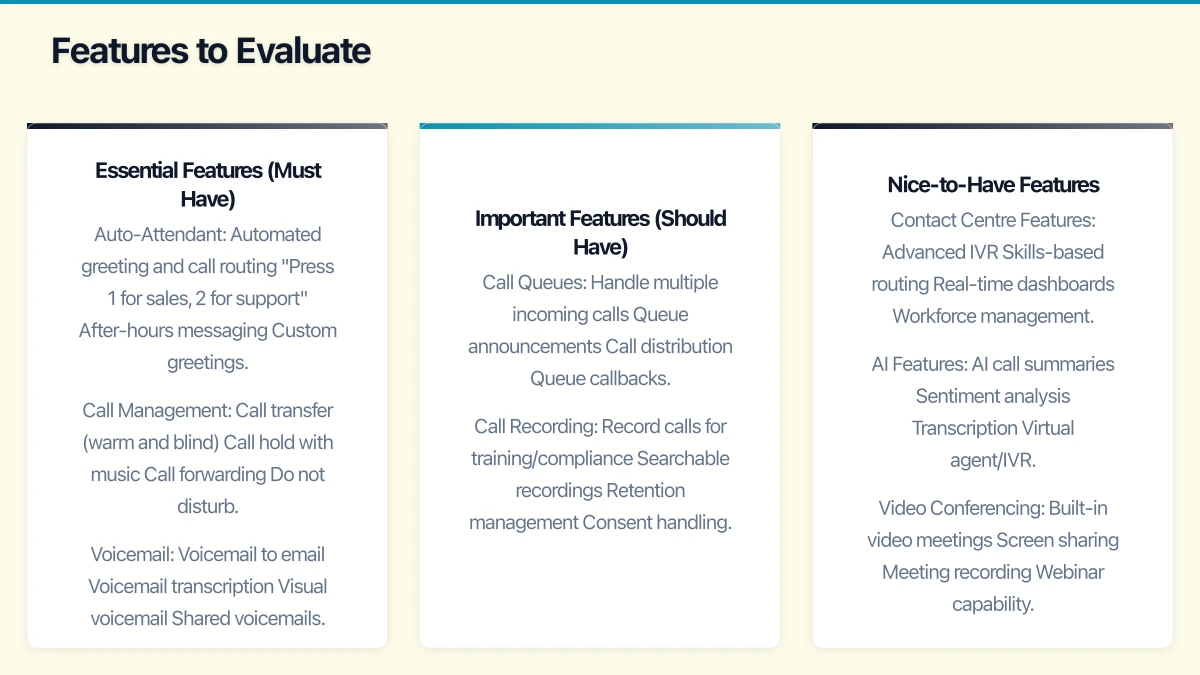
Essential Features (Must Have)
Auto-Attendant
- Automated greeting and call routing
- “Press 1 for sales, 2 for support”
- After-hours messaging
- Custom greetings
Call Management
- Call transfer (warm and blind)
- Call hold with music
- Call forwarding
- Do not disturb
Voicemail
- Voicemail to email
- Voicemail transcription
- Visual voicemail
- Shared voicemails
Mobile App
- Make/receive calls on mobile
- Use business number from personal phone
- Access when out of office
- Push notifications
Important Features (Should Have)
Call Queues
- Handle multiple incoming calls
- Queue announcements
- Call distribution
- Queue callbacks
Call Recording
- Record calls for training/compliance
- Searchable recordings
- Retention management
- Consent handling
Analytics
- Call volume reporting
- Wait time tracking
- Agent performance
- Peak time identification
Integration
- CRM integration (Salesforce, HubSpot)
- Help desk integration (Zendesk, Freshdesk)
- Calendar integration
- Email integration
Nice-to-Have Features
Contact Centre Features
- Advanced IVR
- Skills-based routing
- Real-time dashboards
- Workforce management
AI Features
- AI call summaries
- Sentiment analysis
- Transcription
- Virtual agent/IVR
Video Conferencing
- Built-in video meetings
- Screen sharing
- Meeting recording
- Webinar capability
Implementation Considerations
Number Porting
Moving existing phone numbers to a new system:
The Process
- Identify numbers to port
- Gather required documentation (current bills, authority)
- Submit porting request through new provider
- Wait for porting completion (typically 5-10 business days)
- Verify numbers working on new system
Considerations
- Don’t cancel old service until port complete
- Plan for brief overlap period
- Test thoroughly after port
- Have backup plan during transition
Hardware Decisions
Option 1: IP Desk Phones
Pros
- Familiar form factor
- Dedicated device for calls
- Good audio quality
- Status lights, speed dial
Cons
- Additional cost (A$100-400 per phone)
- More equipment to manage
- May become unnecessary for mobile workers
When to Use
- Reception desks
- Users who prefer traditional phones
- High call volume positions
Option 2: Softphones Only
Pros
- No additional hardware
- Use existing computers and mobiles
- Maximum flexibility
- Lower cost
Cons
- Audio quality depends on headset
- Computer must be on for calls
- May feel less “professional”
When to Use
- Mobile/remote workers
- Low to moderate call volume
- Cost-conscious businesses
Option 3: Hybrid Approach
- Desk phones for reception and high-volume users
- Softphones for most staff
- Mobile apps for remote workers
- Most common approach for Australian SMBs
Network Preparation
Internet Quality
- Test current internet speed and reliability
- Each concurrent call needs ~100kbps up and down
- Consider dedicated internet for voice if on shared connection
- Business-grade NBN recommended
Network Configuration
- Quality of Service (QoS) prioritises voice traffic
- Separate VLAN for voice (recommended)
- Ensure firewall allows VoIP traffic
- Test from actual user locations
Power Considerations
- VoIP phones need power (PoE or adapters)
- Consider UPS for critical phones
- Mobile app provides backup during power outages
Cost Comparison: 15-Person Business
Scenario: Professional Services Firm
Requirements
- 15 users needing phone access
- Auto-attendant
- Basic call queues (2)
- Call recording
- CRM integration
- Mobile access for all
Microsoft Teams Phone
- Microsoft 365 Business Standard: A$297/month (prerequisite)
- Teams Phone + Domestic Calling: A$27 x 15 = A$405/month
- Total: A$702/month (A$8,424/year)
- Note: Includes full Microsoft 365 suite
8x8 X2
- 15 users x A$32 = A$480/month
- Total: A$480/month (A$5,760/year)
- Includes video and team messaging
RingCentral Advanced
- 15 users x A$35 = A$525/month
- Total: A$525/month (A$6,300/year)
- Includes comprehensive features
Google Voice Standard
- Google Workspace Business Standard: A$280.50/month (prerequisite)
- Google Voice: A$24 x 15 = A$360/month
- Total: A$640.50/month (A$7,686/year)
- Includes full Workspace suite
Additional Costs to Consider
One-Time Costs
- IP desk phones (if needed): A$150-300 each
- Headsets: A$50-150 each
- Professional installation: A$500-2,000
- Number porting: Often free but verify
Ongoing Costs
- International calling (if not included)
- Additional features/add-ons
- Support beyond included
- Toll-free number hosting
Making the Decision
Decision Framework
Choose Microsoft Teams Phone If
- You’re already using Microsoft 365 extensively
- Teams is your primary collaboration tool
- You want unified communications in one app
- You’re willing to pay premium for integration
Choose a Dedicated VoIP Provider If
- Phone is a critical business function
- You need advanced call centre features
- You want best-in-class phone features
- You’re not heavily invested in Microsoft/Google
Choose Google Voice If
- You’re using Google Workspace
- Phone needs are relatively simple
- You value simplicity over features
- Price is a significant factor
Choose an Australian Provider If
- Local support is critical
- You want single vendor for connectivity and phones
- You prefer dealing with Australian companies
- You have existing relationships to leverage
Questions to Ask Providers
About the Platform
- Where is data stored? (Important for compliance)
- What’s the guaranteed uptime?
- How do updates and maintenance work?
- What’s the roadmap for new features?
About Pricing
- What’s included vs extra?
- Are there minimum contract terms?
- What happens if we need to add/remove users?
- Are there hidden fees?
About Implementation
- How long does deployment take?
- What support is provided during setup?
- How does number porting work?
- What training is included?
About Support
- What are support hours? (AEST important)
- What support channels are available?
- What’s the typical response time?
- Is support included or extra?
Implementation Roadmap
Phase 1: Planning (2-3 Weeks)
- Audit current phone usage and needs
- Document required features
- Identify numbers to port
- Evaluate 2-3 providers
- Get detailed quotes
- Select provider
Phase 2: Setup (2-4 Weeks)
- Configure phone system
- Set up auto-attendant and call flows
- Create user accounts
- Order any hardware needed
- Initiate number porting
- Configure integrations
Phase 3: Testing (1-2 Weeks)
- Test all features
- Verify number porting complete
- Train key users
- Document procedures
- Create user guides
- Prepare for launch
Phase 4: Rollout (1 Week)
- Deploy to all users
- Provide training
- Monitor for issues
- Gather feedback
- Fine-tune configuration
- Decommission old system
Conclusion
Cloud phone systems offer Australian SMBs significant advantages over traditional telephony: lower costs, better features, and the flexibility modern businesses need. The choice between Microsoft Teams Phone, dedicated VoIP providers, or Australian telco solutions depends on your existing technology investments, specific requirements, and support preferences.
For most Australian SMBs already on Microsoft 365, Teams Phone provides good value and excellent integration. Businesses with more complex phone requirements or those not invested in Microsoft may find dedicated providers like 8x8 or RingCentral better suited to their needs.
Whatever you choose, cloud phone systems are mature, reliable, and ready for business use. The transition from traditional phone systems is usually straightforward and the benefits are immediate.
Need help evaluating cloud phone options for your Australian business? CloudGeeks can assess your requirements and recommend the right solution. Contact us for an obligation-free discussion.
Related Articles
- Microsoft Teams Optimization for Australian SMBs
- Google Workspace Setup Guide for Australian Small Business
- Remote Work Security Essentials
- Business Continuity Planning Guide
For insights on building a technology roadmap that ties cloud, web, and mobile together, visit Ash Ganda’s blog.
This article is brought to you by Ganda Tech Services — Sydney’s complete digital solutions provider covering cloud, web, and mobile.