
Cloud Migration Checklist for Australian SMBs: 2026 Guide
Introduction
Cloud migration is no longer about “if” but “how well.” Most Australian SMBs have already moved some workloads to the cloud, but many are still running hybrid environments with on-premises servers, legacy applications, and a mix of cloud services that don’t quite work together.
Whether you’re completing a migration started years ago, moving remaining on-premises systems, or optimising an already-cloudy environment, a structured approach ensures you capture the benefits while avoiding common pitfalls.
This guide provides a practical, comprehensive checklist for cloud migration tailored to Australian SMB realities—including data sovereignty, compliance considerations, and budget constraints.
Phase 1: Assessment and Planning
Before moving anything, understand what you have and where it should go.
1.1 Inventory Your Current Environment
Hardware Inventory
| Item | Details to Capture |
|---|---|
| Servers | Model, age, specs, role, applications |
| Network equipment | Routers, switches, firewalls, Wi-Fi |
| Storage | NAS, SAN, capacity, utilisation |
| Workstations | Number, specs, age |
| Other | Printers, phones, specialist equipment |
Software Inventory
| Item | Details to Capture |
|---|---|
| Operating systems | Versions, license types |
| Business applications | Names, versions, vendors, dependencies |
| Databases | Types, sizes, applications using them |
| Custom software | Purpose, documentation, maintainer |
| Integrations | What talks to what |
Data Inventory
| Data Type | Location | Size | Sensitivity | Owner |
|---|---|---|---|---|
| Files/documents | File server | X TB | Business confidential | Operations |
| Customer records | CRM/database | X GB | Personal information | Sales |
| Financial data | Accounting system | X GB | Highly sensitive | Finance |
| Exchange/hosted | X GB | Mixed | All staff | |
| Backups | NAS/tape | X TB | Per source | IT |
1.2 Assess Application Suitability
For each application, determine cloud approach:
SaaS Replacement
- Can this be replaced with a cloud-native SaaS application?
- Is there a better SaaS alternative available now?
- Example: On-premises accounting → Xero
Lift and Shift (IaaS)
- Move application as-is to cloud virtual machines
- Minimal changes, quick migration
- Example: Custom database application → Azure VM
Refactor (PaaS)
- Modify application to use cloud-native services
- Better long-term but requires development
- Example: .NET application → Azure App Service + Azure SQL
Retire
- Is this application still needed?
- Can its function be absorbed elsewhere?
- Example: Legacy reporting tool rarely used
Retain
- Must stay on-premises (equipment integration, latency, compliance)
- Example: Manufacturing control systems
1.3 Determine Cloud Platform
Microsoft Azure Best For
- Microsoft-centric environments (M365, Windows Server, SQL)
- Businesses already on Microsoft 365
- Hybrid scenarios with on-premises integration
- Australian government and regulated industries
AWS Best For
- Development and tech-focused businesses
- Wide range of services needed
- Cost optimisation priority
- Global operations
Google Cloud Best For
- Google Workspace users
- Data analytics focus
- Kubernetes/container workloads
- Machine learning projects
Multi-Cloud Considerations
- Adds complexity and cost
- May be necessary for specific services
- Most SMBs should stick to one primary platform
- Use SaaS services across any platform as needed
1.4 Australian-Specific Considerations
Data Sovereignty
- Which data must stay in Australia?
- Personal information under Privacy Act—Australian preferred
- Government data—Australian often required
- All major cloud providers have Australian regions
Platform Region Selection
| Provider | Australian Regions |
|---|---|
| Azure | Australia East (Sydney), Australia Southeast (Melbourne) |
| AWS | ap-southeast-2 (Sydney), ap-southeast-4 (Melbourne) |
| Google Cloud | australia-southeast1 (Sydney), australia-southeast2 (Melbourne) |
Compliance Requirements
- Privacy Act 1988 compliance
- Industry-specific requirements (APRA, healthcare)
- Essential Eight alignment
- Data breach notification capabilities
1.5 Define Success Criteria
Technical Success
- All applications functional in cloud
- Performance meets or exceeds current
- Security controls implemented
- Backup and recovery verified
Business Success
- Minimal disruption during migration
- Staff can work effectively
- Costs within budget
- Improved capabilities realised
Timeline
- Realistic timeline with buffers
- Avoid migration during busy periods
- EOFY, Christmas, major projects
Phase 2: Design and Preparation
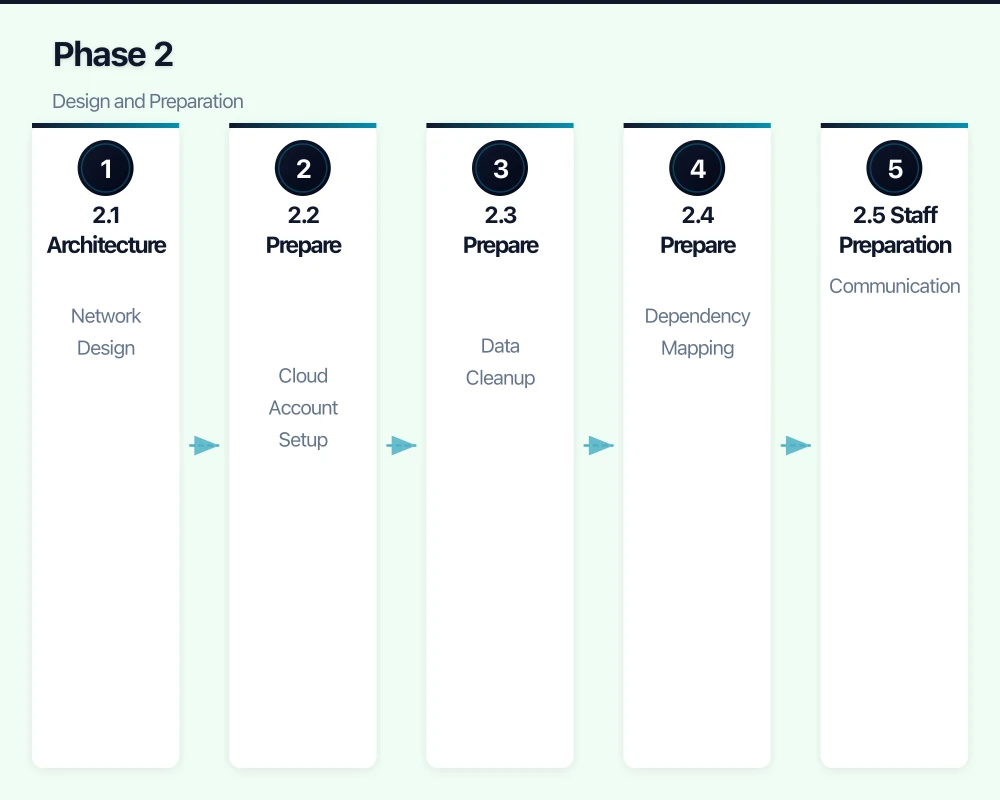
2.1 Architecture Design
Network Design
- Virtual network structure
- Connectivity to on-premises (if hybrid)
- Internet connectivity and security
- DNS planning
Identity and Access
- Azure AD/Entra ID as identity provider
- Synchronisation from on-premises AD (if applicable)
- Multi-factor authentication
- Role-based access control
Security Architecture
- Network security groups/firewalls
- Endpoint protection
- Logging and monitoring
- Encryption (in transit and at rest)
Backup and Recovery
- Backup strategy for cloud resources
- Recovery time objectives
- Testing procedures
- Offsite/cross-region considerations
2.2 Prepare the Target Environment
Cloud Account Setup
- Create cloud subscription/account
- Configure billing and budgets
- Set up cost alerts
- Configure administrative access
- Enable audit logging
Network Setup
- Create virtual networks
- Configure subnets
- Set up connectivity (VPN/ExpressRoute if needed)
- Configure DNS
- Implement network security
Identity Setup
- Configure Azure AD/identity provider
- Set up directory synchronisation
- Enable MFA
- Create administrative accounts
- Configure conditional access
Security Setup
- Enable security services (Defender, Security Centre)
- Configure logging
- Set up alerting
- Implement encryption
- Configure backup services
2.3 Prepare Data for Migration
Data Cleanup
- Remove unnecessary files (ROT: Redundant, Obsolete, Trivial)
- Archive old data that doesn’t need to migrate
- Fix known data quality issues
- Document data ownership
Data Classification
- Identify sensitive data
- Apply appropriate classifications
- Plan security controls per classification
Migration Method Selection
| Data Volume | Connection Speed | Best Method |
|---|---|---|
| < 100 GB | Any | Direct upload |
| 100 GB - 1 TB | 100+ Mbps | Direct upload (may take time) |
| 1 TB - 10 TB | 100+ Mbps | Direct upload or data box |
| > 10 TB | Any | Data box or physical shipping |
2.4 Prepare Applications
Dependency Mapping
- Document all application dependencies
- Identify migration order (foundations first)
- Plan for temporary connectivity during transition
Testing Preparation
- Define test cases for each application
- Identify testers (application owners)
- Prepare test data
- Schedule testing windows
Rollback Planning
- Define rollback triggers
- Document rollback procedures
- Ensure old systems can be restored
- Keep old systems available during transition
2.5 Staff Preparation
Communication
- Announce migration timeline
- Explain what will change
- Set expectations for temporary disruption
- Provide support channels
Training
- Identify new procedures staff need
- Prepare training materials
- Schedule training sessions
- Create quick reference guides
Phase 3: Migration Execution
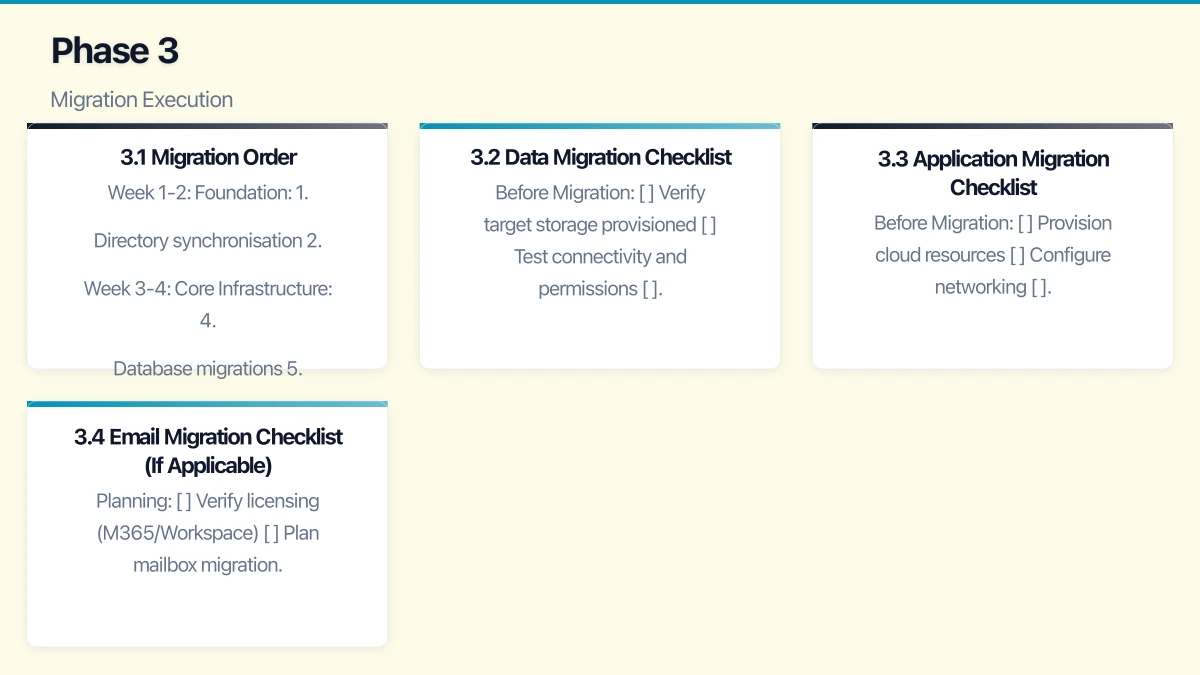
3.1 Migration Order
Typical order (adjust for your dependencies):
Week 1-2: Foundation
- Directory synchronisation
- Email migration (if part of project)
- File storage migration begins
Week 3-4: Core Infrastructure 4. Database migrations 5. Application server migrations 6. Integration testing
Week 5-6: Applications 7. Business application migrations 8. User acceptance testing 9. Performance tuning
Week 7-8: Cutover and Cleanup 10. Final cutover 11. Decommission old systems 12. Documentation and handover
3.2 Data Migration Checklist
Before Migration
- Verify target storage provisioned
- Test connectivity and permissions
- Estimate migration duration
- Schedule migration window
- Notify affected users
During Migration
- Start data copy
- Monitor progress
- Verify data integrity (checksums)
- Handle errors as they occur
- Update users on progress
After Migration
- Verify all data transferred
- Test access from cloud
- Update application connections
- Perform validation testing
- Confirm backup working
3.3 Application Migration Checklist
Before Migration
- Provision cloud resources
- Configure networking
- Install operating system/platforms
- Test basic connectivity
- Document current configuration
During Migration
- Install application
- Migrate application data
- Configure application settings
- Integrate with other systems
- Perform initial testing
After Migration
- Complete functional testing
- Performance testing
- User acceptance testing
- Update DNS/access
- Monitor closely
3.4 Email Migration Checklist (If Applicable)
Planning
- Verify licensing (M365/Workspace)
- Plan mailbox migration batches
- Communicate timeline to users
- Prepare for coexistence period
Execution
- Configure target environment
- Migrate mailboxes in batches
- Verify each batch
- Cut over MX records
- Monitor for delivery issues
Post-Migration
- Verify all mailboxes migrated
- Test sending and receiving
- Configure mobile devices
- Decommission old email system
Phase 4: Testing and Validation
4.1 Functional Testing
For Each Application
- Can users log in?
- Do core functions work?
- Do integrations work?
- Do reports/outputs work?
- Are there any errors?
For Infrastructure
- Network connectivity verified
- Name resolution working
- Security controls functioning
- Monitoring capturing data
- Alerts triggering correctly
4.2 Performance Testing
Metrics to Verify
- Application response times
- File access speeds
- Database query performance
- Network latency
- Backup completion times
Acceptable Performance
- Equal to or better than pre-migration
- Within defined acceptable ranges
- User experience acceptable
- No bottlenecks identified
4.3 Security Testing
Verify Controls
- Authentication working correctly
- MFA enforced where required
- Access controls restricting appropriately
- Encryption in place
- Logging capturing events
Security Validation
- Vulnerability scan of cloud resources
- Review security configurations
- Test backup and recovery
- Verify incident response capability
4.4 User Acceptance Testing
Involve Business Users
- Application owners test their applications
- Finance tests financial systems
- Operations tests operational systems
- Representative sample for general applications
Sign-Off Process
- Document test results
- Obtain written acceptance
- Note any issues and remediation plans
- Don’t proceed without business agreement
Phase 5: Cutover
5.1 Final Cutover Checklist
Pre-Cutover (T-1 Week)
- All testing complete and signed off
- Cutover plan documented and reviewed
- Communication sent to all users
- Support team briefed and ready
- Rollback plan verified
Cutover Day
- Final data synchronisation
- Update DNS records
- Verify access to new systems
- Monitor for issues
- Provide heightened support
Post-Cutover (T+1 Week)
- Monitor performance and issues
- Address problems quickly
- Gather user feedback
- Document lessons learned
- Begin decommissioning old systems
5.2 Communication Plan
Before Cutover
- 2 weeks out: Detailed timeline and what to expect
- 1 week out: Reminder with specific instructions
- 1 day out: Final reminder
During Cutover
- Status updates as milestones completed
- Immediate notification of any issues
- Clear escalation path for problems
After Cutover
- Confirmation of completion
- Where to get help
- Feedback request
5.3 Support Plan
Hypercare Period (First 2 Weeks)
- Extended support availability
- Quick response to issues
- Daily check-ins with key users
- Rapid issue resolution
Transition to Normal Support
- Gradual reduction of heightened support
- Documentation of common issues
- Training updates as needed
- Normal support channels resume
Phase 6: Optimisation and Operations
6.1 Cost Optimisation
Immediate (First Month)
- Review actual vs estimated costs
- Right-size over-provisioned resources
- Implement auto-scaling where appropriate
- Configure cost alerts
Ongoing (Monthly)
- Review cost reports
- Identify unused resources
- Evaluate reserved instances for stable workloads
- Optimise storage tiers
Cost Management Tools
- Azure Cost Management + Billing
- AWS Cost Explorer
- Google Cloud Billing
- Third-party tools (CloudHealth, Spot.io)
6.2 Security Hardening
Post-Migration Security Review
- Review all access permissions
- Verify security configurations
- Enable additional security features
- Conduct security assessment
Ongoing Security
- Regular patching
- Continuous monitoring
- Periodic security reviews
- Incident response readiness
6.3 Operational Procedures
Document
- System architecture
- Administrative procedures
- Troubleshooting guides
- Disaster recovery procedures
- Vendor contact information
Implement
- Monitoring and alerting
- Backup verification (regular restore tests)
- Change management process
- Capacity planning
6.4 Decommission Old Systems
After Successful Migration
- Verify all data migrated and accessible
- Confirm no dependencies on old systems
- Maintain backups of old systems
- Physically decommission hardware
- Securely dispose of/wipe storage
- Update asset inventory
- Cancel obsolete services/contracts
Common Migration Challenges
Challenge 1: Underestimating Complexity
Symptoms
- Timeline slippage
- Budget overruns
- Integration issues
Prevention
- Thorough discovery and assessment
- Realistic timeline with buffers
- Expert assistance for complex migrations
Challenge 2: Performance Issues
Symptoms
- Slow applications after migration
- User complaints
- Business impact
Prevention/Resolution
- Performance testing before cutover
- Right-sizing resources
- Network optimisation (latency-sensitive apps)
- Consider application architecture changes
Challenge 3: Security Gaps
Symptoms
- Exposed resources
- Compliance failures
- Security incidents
Prevention
- Security-first design
- Post-migration security review
- Continuous monitoring
- Regular assessments
Challenge 4: Cost Overruns
Symptoms
- Bills higher than expected
- Budget exceeded
- Unplanned expenses
Prevention/Resolution
- Accurate cost estimation upfront
- Cost alerts and budgets
- Regular cost reviews
- Right-sizing and optimisation
Challenge 5: Change Management
Symptoms
- User resistance
- Low adoption
- Workarounds and shadow IT
Prevention
- Clear communication
- Involve users early
- Training and support
- Address concerns genuinely
Timeline Estimates
Small Migration (5-15 Users, Simple Environment)
- Assessment: 1-2 weeks
- Preparation: 1-2 weeks
- Migration: 2-4 weeks
- Optimisation: Ongoing
- Total: 4-8 weeks
Medium Migration (15-50 Users, Moderate Complexity)
- Assessment: 2-4 weeks
- Preparation: 2-4 weeks
- Migration: 4-8 weeks
- Optimisation: Ongoing
- Total: 8-16 weeks
Complex Migration (50+ Users or Complex Applications)
- Assessment: 4-8 weeks
- Preparation: 4-8 weeks
- Migration: 8-16 weeks
- Optimisation: Ongoing
- Total: 16-32 weeks
Conclusion
Cloud migration, done well, delivers significant benefits: reduced infrastructure burden, improved flexibility, better security capabilities, and often lower total cost of ownership. Done poorly, it creates frustrated users, ongoing issues, and unrealised benefits.
The keys to successful migration:
- Thorough assessment: Know what you have before moving it
- Realistic planning: Include buffers and contingencies
- Rigorous testing: Don’t cutover until thoroughly validated
- Clear communication: Keep stakeholders informed
- Post-migration optimisation: Migration is the beginning, not the end
Australian SMBs have access to world-class cloud infrastructure with local data centres. The opportunity to leverage these capabilities has never been better.
Need help planning or executing your cloud migration? CloudGeeks provides practical cloud migration assistance for Australian SMBs, from initial assessment through optimisation. Contact us for an obligation-free discussion.
Related Articles
- Azure vs AWS for Australian Businesses
- Cloud Migration ROI: Calculating Real Costs
- Multi-Cloud Strategy for Australian Businesses
- Business Continuity Planning Guide
Need a web presence to complement your cloud setup? Our web team at Cosmos Web Tech designs fast, secure websites for Australian businesses.
Ashish Ganda is the founder of Ganda Tech Services, a Sydney-based technology consultancy helping Australian businesses grow through cloud, web, and mobile solutions.