
AWS for Non-Coders: Building Your First Business App with PartyRock
“AWS is for big tech companies with developer teams.” We hear this from Australian SMB owners constantly. And until recently, they weren’t entirely wrong. Amazon Web Services has traditionally required technical expertise that most small businesses simply don’t have.
But AWS PartyRock changes everything.
PartyRock is AWS’s no-code generative AI playground that lets anyone—yes, anyone—build functional AI-powered applications without writing a single line of code. And it’s completely free to experiment with.
With one Australian business adopting AI every three minutes (according to AI Spring Australia research), the race to implement AI is accelerating. PartyRock puts enterprise-grade AI capabilities in the hands of business owners who’ve never touched a command line.
At CloudGeeks, we’ve helped numerous Australian businesses discover that AWS isn’t just accessible—it’s becoming essential. Here’s your complete guide to building your first business application with PartyRock.
What Exactly is AWS PartyRock?
PartyRock is a shareable generative AI app-building playground powered by Amazon Bedrock. In plain English: it’s a website where you can create AI tools by describing what you want in normal sentences.
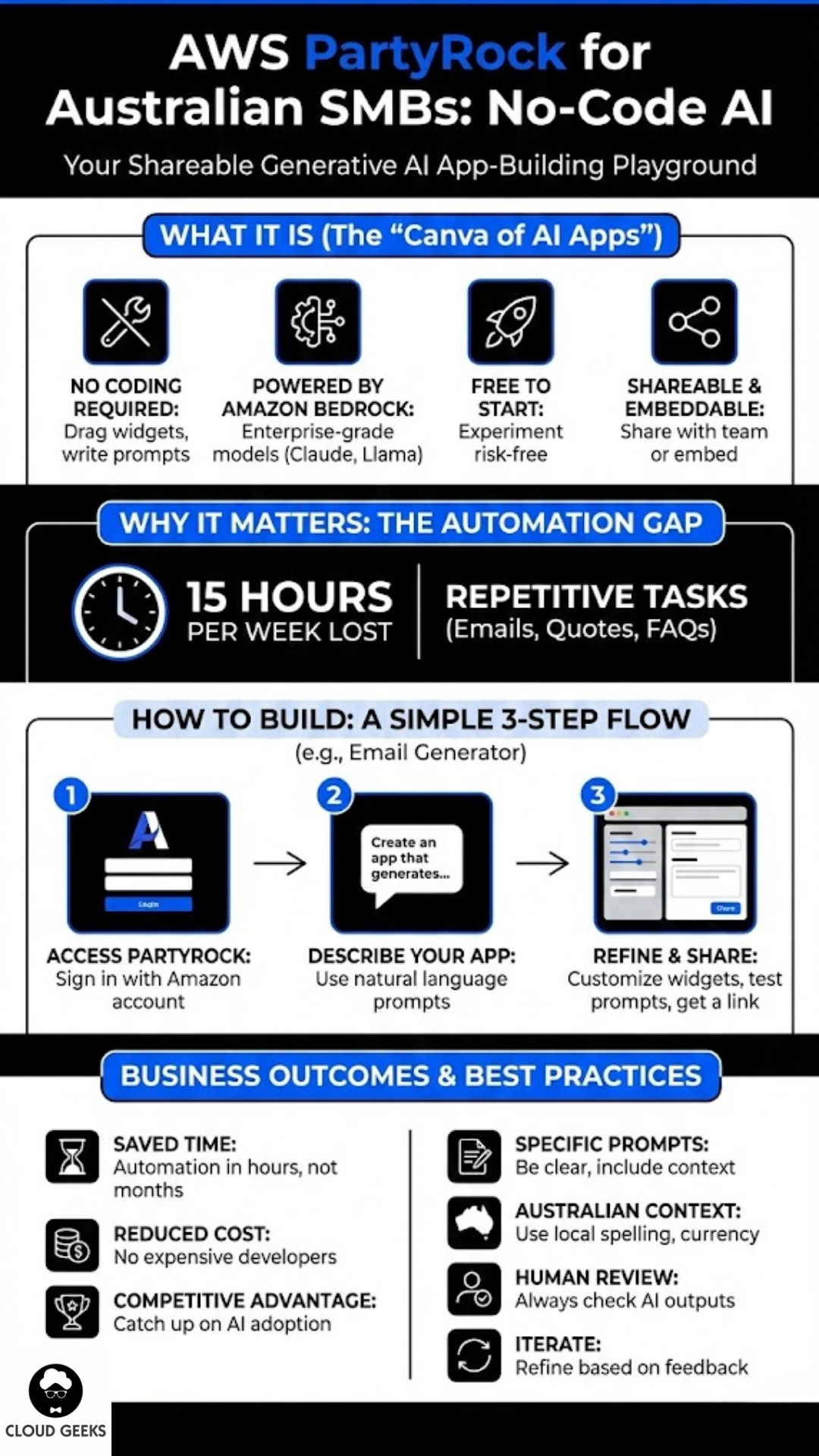
No coding required: You build apps by dragging widgets and writing prompts.
Powered by serious AI: Behind the scenes, PartyRock uses the same foundation models (Claude, Llama, etc.) that power enterprise AI applications.
Completely free to start: AWS provides free credits for experimentation, making it risk-free to learn.
Shareable and embeddable: Once you build something useful, you can share it with your team or embed it in your website.
Think of PartyRock as the “Canva of AI apps”—it democratises something that previously required expensive specialists.
Why Australian SMBs Should Care
The Automation Gap
Australian SMBs spend an average of 15 hours per week on repetitive administrative tasks that AI could handle. That’s nearly two full working days lost to:
- Writing routine emails
- Generating quotes and proposals
- Answering common customer questions
- Creating social media content
- Summarising meeting notes
PartyRock lets you build tools to automate these tasks in hours, not months.
The Cost Reality
Hiring a developer to build a custom AI tool? Budget $10,000-50,000 minimum. Using PartyRock? Your only cost is time—and even that’s minimal once you understand the basics.
The Competitive Pressure
Your competitors are adopting AI. The question isn’t whether to join them—it’s how quickly you can catch up. PartyRock removes the technical barrier entirely.
Tutorial: Building a Customer Email Generator
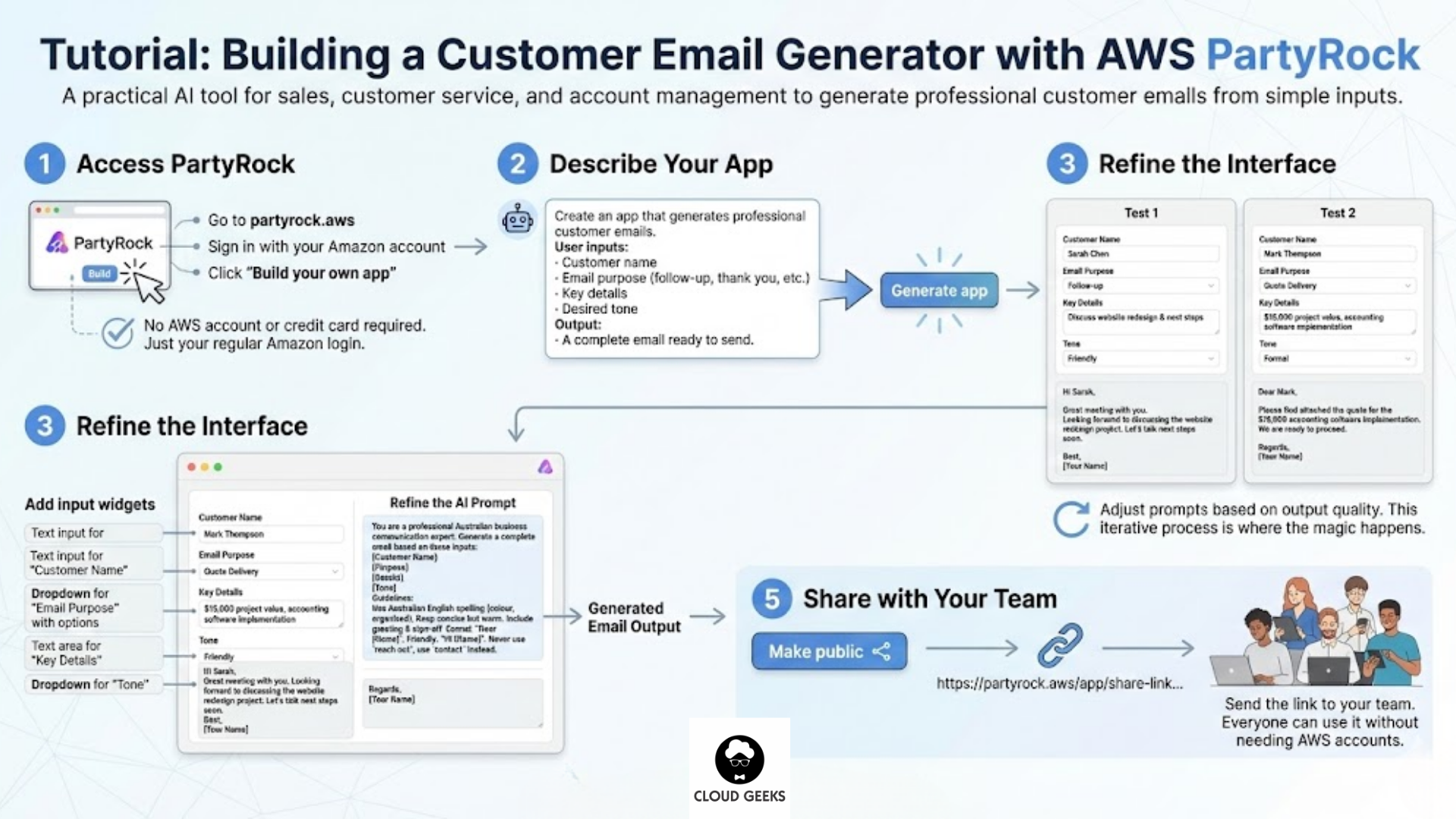
Let’s build something practical: an AI tool that generates professional customer emails based on simple inputs. This is useful for sales teams, customer service, and account management.
Step 1: Access PartyRock
- Go to partyrock.aws
- Sign in with your Amazon account (the same one you use for shopping)
- Click “Build your own app”
No AWS account required. No credit card needed. Just your regular Amazon login.
Step 2: Describe Your App
PartyRock asks you to describe what you want to build. Be specific:
Create an app that generates professional customer emails.
The user should input:
- Customer name
- Email purpose (follow-up, thank you, appointment reminder, quote delivery)
- Key details to include
- Desired tone (formal, friendly, casual)

The app should output a complete email ready to copy and send.
Click “Generate app” and watch PartyRock create the foundation.
Step 3: Refine the Interface
PartyRock will generate a basic app with input fields and an output area. Now customise it:
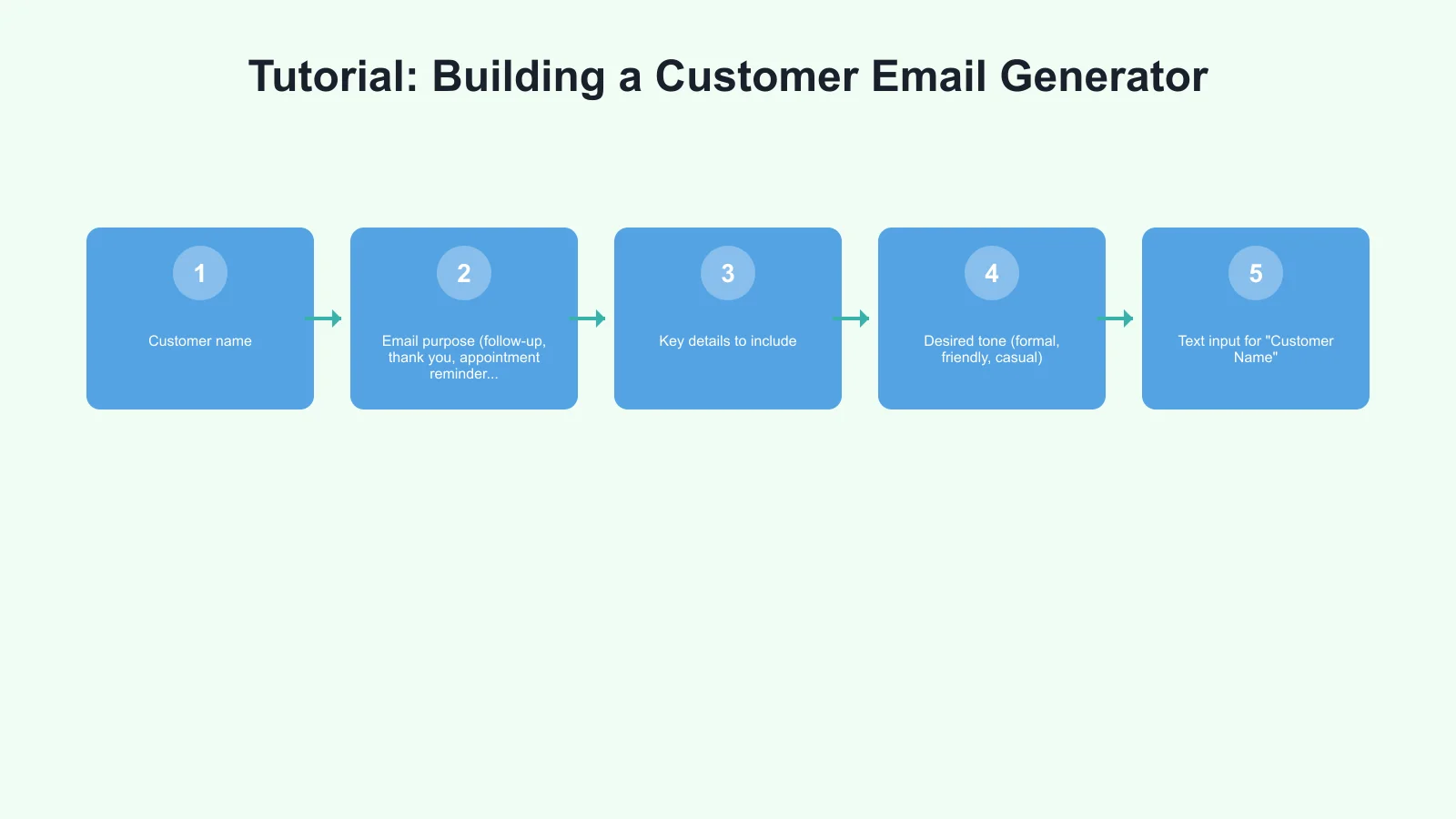
Add input widgets:
- Text input for “Customer Name”
- Dropdown for “Email Purpose” with options
- Text area for “Key Details”
- Dropdown for “Tone”
Refine the prompt that drives the AI:
You are a professional business communication expert for an Australian company.
Generate a complete email based on these inputs:

Customer Name: [user input]
Purpose: [user input]
Details to include: [user input]
Tone: [user input]

Guidelines:
- Use Australian English spelling (colour, organised, etc.)
- Keep emails concise but warm
- Include appropriate greeting and sign-off
- For formal tone, use "Dear [Name]"; for friendly, use "Hi [Name]"
- Never use American phrases like "reach out" - use "contact" instead
Step 4: Test and Iterate
Try your app with real scenarios:
Test 1: Follow-up email to “Sarah Chen” after a meeting, friendly tone, mention discussing the website redesign project and next steps.
Test 2: Quote delivery to “Mark Thompson” for accounting software implementation, formal tone, $15,000 project value.
Adjust the prompts based on output quality. This iterative process is where the magic happens.
Step 5: Share with Your Team
Once you’re happy with the app:
- Click “Make public” to generate a shareable link
- Send the link to your team
- Everyone can use it without needing AWS accounts
Tutorial: Building a Quote Calculator
Let’s build something more complex: an AI-powered quote calculator for a services business.
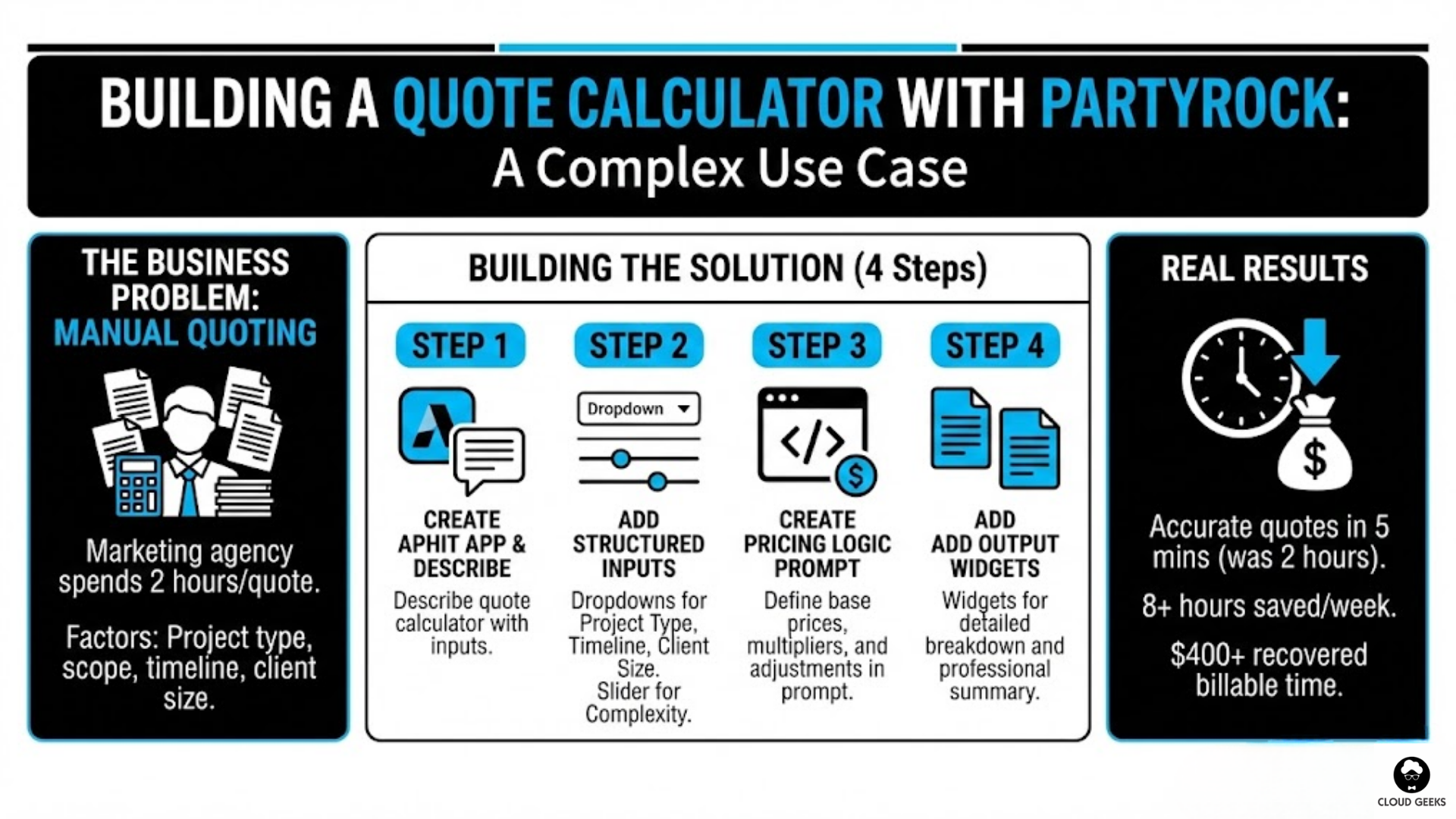
The Business Problem
A Sydney-based marketing agency spends 2 hours per quote manually calculating project costs. They need to factor in:
- Project type (website, branding, campaign)
- Scope complexity
- Timeline urgency
- Client size
Building the Solution
Step 1: Create new app with this description:
Build a quote calculator for a marketing agency.
Users input project type, complexity, timeline, and client size.
The app calculates a price range and generates a professional quote summary.
Step 2: Add structured inputs:
- Dropdown: Project Type (Website Design, Brand Identity, Marketing Campaign, Social Media Package)
- Slider: Complexity (1-5 scale)
- Dropdown: Timeline (Standard 4-6 weeks, Rushed 2-3 weeks, Urgent under 2 weeks)
- Dropdown: Client Size (Startup, SMB, Enterprise)
Step 3: Create the pricing logic prompt:
You are a pricing calculator for an Australian marketing agency.

Base prices (AUD):
- Website Design: $8,000-25,000
- Brand Identity: $5,000-15,000
- Marketing Campaign: $10,000-40,000
- Social Media Package: $2,000-8,000

Adjustments:
- Complexity multiplier: Level 1 = 0.8x, Level 3 = 1.0x, Level 5 = 1.5x
- Rushed timeline: +25%
- Urgent timeline: +50%
- Enterprise client: +20%
- Startup client: -15%

Based on these inputs:
Project: [input]
Complexity: [input]
Timeline: [input]
Client: [input]

Calculate the price range and provide:
1. Recommended price range (min-max)
2. Breakdown of how you calculated it
3. A professional 2-paragraph quote summary suitable for a proposal
Step 4: Add an output widget for the detailed breakdown and another for the quote summary.
Real Results
The agency now generates accurate quotes in 5 minutes instead of 2 hours. That’s 8+ hours saved per week—or $400+ in recovered billable time.
Five More Business Apps You Can Build Today
1. Meeting Summary Generator
Purpose: Turn messy meeting notes into structured summaries with action items.
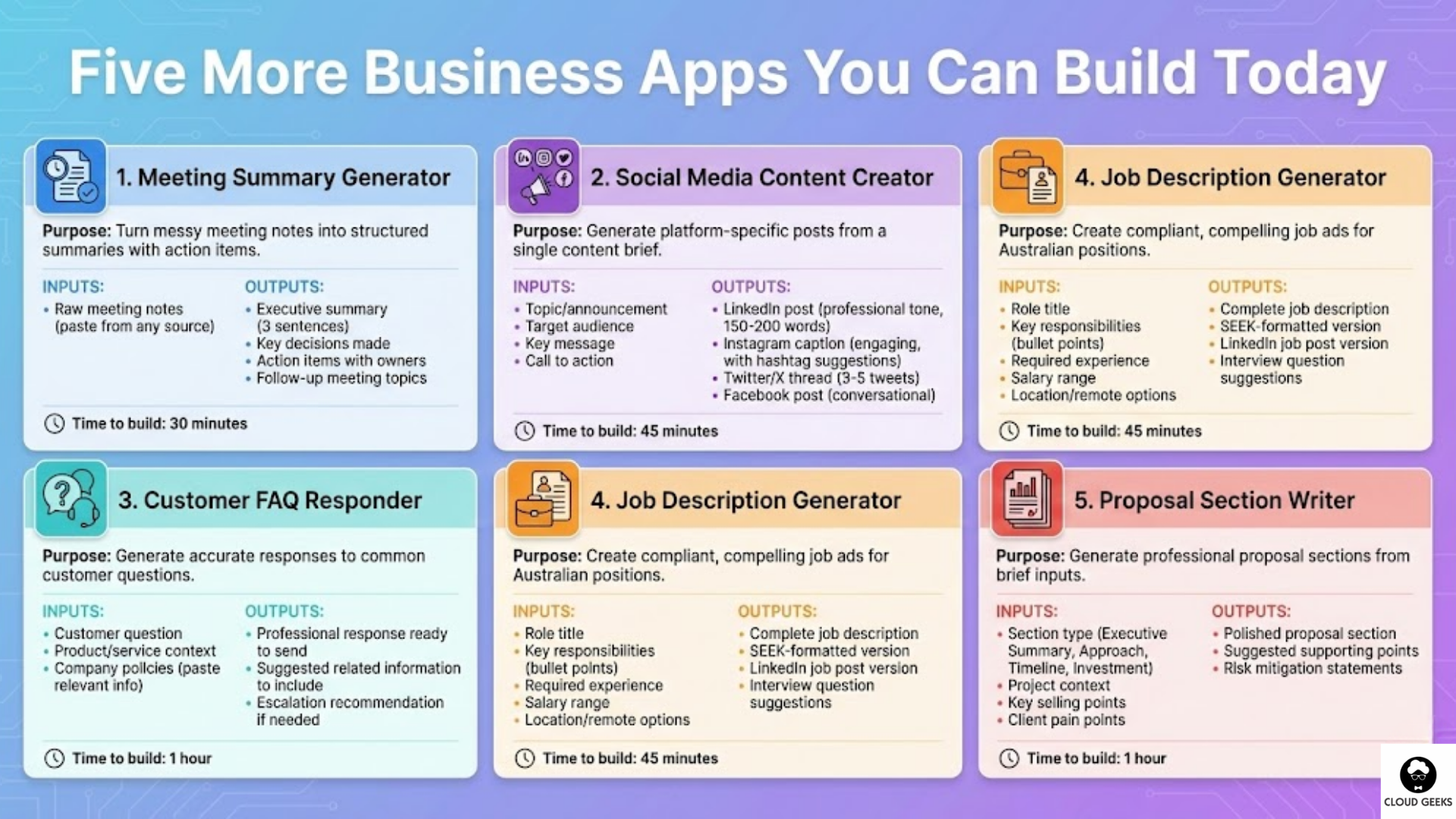
Inputs: Raw meeting notes (paste from any source)
Outputs:
- Executive summary (3 sentences)
- Key decisions made
- Action items with owners
- Follow-up meeting topics
Time to build: 30 minutes
2. Social Media Content Creator
Purpose: Generate platform-specific posts from a single content brief.
Inputs:
- Topic/announcement
- Target audience
- Key message
- Call to action
Outputs:
- LinkedIn post (professional tone, 150-200 words)
- Instagram caption (engaging, with hashtag suggestions)
- Twitter/X thread (3-5 tweets)
- Facebook post (conversational)
Time to build: 45 minutes
3. Customer FAQ Responder
Purpose: Generate accurate responses to common customer questions.
Inputs:
- Customer question
- Product/service context
- Company policies (paste relevant info)
Outputs:
- Professional response ready to send
- Suggested related information to include
- Escalation recommendation if needed
Time to build: 1 hour
4. Job Description Generator
Purpose: Create compliant, compelling job ads for Australian positions.
Inputs:
- Role title
- Key responsibilities (bullet points)
- Required experience
- Salary range
- Location/remote options
Outputs:
- Complete job description
- SEEK-formatted version
- LinkedIn job post version
- Interview question suggestions
Time to build: 45 minutes
5. Proposal Section Writer
Purpose: Generate professional proposal sections from brief inputs.
Inputs:
- Section type (Executive Summary, Approach, Timeline, Investment)
- Project context
- Key selling points
- Client pain points
Outputs:
- Polished proposal section
- Suggested supporting points
- Risk mitigation statements
Time to build: 1 hour
Best Practices for PartyRock Success
Write Specific Prompts
Bad prompt: “Write a good email”
Good prompt: “Write a professional follow-up email for an Australian B2B software company. The recipient is a CTO who attended our webinar on cloud migration. Mention the key takeaway about cost savings and suggest a 30-minute discovery call. Tone should be confident but not pushy. Use Australian English.”
Include Australian Context
Always specify:
- “Australian English spelling”
- “Australian business context”
- “$AUD” for any pricing
- “Australian regulations” if relevant (privacy, employment, etc.)
Test with Edge Cases
Don’t just test the happy path. Try:
- Very short inputs
- Very long inputs
- Unusual requests
- Potential misuse scenarios
Iterate Based on Feedback
Share early versions with colleagues. Their confusion points reveal where your app needs refinement.
Document Your Apps
Keep notes on:
- What each app does
- The prompts that work best
- Common issues and fixes
- Ideas for improvements
From PartyRock to Production
PartyRock is perfect for prototyping and light usage. But what if your app becomes mission-critical?
When to Graduate Beyond PartyRock
Consider moving to more robust solutions when:
- You’re using the app 50+ times per day
- You need to integrate with other systems (CRM, accounting)
- You require audit trails and compliance logging
- Multiple team members need different permission levels
The Natural Progression
- PartyRock (Free): Prototype and validate the concept
- Amazon Bedrock ($): Production-grade with API access
- Custom Application ($$): Full integration with your business systems
CloudGeeks specialises in helping Australian businesses make this transition when they’re ready.
Common Mistakes to Avoid
1. Over-Engineering Early
Start simple. Your first app doesn’t need 15 input fields. Build the minimum viable tool, use it, then add complexity based on real needs.
2. Ignoring Output Quality
Just because AI generates something doesn’t mean it’s good. Review outputs critically. Bad AI outputs can damage customer relationships.
3. Forgetting the Human Review
Never send AI-generated content to customers without human review. PartyRock accelerates creation—it doesn’t replace judgement.
4. Not Sharing with the Team
The value multiplies when your whole team uses these tools. Don’t keep them to yourself.
5. Giving Up Too Soon
Your first app might produce mediocre results. That’s normal. Refine the prompts, test different approaches, and persist. The second attempt is always better.
The Bottom Line
AWS PartyRock demolishes the myth that cloud AI is only for tech companies. With zero coding required and no upfront costs, there’s no excuse for Australian SMBs not to experiment.
Start this week:
- Identify one repetitive task that frustrates your team
- Spend 1 hour building a PartyRock app to address it
- Test it with real scenarios
- Share it with colleagues
- Iterate based on feedback
The businesses that thrive in the AI era won’t be those with the biggest budgets—they’ll be those willing to experiment, learn, and adapt. PartyRock makes that experimentation accessible to everyone.
Ready to build more sophisticated AI solutions? Contact CloudGeeks to discuss how we can help you move from PartyRock prototypes to production-ready AI applications that transform your Australian business.
Related Articles
- AI Tools for Australian SMBs: Practical Guide with Real Case Studies
- AI on a Budget: How Australian SMBs Can Harness Artificial Intelligence
- Azure vs AWS for Australian Businesses: Complete Comparison
- Multi-Cloud Strategy for Australian Businesses: AWS vs Azure vs GCP
- Cloud Migration ROI: Calculating Real Costs for Australian SMBs
Strong cloud infrastructure is the foundation — a great website is the shopfront. Cosmos Web Tech helps Australian businesses turn technical capability into online growth.
This article is brought to you by Ganda Tech Services — Sydney’s complete digital solutions provider covering cloud, web, and mobile.