
Building an Enterprise Translation Platform: The Infrastructure Lessons We Learned the Hard Way
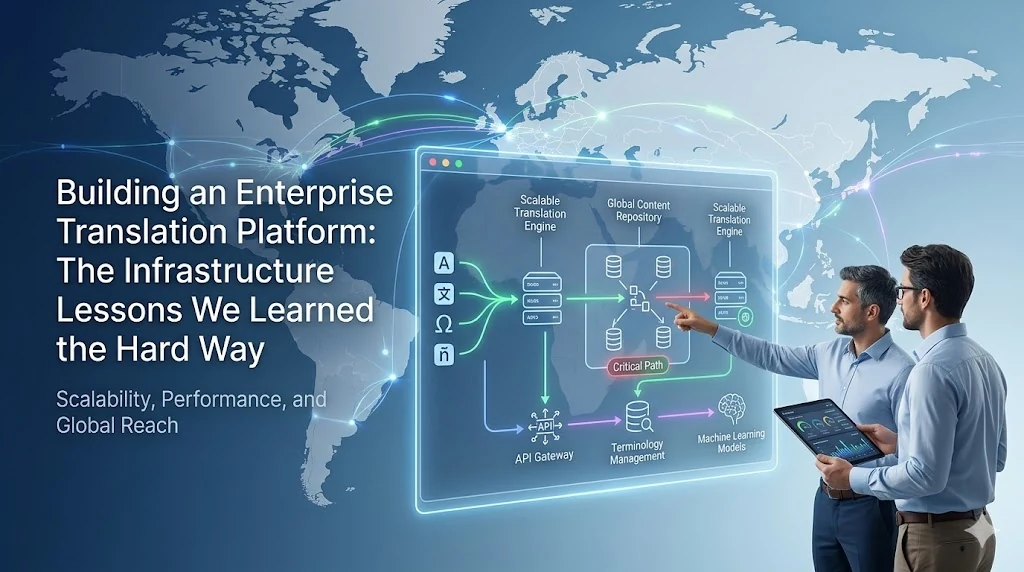
Building an Enterprise Translation Platform: The Infrastructure Lessons We Learned the Hard Way
Translation technology is fascinating to build because the problem is genuinely complex. It is not enough to convert words — you need to handle dialect differences, right-to-left scripts, locale-specific formatting, translation memory for consistency, and reviewer workflows for quality control. The linguistic problem is interesting.
The infrastructure problem is less glamorous. But infrastructure failures are what actually stop a translation platform from working.
We built the Enterprise Translation System as a multi-service Docker application: separate containers for the API gateway, translation engine, memory storage, reviewer workflow, and a reverse proxy sitting in front of all of it. We hit three infrastructure failures in the first month that had nothing to do with translation logic. All three were entirely avoidable.
This is the documentation of those failures — what they looked like, why they happened, and what we changed.
The Architecture
Before the failures make sense, the architecture needs context.
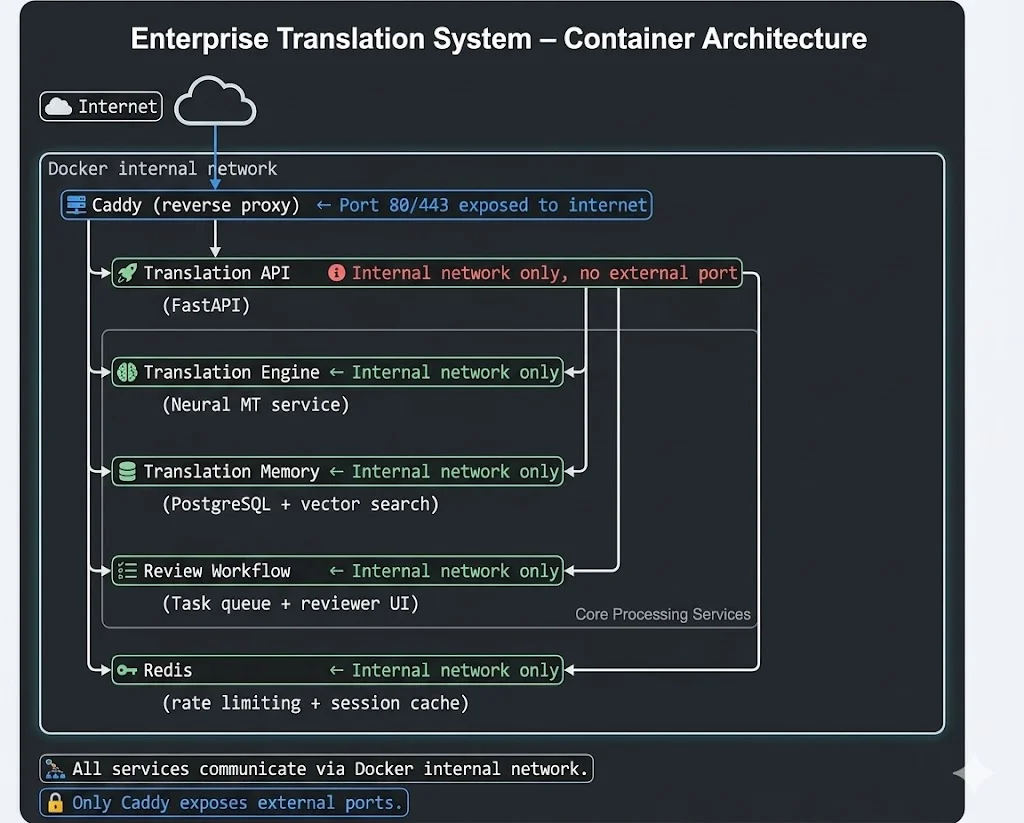
Five containers. One reverse proxy. Internal networking between services. Clean on paper.
Failure 1: Port Conflict Took Down a Container at Startup
Symptom:
The Translation API container failed to start with:
Bind for 0.0.0.0:3001 failed: port is already allocatedWe had recently added a separate client dashboard tool to the same server. It happened to also use port 3001. Docker refused to start the Translation API because the port was already claimed.
The Caddy reverse proxy had been running fine. Only the Translation API was down. Users could reach the proxy but got a 503 error on all translation endpoints.
Why it happened:
The docker-compose.yml file for the Translation API had:
# Simplified representation
ports:
  - "3001:3001"  ← Exposed to host
This bound port 3001 on the host machine to the container’s port 3001. When the dashboard tool also claimed port 3001, Docker rejected the second binding.
The fundamental mistake was exposing a port to the host at all. The Translation API does not need to be reachable directly from the internet. Caddy is the only entry point. The API only needs to be reachable from Caddy — and Caddy is in the same Docker network.
The fix:
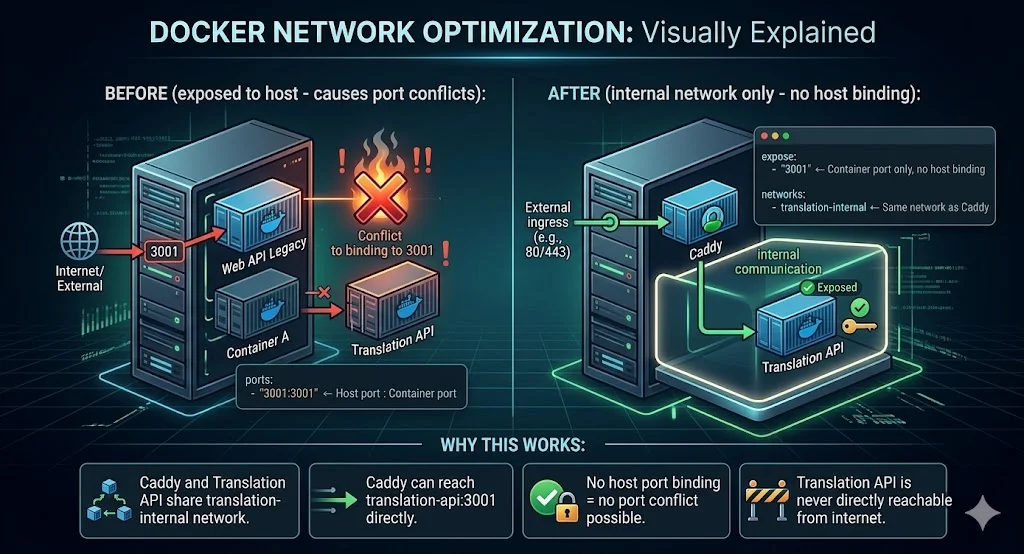
The rule we now apply to every containerised service: only the reverse proxy exposes host ports. Backend services use internal Docker networking only.
Failure 2: Containers Could Not Reach a Service Running Directly on the Host
Context:
During a transitional period, we were running the Translation Memory service directly on the host — not containerised yet. The other containers needed to connect to it.
Symptom:
The Translation Engine container logged:
Error: connect ECONNREFUSED 127.0.0.1:5432And:
Error: dial tcp [::1]:5432: connect: connection refusedThe Translation Memory was definitely running. psql from the host connected immediately. But from inside the container, localhost:5432 and 127.0.0.1:5432 both failed.
Why it happened:
This is a fundamental Docker networking concept that catches many teams the first time.
Inside a Docker container:
──────────────────────────
  localhost        = this container's loopback interface
  127.0.0.1        = this container's loopback interface

  NOT the host machine's localhost.
  NOT the host machine's 127.0.0.1.

  The container is an isolated network namespace.
  Its "localhost" has nothing at port 5432.
  The host's port 5432 is on a different network entirely.
The common suggestion for this problem is host.docker.internal — a Docker Desktop feature that resolves to the host machine’s IP. This works correctly on Docker Desktop for Mac and Windows. It works inconsistently on Linux Docker (where most production deployments run).
On our Linux server, host.docker.internal either did not resolve at all or resolved to the wrong network gateway.
The fix:
Correct approach for Linux Docker host access:
──────────────────────────────────────────────
Step 1: Find the Docker bridge gateway IP

  On the host:
    docker network inspect bridge
    → Look for "Gateway" field
    → Typically 172.17.0.1 or 172.19.0.1

  This IP is reachable from containers as the "host".

Step 2: Use gateway IP in container configuration

  In docker-compose.yml environment:
    DB_HOST: 172.17.0.1  ← Host gateway IP, not localhost

  Or, use Docker Compose extra_hosts:
    extra_hosts:
      - "host-services:172.17.0.1"

  Then connect to: host-services:5432

Step 3 (better long-term): Containerise the host service

  The real fix is to run the Translation Memory
  in Docker alongside the other services.
  Then all services share an internal network
  and communicate by service name:
    DB_HOST: translation-memory  ← Docker service name
  No IP addresses needed.
We containerised the Translation Memory service that weekend. Host access is now a solved problem — everything runs in the same Docker network.
Failure 3: Updating .env Did Not Update the Running Container
Context:
We had configured API keys and model endpoints in a .env file. After switching to a higher-tier translation model, we updated .env with the new endpoint and key — then ran:
docker compose restart translation-engineThe container restarted. The new model endpoint was not being used. The old API key was still active. Requests were going to the old endpoint.
Symptom:
This failure had no error. The service ran fine. Logs showed successful translation requests. But the translations were coming from the old model — noticeable because quality characteristics had not changed.
We spent over an hour convinced the model switch was not working, testing different configurations, before realising the environment had not changed at all.
Why it happened:
docker compose restart — what it actually does:
────────────────────────────────────────────────
  Stops the container process
  Starts the container process

  Does NOT recreate the container.
  Does NOT re-read the env_file directive.
  The container's environment is frozen at creation time.

  .env changes are invisible to docker compose restart.

Timeline of what we thought happened:
  Update .env  →  restart  →  new env vars active

Timeline of what actually happened:
  Update .env  →  restart  →  same container, same env vars
  .env file changed on disk
  container does not know and does not care
env_file: in Docker Compose is only read when the container is created, not when it is restarted.
The fix:
Correct commands for env var changes:
───────────────────────────────────────

# WRONG — does not re-read env_file
docker compose restart translation-engine

# CORRECT — recreates container, re-reads env_file
docker compose up -d --force-recreate translation-engine

# ALSO CORRECT — stops and removes container, then starts fresh
docker compose down translation-engine
docker compose up -d translation-engine

# Verify env vars are what you expect (before going to prod):
docker compose exec translation-engine env | grep API_KEY
We now add this to every deployment runbook: “If you changed .env, use --force-recreate, not restart.”
The Pattern Across All Three Failures
Looking at these three failures together, they share a common root cause: a gap between what we assumed Docker did and what Docker actually does.
Mental model vs reality:

Failure 1:
  Assumed: External port exposure is optional
  Reality: Without expose + network, backend services
           can't communicate and compete for host ports

Failure 2:
  Assumed: localhost means the host machine
  Reality: Inside a container, localhost is the container

Failure 3:
  Assumed: restart = fresh start with current config
  Reality: restart = same container, same frozen config
Each assumption is reasonable if you have not used Docker deeply. Each is wrong. And each was invisible until it caused an outage.
What We Added to the Team’s Docker Runbook
After these three failures, we added a Docker Infrastructure Checklist to the project’s runbook. Any new containerised service must pass these checks before going to production:
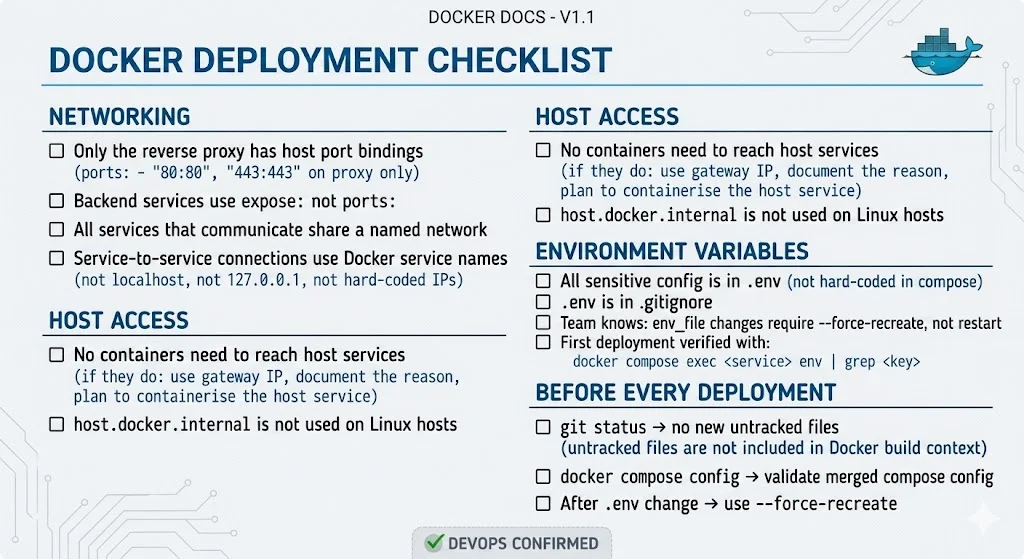
The Translation Platform Today
The Enterprise Translation System now handles:
Supported workflows:
  ─ Document translation (PDF, DOCX, HTML)
  ─ Translation memory (consistency across documents)
  ─ Human review queue (reviewer assignment + approval)
  ─ Multi-dialect support (e.g., Mandarin Simplified + Traditional)
  ─ Right-to-left layout handling (Arabic, Hebrew, Urdu)
  ─ API integration (webhook callbacks on job completion)

Performance after infrastructure fixes:
  Service uptime:         99.7%
  Port conflict incidents: 0 (since removing host bindings)
  Env var incidents:      0 (since updating runbook)
  Failed deployments:     ~1/month (down from ~1/week)
The translation logic — the part that is actually hard — was never the problem. The infrastructure was the problem, and infrastructure problems are fixable with the right patterns.
For Businesses Building on Docker
If you are containerising a multi-service application — whether a translation platform, a content management system, or any microservices architecture — these three failure patterns are worth bookmarking.
They are not obvious from the Docker documentation. They only appear when your assumptions about networking and environment management are tested in production.
If you are building a multilingual platform, localisation system, or any application that needs to serve content in multiple languages, the Saya team works with Australian businesses across all stages of multilingual implementation — from initial architecture to deployment to ongoing translation operations.
Related: Choosing a Translation Stack: When Neural Machine Translation Is Enough and When It Isn’t