
NordVPN for Australian Small Business: The Remote-Team VPN That Actually Fits SMB Ops
NordVPN for Australian Small Business: The Remote-Team VPN That Actually Fits SMB Ops
Most VPN reviews are written for consumers who want to stream US Netflix from a Sydney lounge room. That is a legitimate use case, and NordVPN handles it well, and it is also completely uninteresting if you are running a business.
The interesting question for an Australian small business is this: what does a VPN buy you that your existing stack does not, and is NordVPN specifically the right one to buy it from?
What a business VPN actually solves
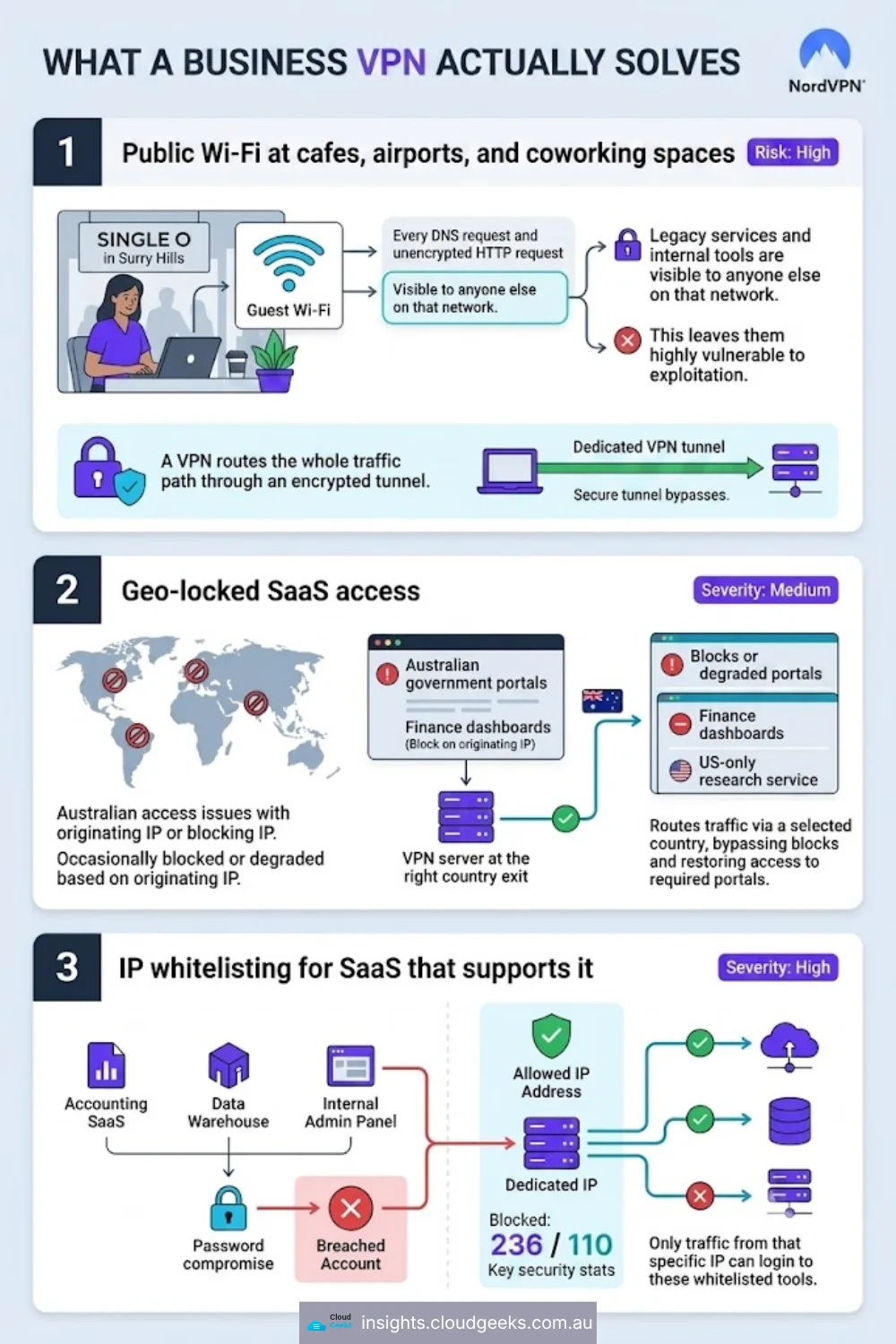
Three problems, in the order they usually appear:
1. Public Wi-Fi at cafes, airports and coworking spaces. Your team member opens their laptop at Single O in Surry Hills, connects to the cafe’s guest Wi-Fi, and immediately every DNS request and every unencrypted HTTP request is visible to anyone else on that network. Most SaaS is HTTPS-only now, but internal tools, home routers accessed remotely, and any legacy service on the corporate side is not. A VPN routes the whole traffic path through an encrypted tunnel.
2. Geo-locked SaaS access. Some tools - certain finance dashboards, some Australian government portals, occasionally a US-only research service - will block or degrade based on originating IP. A VPN with the right country exit gives you a stable route.
3. IP whitelisting for SaaS that supports it. This is the one that matters most for security-mature small businesses. If your accounting SaaS, your data warehouse, or your internal admin panel supports IP-address allowlisting, a VPN with a dedicated IP means only traffic from that IP can log in. Password compromise no longer equals account compromise.
Where NordVPN fits (and where it does not)
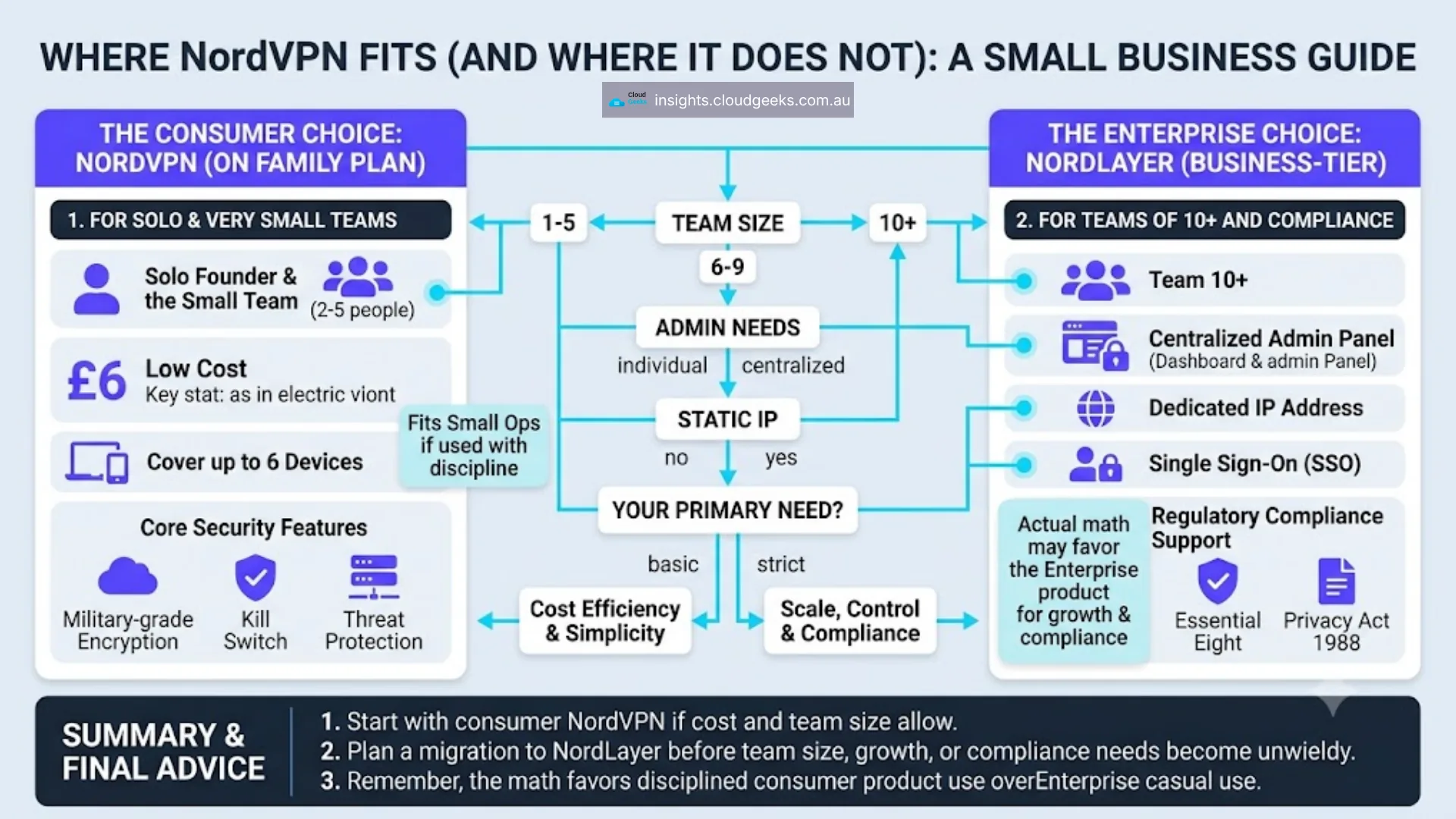
NordVPN sells two products that get conflated: NordVPN (the consumer product, with business-appropriate features) and NordLayer (the actual business-tier product, previously NordVPN Teams).
For a solo founder or a two-to-five-person team, the consumer NordVPN product on a family plan is often the right fit - low cost, six devices covered, and every core security feature. For a team of ten-plus with centralised admin, dedicated IPs, and SSO requirements, NordLayer is the right product and it is priced accordingly.
This post focuses on NordVPN for SMBs at the small end, where the actual math often favours the consumer product used with discipline over the enterprise product used casually.
What you get on a standard NordVPN plan
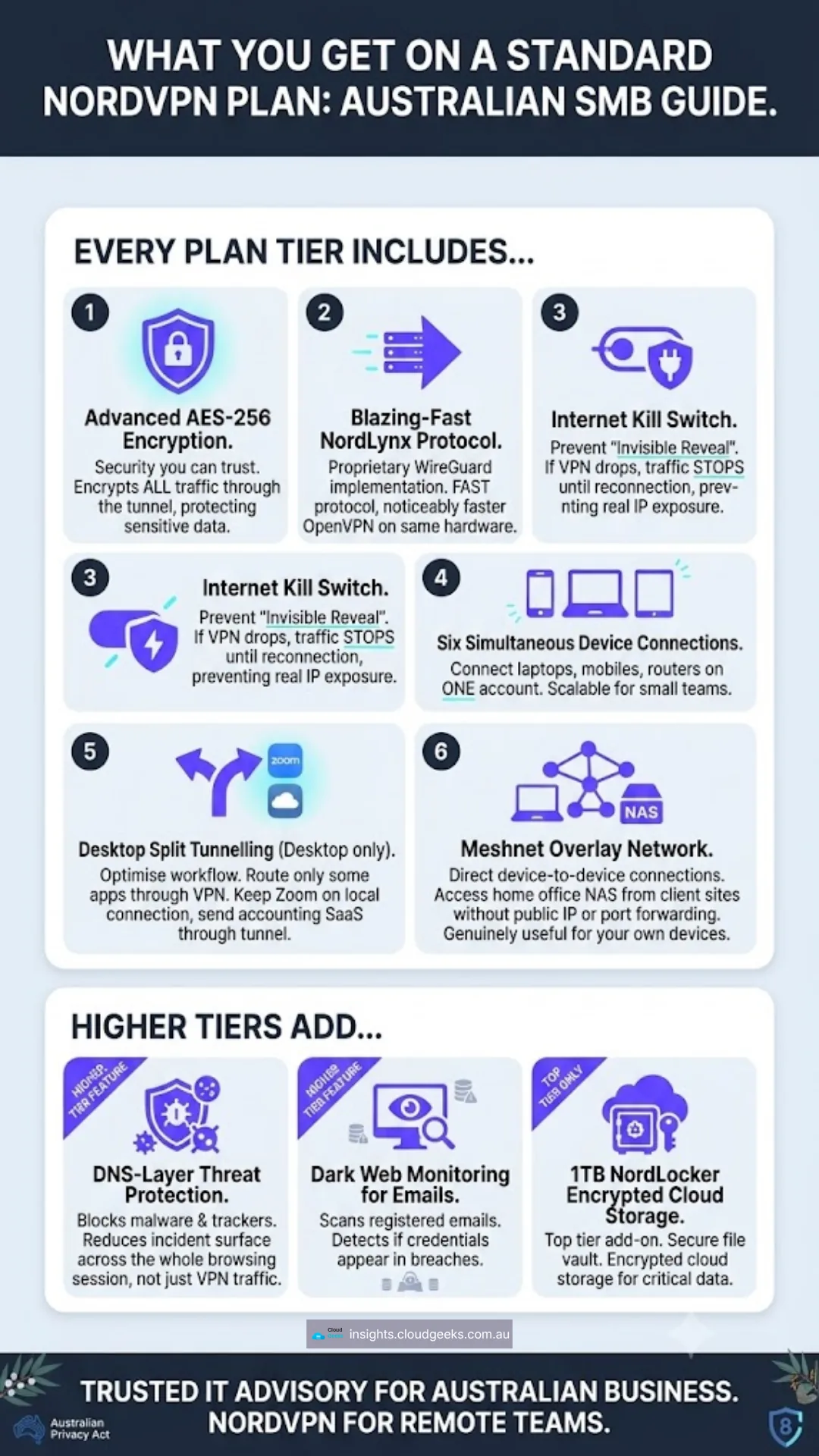
Every plan tier includes:
- AES-256 encryption on all traffic through the tunnel
- NordLynx protocol (their WireGuard implementation) - noticeably faster than OpenVPN on the same hardware
- Kill switch - if the VPN drops, traffic stops until it reconnects, preventing the “invisible reveal” where your real IP is exposed for two seconds during a reconnection
- Six simultaneous device connections on one account
- Split tunnelling on desktop - route only some apps through the VPN, so Zoom stays on your local connection while your accounting SaaS goes through the tunnel
- Meshnet - a mesh network overlay that lets your own devices reach each other through NordVPN’s infrastructure without needing a public IP or port forwarding. Genuinely useful for connecting to a home office NAS from a client site.
The higher tiers add: Threat Protection (malware and tracker blocking at the DNS layer, which reduces incident surface across the whole browsing session, not just the VPN traffic), dark web monitoring for the account’s registered emails, and on the top tier a 1TB NordLocker encrypted cloud storage add-on.
Australian pricing (as at July 2026)
NordVPN prices in USD but the plan structure is stable:
- Basic (VPN only) - about AUD $5-6/month on the 2-year plan, higher on shorter commitments
- Plus (adds password manager and data breach scanner) - about AUD $7-8/month on the 2-year plan
- Complete (adds 1TB encrypted cloud storage) - about AUD $10-11/month on the 2-year plan
Six devices, one account. For a five-person team all using one shared business account (fine under NordVPN’s terms for a small business setup), that is roughly AUD $1-2 per person per month at the Basic tier. Even at the Complete tier it is under AUD $3/person/month.
For context: NordLayer starts at roughly USD $8-11 per user per month billed annually. If you are under ten seats and do not specifically need centralised user provisioning, the consumer product beats it on cost by 4-5x with substantially the same security guarantees.
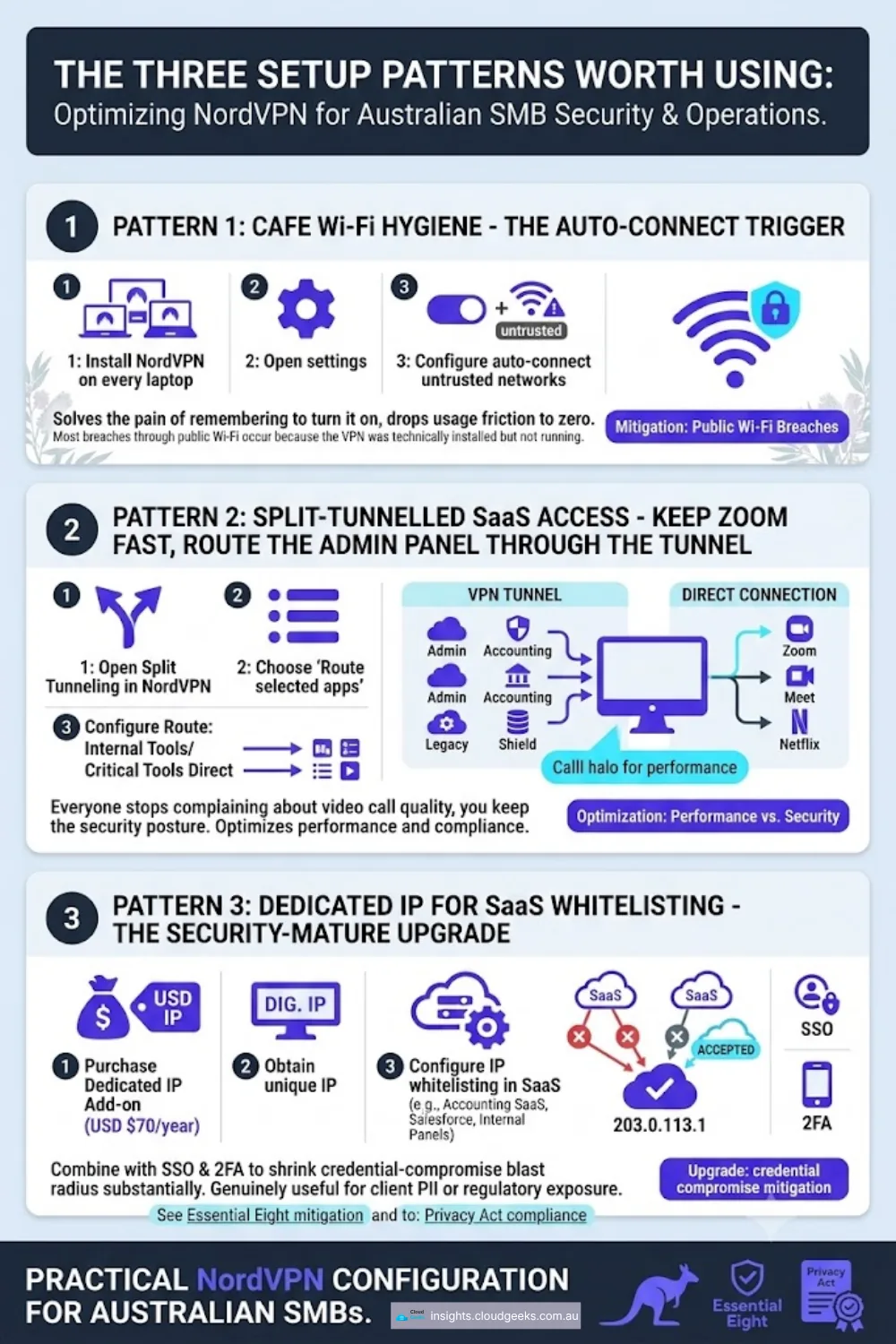
The three setup patterns worth using
Pattern 1: Cafe Wi-Fi hygiene - the auto-connect trigger. Install the NordVPN app on every laptop. Set it to auto-connect any time the device joins a Wi-Fi network it does not trust. The pain of remembering to turn it on drops to zero, so it actually gets used. Most breaches through public Wi-Fi happen because the VPN was theoretically installed but not running.
Pattern 2: Split-tunnelled SaaS access - keep Zoom fast, route the admin panel through the tunnel. NordVPN’s split tunnelling lets you specify which apps route through the VPN. Put internal admin panels, your accounting SaaS, and any legacy corporate tools on the tunnel. Leave Zoom, Google Meet and Netflix on your direct connection. Everyone stops complaining about video call quality and you keep the security posture.
Pattern 3: Dedicated IP for SaaS whitelisting - the security-mature upgrade. NordVPN offers a dedicated IP add-on (approximately USD $70/year on top of a subscription). Any tool that supports IP allowlisting - and most enterprise-tier SaaS does - can now be locked to that specific IP. Combined with SSO and 2FA, this shrinks the credential-compromise blast radius substantially. Worth the money if you handle client PII or run a service business with regulatory exposure.
Get started
If you already run a security-mature small business and just want to test whether NordVPN fits your team’s workflow, start with a NordVPN plan here - the 2-year Basic plan is the cheapest way to trial it across three-to-six devices without a large upfront commitment.
If you need help evaluating the VPN choice as part of a broader Australian small business security posture - firewall configuration, endpoint protection, SaaS access hardening, incident response - our team can walk through your specific stack in a 30-minute call. Get in touch here.
Part of our Australian small business security series. See also our earlier posts on WordPress security hardening and Sucuri Firewall for Australian small business.
Pairing solid security infrastructure with a professional website matters. Cosmos Web Tech builds security-hardened WordPress and Jamstack sites for Australian small businesses.
Part of the Ganda Tech Services family, Cloud Geeks delivers specialist IT and cloud solutions for Australian small and medium businesses.