
IT Disaster Recovery Planning on a Small Business Budget
IT Disaster Recovery Planning on a Small Business Budget
When disaster strikes — whether it is a ransomware attack, hardware failure, fire, or flood — the ability to recover your IT systems quickly determines whether your business survives the disruption or suffers lasting damage. Large enterprises invest millions in disaster recovery (DR) infrastructure. Small businesses cannot match that spending, but they can still build effective DR capabilities on a realistic budget.
This guide focuses on practical, affordable disaster recovery strategies for Australian SMBs.
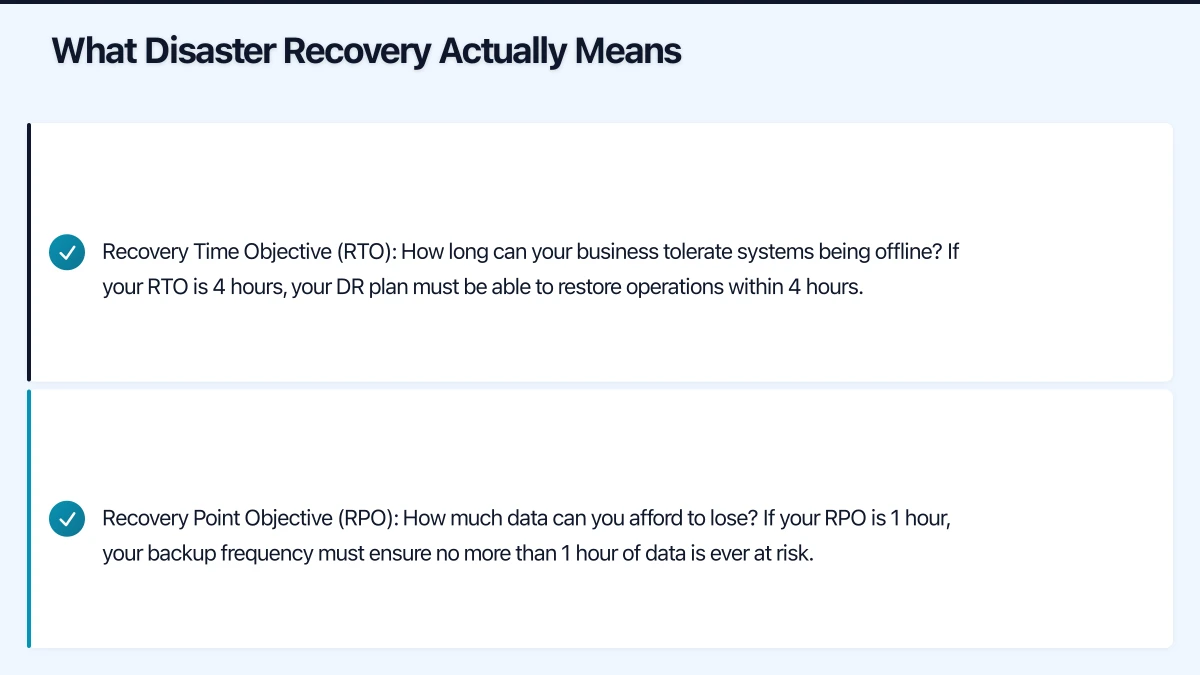
What Disaster Recovery Actually Means
IT disaster recovery is the process of restoring your technology systems and data after a disruptive event. It is a subset of broader business continuity planning, focused specifically on the technology component.
The key metrics are:
Recovery Time Objective (RTO): How long can your business tolerate systems being offline? If your RTO is 4 hours, your DR plan must be able to restore operations within 4 hours.
Recovery Point Objective (RPO): How much data can you afford to lose? If your RPO is 1 hour, your backup frequency must ensure no more than 1 hour of data is ever at risk.
These two numbers drive every DR decision. The shorter the RTO and RPO, the more the solution costs. A realistic assessment of what your business actually needs prevents overspending.
Tiered Recovery Strategy
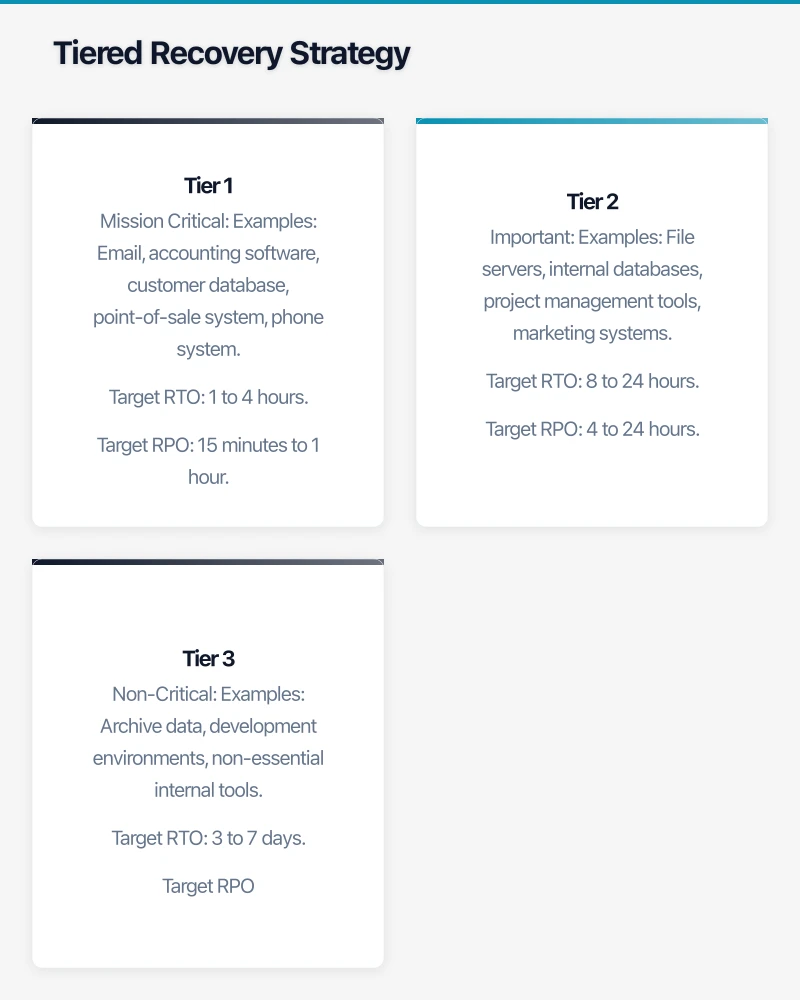
Not every system needs the same level of protection. A tiered approach allocates your budget where it matters most.
Tier 1: Mission Critical
Systems that must be restored within hours. The business cannot generate revenue or serve customers without them.
Examples: Email, accounting software, customer database, point-of-sale system, phone system.
Target RTO: 1 to 4 hours. Target RPO: 15 minutes to 1 hour.
Tier 2: Important
Systems that should be restored within one business day. Operations are impacted but workarounds exist.
Examples: File servers, internal databases, project management tools, marketing systems.
Target RTO: 8 to 24 hours. Target RPO: 4 to 24 hours.
Tier 3: Non-Critical
Systems that can wait several days without significant business impact.
Examples: Archive data, development environments, non-essential internal tools.
Target RTO: 3 to 7 days. Target RPO: 24 hours.
Budget-Friendly DR Solutions
Cloud-Based Backup and Recovery
Cloud backup is the foundation of affordable disaster recovery. For the cost of a monthly subscription, you get offsite data protection without managing physical backup media.
For cloud-first businesses (Microsoft 365, Google Workspace): If your email, files, and key applications are already in the cloud, the providers handle much of the infrastructure redundancy. Your main DR concern is data protection:
- Microsoft 365 backup: Use a third-party backup service (Veeam, Datto SaaS Protection, or Acronis) to back up mailboxes, OneDrive, and SharePoint. Cost: $2 to $5 per user per month.
- Google Workspace backup: Similar third-party options available. Cost: $3 to $5 per user per month.
This protects against accidental deletion, malicious deletion, and retention policy gaps — risks that the cloud providers do not cover.
For on-premises servers: Back up to the cloud using solutions like Acronis, Veeam, or Azure Backup. Cost: $50 to $250 per month depending on data volume and server count.
Hybrid Backup Appliance
For businesses that need faster recovery than pure cloud backup can provide, a hybrid backup appliance (like Datto ALTO or a NAS with cloud replication) keeps a local copy of backups for fast restoration while replicating to the cloud for offsite protection.
How it works: Backups are stored locally on the appliance for fast access. The appliance automatically replicates backup data to the cloud for offsite protection.
Key benefit: If a server fails, you can often virtualise it directly on the backup appliance, getting the business back up and running in minutes rather than hours.
Cost: $200 to $600 per month, including the appliance and cloud storage.
Cloud DR (Disaster Recovery as a Service)
For the fastest recovery times, cloud DR services replicate your on-premises servers to cloud virtual machines. If your physical servers are unavailable, you can start the cloud replicas and continue operating.
Options:
- Azure Site Recovery: Replicates on-premises VMs to Azure. If disaster strikes, failover to Azure VMs. Cost: approximately $35 per protected instance per month, plus Azure VM costs during failover.
- Veeam Cloud Connect with a local provider: Replicates Veeam backups to a local service provider’s cloud, with failover capability.
Cost: $100 to $500 per month depending on the number and size of servers.
SaaS Replacement Strategy
The most cost-effective DR strategy for many small businesses is to reduce the number of on-premises systems that need protection by moving to SaaS alternatives:
- On-premises Exchange becomes Microsoft 365 — Microsoft manages the infrastructure and redundancy.
- On-premises file server becomes SharePoint/OneDrive — files are available from any device, backed by Microsoft’s infrastructure.
- On-premises accounting becomes Xero — the vendor manages availability.
Each workload moved to SaaS is one fewer system you need to back up, manage, and recover.
Building Your DR Plan
Step 1: Identify and Classify
List every IT system and classify it into Tier 1, 2, or 3. Be honest about what is truly critical versus what feels important.
Step 2: Define RTO and RPO
For each tier, set realistic RTO and RPO targets. Discuss these with business stakeholders — they need to understand the trade-offs between faster recovery and higher cost.
Step 3: Choose Solutions
Match solutions to each tier:
| Tier | Solution | Typical Cost |
|---|---|---|
| Tier 1 (critical) | Hybrid appliance or cloud DR | $200 - $500/month |
| Tier 2 (important) | Cloud backup with restore capability | $50 - $200/month |
| Tier 3 (non-critical) | Cloud backup with longer retention | $20 - $50/month |
Step 4: Document the Recovery Process
For each system, document:
- What is backed up and where the backup is stored.
- Step-by-step recovery instructions (detailed enough that someone unfamiliar with the system could follow them).
- Expected recovery time.
- Verification steps (how to confirm the system is working after restoration).
- Contact details for relevant vendors and support teams.
Step 5: Test Regularly
Schedule and execute DR tests:
- Monthly: Verify that backups are completing successfully. Restore a sample file to confirm data integrity.
- Quarterly: Perform a full server restore to a test environment. Verify that the restored system functions correctly.
- Annually: Conduct a full DR drill. Simulate a disaster scenario and execute the recovery plan. Time the process and compare against your RTO targets.
Document the results of every test. If the test reveals gaps, update the plan.
Cost Summary
For a typical Australian SMB with 2 servers, 20 workstations, and Microsoft 365:
| Component | Monthly Cost |
|---|---|
| Microsoft 365 backup (20 users) | $60 - $100 |
| Server backup to cloud | $80 - $200 |
| Hybrid backup appliance (optional) | $200 - $400 |
| Cloud DR for critical server (optional) | $100 - $200 |
| Total (basic) | $140 - $300 |
| Total (comprehensive) | $440 - $900 |
At the basic level, effective disaster recovery costs less than $300 per month — about $15 per employee. At the comprehensive level, you are paying under $900 per month for protection that would cost tens of thousands of dollars to replicate with traditional infrastructure.
Common Mistakes to Avoid
Not testing backups: A backup you have never restored is an assumption, not a guarantee. Test regularly.
Backing up to the same location: If your backup is on a USB drive connected to the server, a ransomware attack or fire destroys both. Always have an offsite copy.
Ignoring Microsoft 365/Google Workspace backup: The cloud providers manage infrastructure redundancy, but they do not protect against accidental deletion, malicious deletion, or retention policy gaps. You need a third-party backup.
No documentation: If the only person who knows how to restore your systems is unavailable during a disaster, the plan fails. Document everything.
Setting and forgetting: Technology changes. Staff change. Business needs change. Review and update your DR plan at least annually.
Over-engineering: Not every system needs instant failover. Over-investing in DR for non-critical systems wastes budget that could protect critical systems better.
Getting Started
If you have no disaster recovery plan today, start here:
- Verify your backups: Are they running? Can you restore from them? Test today.
- Identify your top three critical systems: What would stop your business if they were unavailable?
- Ensure offsite backup exists: At minimum, your data should be backed up to a cloud location.
- Write a one-page recovery plan: For each critical system, document where the backup is, how to restore it, and who to call.
- Schedule a test: Within the next 30 days, perform a full restore of at least one system.
You can build on this foundation over time, but these five steps give you a working baseline that most Australian SMBs currently lack. The peace of mind alone is worth the effort.
Looking for a website that matches your enterprise-grade infrastructure? Cosmos Web Tech specialises in responsive web design and SEO for Australian businesses.
Cloud Geeks is the IT infrastructure division of Ganda Tech Services, providing managed cloud and cybersecurity solutions to Australian businesses.