
Disaster Recovery Testing for Australian SMBs: Because Untested Plans Aren't Plans
Introduction
Every Australian SMB claims to have backups. Most even have some form of disaster recovery plan, perhaps written during a compliance exercise or after a close call. But here’s the uncomfortable truth: a disaster recovery plan that hasn’t been tested isn’t a plan—it’s a hope.
The 2024-2025 period brought this home for many businesses. Widespread ransomware attacks, the Sydney data centre fire that affected multiple cloud providers, and increasingly frequent severe weather events showed that disasters aren’t theoretical. When they happen, you discover whether your recovery capabilities work.
This guide provides a practical framework for testing disaster recovery in Australian SMBs—not the enterprise approach requiring dedicated DR teams, but realistic testing that validates your actual recovery capability.
Why SMBs Don’t Test (And Why They Must)
Let’s address the common excuses first.
”We Don’t Have Time”
You don’t have time to recover when your systems are down and customers are waiting. Testing takes hours; unplanned recovery takes days or weeks when you discover problems in the middle of a crisis.
”It’s Too Disruptive”
Untested recovery during an actual disaster is infinitely more disruptive than planned testing. Modern testing approaches minimise operational impact.
“Our Backups Are Automated”
Automated backups failing silently is one of the most common disaster scenarios. Automation doesn’t guarantee success; testing does.
”We Trust Our IT Provider/MSP”
Trust but verify. Even excellent providers make mistakes, and you bear the business consequences of recovery failure regardless of who’s responsible.
”We’re Too Small for Disasters”
Small businesses are actually more vulnerable to disasters because they have less redundancy, fewer resources for recovery, and less margin for downtime. A disaster that’s an inconvenience for an enterprise can be existential for an SMB.
Understanding Your Recovery Requirements
Before testing, define what you’re testing against.
Recovery Time Objective (RTO)
How long can your business operate without each system?
Critical Systems (RTO: 1-4 hours)
- Point of sale
- Customer-facing websites
- Core business applications
- Phone systems
Important Systems (RTO: 4-24 hours)
- File shares
- Secondary business applications
- HR/payroll systems
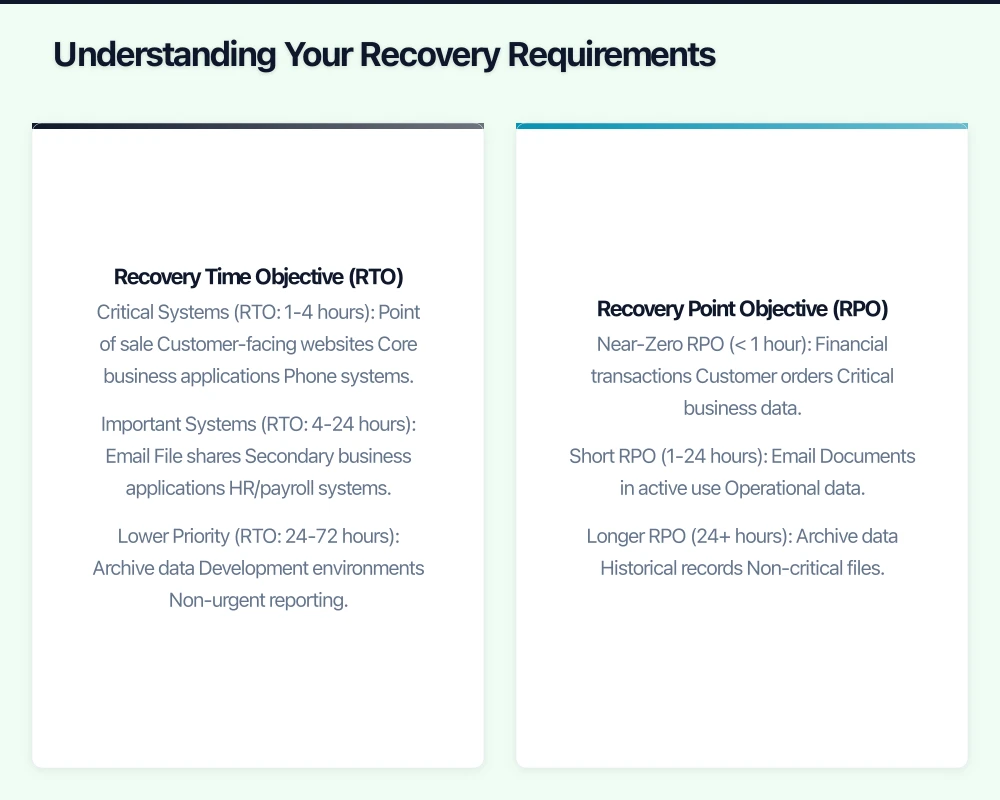
Lower Priority (RTO: 24-72 hours)
- Archive data
- Development environments
- Non-urgent reporting
Recovery Point Objective (RPO)
How much data loss is acceptable?
Near-Zero RPO (< 1 hour)
- Financial transactions
- Customer orders
- Critical business data
Short RPO (1-24 hours)
- Documents in active use
- Operational data
Longer RPO (24+ hours)
- Archive data
- Historical records
- Non-critical files
Document these requirements for each system. They become the benchmarks for testing.
Types of DR Testing
Different tests serve different purposes. Use multiple approaches.
1. Plan Review (Monthly)
The simplest test—review the DR plan documentation.
What to Check:
- Are contact lists current?
- Have systems changed since last update?
- Are documented procedures still accurate?
- Do assigned personnel still have required access?
Time Required: 1-2 hours Disruption: None Value: Catches documentation drift before it causes problems
2. Backup Verification (Weekly/Monthly)
Verify that backups complete successfully and contain expected data.
What to Check:
- Backup job completion status
- Data volume backed up (unusual changes indicate problems)
- Backup destination accessibility
- Older backup availability per retention policy
Automated Monitoring:
- Configure backup tools to alert on failure
- Set thresholds for backup size anomalies
- Monitor backup destination health
Time Required: 30 minutes weekly (mostly automated) Disruption: None Value: Catches backup failures before you need the backups
3. Restore Testing (Monthly)
Actually restore data from backups to verify they work.
What to Test:
- Restore individual files (random selection)
- Restore application data (database exports)
- Restore system images (VMs from backup)
- Restore to different hardware/environment
Procedure:
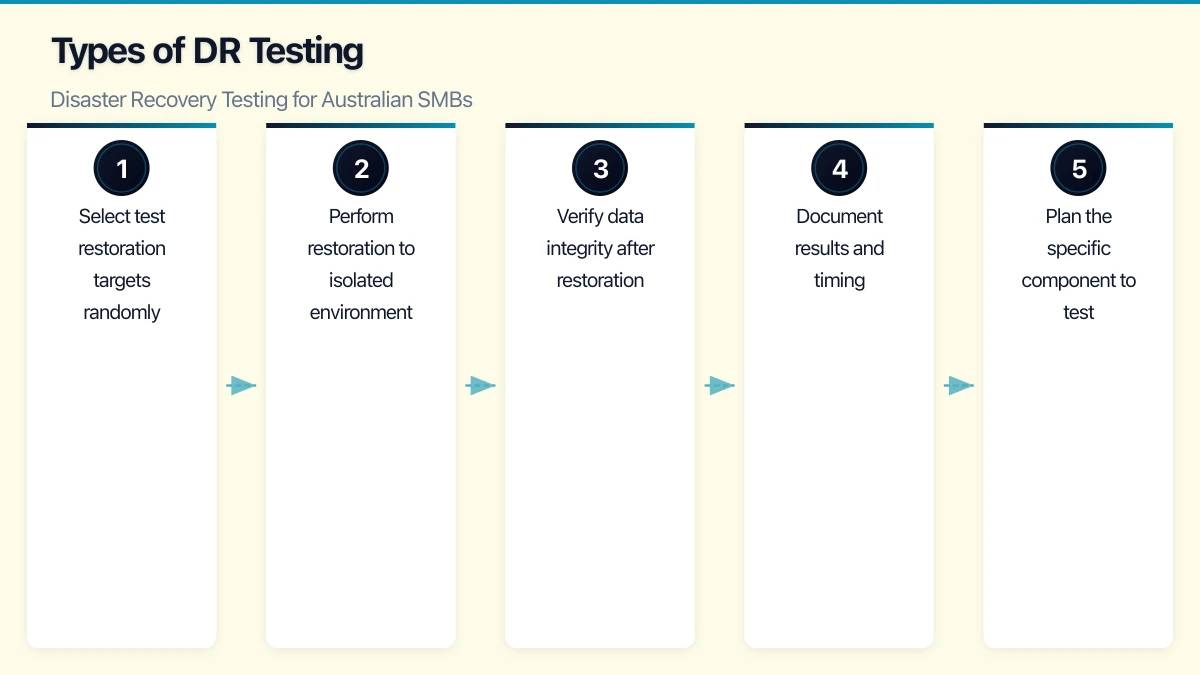
- Select test restoration targets randomly
- Perform restoration to isolated environment
- Verify data integrity after restoration
- Document results and timing
Time Required: 2-4 hours monthly Disruption: None if restoring to isolated environment Value: Proves backups are actually usable

4. Component Failover Testing (Quarterly)
Test individual recovery components in isolation.
What to Test:
- Failover to backup internet connection
- Switch to secondary DNS
- Activate backup email routing
- Start standby database replica
Procedure:
- Plan the specific component to test
- Notify affected users
- Trigger failover
- Verify service continuity
- Document any issues
- Fail back to primary
Time Required: 1-2 hours per component Disruption: Minimal to moderate (brief outage during failover) Value: Validates individual recovery mechanisms work
5. Tabletop Exercise (Semi-Annual)
Walk through a disaster scenario verbally without touching systems.
Scenario Examples:
- Ransomware encrypts all servers
- Data centre fire destroys primary infrastructure
- Key staff member unavailable during incident
- Cloud provider experiences extended outage
Procedure:
- Define realistic scenario
- Gather key personnel
- Walk through response step-by-step
- Identify gaps, dependencies, and questions
- Document improvements needed
Time Required: 2-4 hours Disruption: None (meetings only) Value: Tests people and processes, not just technology
6. Full DR Test (Annual)
Complete simulation of recovery from disaster.
What to Test:
- Full system recovery from backups
- Business operation from DR environment
- Communication with stakeholders
- End-to-end process validation
Procedure:
- Plan test scope and timing (weekend typically)
- “Declare” simulated disaster
- Execute recovery procedures
- Operate from recovered environment
- Verify all critical functions work
- Document timing, issues, and gaps
- Restore normal operations
- Debrief and update plans
Time Required: 4-8 hours active, may extend over weekend Disruption: Moderate (planned downtime for cutover) Value: Proves end-to-end recovery capability
Practical Testing Procedures
Here’s how to structure ongoing DR testing for a typical SMB.
Weekly Checklist (15-30 minutes)
- Review backup job reports—all successful?
- Check backup sizes—within normal range?
- Verify offsite/cloud backup accessibility
- Confirm critical system availability
- Review any alerts or warnings
Monthly Checklist (2-4 hours)
- Restore random file selection from backups
- Restore one application database to test environment
- Review and update contact lists
- Verify DR documentation accuracy
- Test one communication channel (alternate email, emergency phone tree)
Quarterly Checklist (4-8 hours)
- Perform restore of complete system image to test hardware
- Test one failover mechanism (internet, DNS, etc.)
- Review and update RTOs/RPOs
- Verify third-party DR arrangements (ISP, hosting, etc.)
- Conduct brief tabletop scenario discussion
Annual Checklist (1-2 days)
- Full DR simulation exercise
- Complete plan documentation review
- Third-party/MSP DR capability verification
- Insurance coverage review
- Staff training/refresher
- Tool and contract renewal review
Common Testing Failures and How to Avoid Them
Failure 1: Backups Exist But Can’t Be Restored
Symptoms:
- Backup files corrupted
- Missing dependencies (encryption keys, catalogs)
- Incompatible backup format with current software version
Prevention:
- Monthly restore testing, not just backup monitoring
- Store encryption keys separately from backups
- Test restoration after backup software upgrades
- Verify backup chain integrity (full + incrementals)
Failure 2: Recovery Takes Too Long
Symptoms:
- Restoration from cloud/offsite takes days due to bandwidth
- Manual steps in recovery process create bottlenecks
- Unfamiliar staff struggle with undocumented procedures
Prevention:
- Time your restoration tests
- Pre-stage critical data locally for faster recovery
- Document procedures in executable detail
- Cross-train multiple staff on recovery procedures
Failure 3: Recovered System Doesn’t Work
Symptoms:
- Application won’t start due to missing configuration
- Database recovered but application servers not configured
- Network settings incorrect in recovered environment
- License keys not available for recovered software
Prevention:
- Test full application functionality after restoration
- Include configuration data in backups
- Maintain license keys in secure, accessible location
- Document dependencies between systems
Failure 4: Can’t Contact Key People
Symptoms:
- Contact numbers outdated
- Key personnel unreachable (holidays, changed roles)
- No clear escalation path
- Communication channels unavailable (email is down!)
Prevention:
- Monthly contact list verification
- Multiple contacts for each critical role
- Out-of-band communication methods (personal mobiles, WhatsApp)
- Clear authority delegation during absences
Failure 5: Third Parties Aren’t Ready
Symptoms:
- ISP can’t expedite backup circuit activation
- Cloud provider DR region has capacity issues
- Software vendor can’t provide emergency licensing
- MSP has multiple simultaneous client incidents
Prevention:
- Review third-party SLAs annually
- Test third-party DR procedures
- Have backup vendors identified
- Document third-party contact and escalation procedures
Building a Testing Culture
Sustainable DR testing requires cultural support, not just technical capability.
Make It Routine
- Schedule tests like any other operational activity
- Include in staff KPIs where appropriate
- Report results to leadership regularly
- Celebrate successful tests
Learn from Every Test
- Document all issues discovered
- Assign owners for improvement actions
- Track issue resolution
- Apply lessons before next test
Keep It Proportionate
- Test rigor should match business risk
- Don’t over-engineer testing for low-risk systems
- Focus testing effort on critical capabilities
- Accept that perfect DR is impossible—aim for good enough
Engage the Business
- Include business stakeholders in tabletop exercises
- Report recovery capabilities in business terms (hours, dollars)
- Connect DR investment to business risk
- Update plans when business priorities change
Measuring DR Capability
Track metrics that indicate actual recovery capability.
Technical Metrics
| Metric | Target | Measurement |
|---|---|---|
| Backup success rate | >99% | Weekly monitoring |
| Restore test success rate | >95% | Monthly testing |
| Actual RTO (tested) | Within target | Timed tests |
| Actual RPO (achieved) | Within target | Backup frequency verification |
| Time since last full DR test | Under 12 months | Annual planning |
Process Metrics
| Metric | Target | Measurement |
|---|---|---|
| Plan currency | Updated within 3 months | Documentation review |
| Contact list accuracy | >95% accurate | Monthly verification |
| Staff training currency | Within 12 months | Training records |
| Third-party SLA compliance | Meeting commitments | Quarterly review |
Improvement Metrics
| Metric | Target | Measurement |
|---|---|---|
| Issues found per test | Trending down | Test reports |
| Issue resolution time | Within 30 days | Action tracking |
| Test completion rate | 100% of scheduled | Test calendar |
When Things Go Wrong
Despite best efforts, real disasters happen. Testing makes actual recovery better.
If You Discover Problems During Testing
- Document thoroughly—this is why you test
- Assess severity and create remediation plan
- Prioritise fixes before next test
- Consider whether discovered gap requires immediate mitigation
If Recovery Fails During Actual Incident
- Escalate early—don’t struggle alone hoping to fix it
- Document what’s happening for post-incident review
- Communicate with stakeholders about realistic timelines
- Engage vendors and experts as needed
- Focus on business continuity, not blame
Post-Incident Improvement
After any DR test or actual incident:
- Conduct thorough debrief
- Document lessons learned
- Update procedures based on experience
- Share learnings with team
- Update business cases for DR investment if needed
The Bottom Line
Disaster recovery testing isn’t optional for businesses that depend on their IT systems—which is every Australian SMB in 2026.
The investment in regular testing is modest compared to the cost of discovering your recovery doesn’t work during an actual disaster. A few hours monthly, a day annually, and you have reasonable confidence that when disaster strikes, you can recover.
The alternative—hoping your backups work, hoping your procedures are correct, hoping someone knows what to do—isn’t a strategy. It’s gambling with your business.
Test your recovery. Find the problems before they find you.
Need help developing or testing your disaster recovery plan? CloudGeeks provides DR assessments and testing services for Australian SMBs. Contact us for a practical evaluation of your recovery capabilities.
Pairing cloud infrastructure with a professional website amplifies your online presence. Cosmos Web Tech builds high-performance sites that make the most of solid hosting foundations.
Part of the Ganda Tech Services family, Cloud Geeks delivers specialist IT and cloud solutions for Australian small and medium businesses.