
Cookie Consent Compliance for Australian Websites in 2026: A Plain-English Guide to Usercentrics

There is a good chance your Australian business website has a cookie notice somewhere near the bottom of the page. A small bar, maybe a pop-up, that says something along the lines of “This site uses cookies to improve your experience.” You might have set it up years ago and never thought about it again.
Here is the uncomfortable reality: that banner almost certainly does nothing. It does not block cookies until the visitor gives consent. It does not record whether consent was given. It does not let visitors say no to tracking. And it almost certainly does not integrate with Google Consent Mode v2, which Google made mandatory for websites using Google Ads or Google Analytics 4 when serving European users — a deadline that passed in March 2024.
This guide covers what cookie consent compliance actually looks like in 2026 for Australian business websites, why the current landscape creates real risk even for businesses that only operate domestically, and how a platform called Usercentrics makes it straightforward to get compliant without rebuilding your entire website.
What Is a Consent Management Platform (CMP)?
Before getting into specifics, it helps to understand the terminology clearly, because it is thrown around loosely.
A Consent Management Platform (CMP) is software that manages the process of collecting, recording, and honouring cookie consent on a website. That sounds simple, but the technical implementation matters enormously.
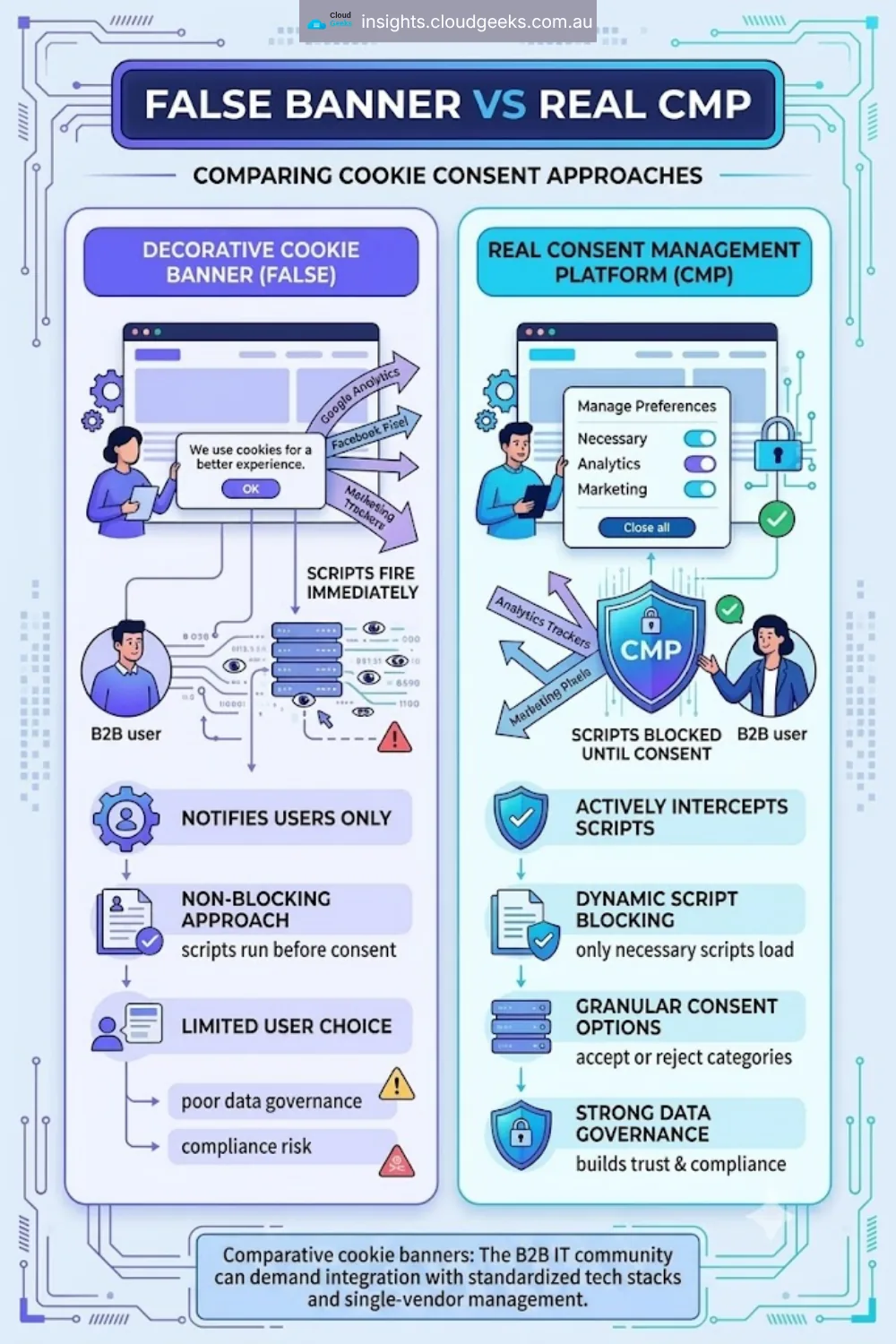
The key distinction between a real CMP and a decorative cookie banner:
- A decorative cookie banner is a notification. It tells visitors cookies are in use. It does nothing to actually block those cookies. Google Analytics fires, Facebook Pixel fires, advertising tags fire — all before the visitor has a chance to consent to anything.
- A real CMP sits between your website and all its third-party scripts. When a new visitor lands on your site, the CMP intercepts the loading of tracking scripts and blocks them until the visitor actively gives consent. Once consent is given (or declined), that decision is recorded and the appropriate scripts are either allowed or kept blocked.
This distinction — between notification and actual consent control — is what separates compliant websites from non-compliant ones. Most small business websites, including most Australian ones, are still in the notification camp.
A CMP also handles the ongoing management side: storing consent records, giving users a way to change their preferences later, and providing audit logs that demonstrate compliance if you ever needed to show evidence to a regulator.
Google Consent Mode v2: What Australian Businesses Need to Know
In March 2024, Google made it mandatory for all websites using Google Ads or Google Analytics 4 to implement something called Google Consent Mode v2 if they serve users in the European Economic Area (EEA).
If your immediate reaction is “my business is Australian, I only serve Australian customers” — read on, because this may well affect you anyway.
What Google Consent Mode v2 Does
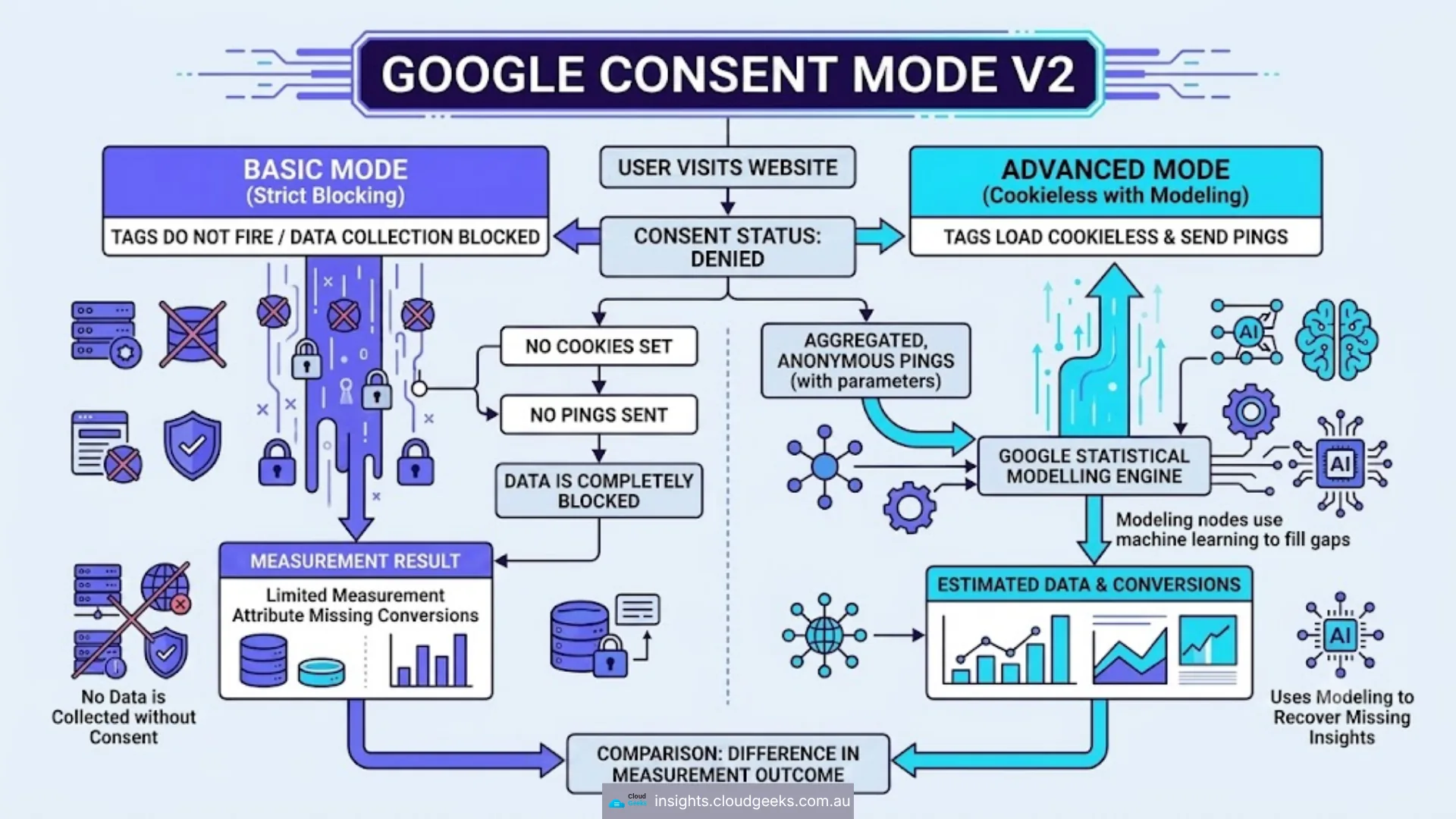
Google Consent Mode v2 is an API that lets your website communicate visitor consent decisions to Google’s tags (Google Ads, GA4, Floodlight, etc.) in real time. It works in two modes:
Basic mode: Google’s measurement and advertising tags are blocked completely until the visitor consents. If no consent is given, no data is collected. Simple and strict.
Advanced mode: Google’s tags load regardless of consent, but they operate in a limited, cookieless way. Google then uses modelling (statistical estimation) to fill in gaps in conversion data based on what consented users do. This gives you more complete data while still honouring consent.
For most Australian small businesses, basic mode is sufficient and easiest to implement. Advanced mode is worth considering if you run significant Google Ads campaigns and cannot afford gaps in conversion data.
Why This Matters Even for Purely Australian Websites
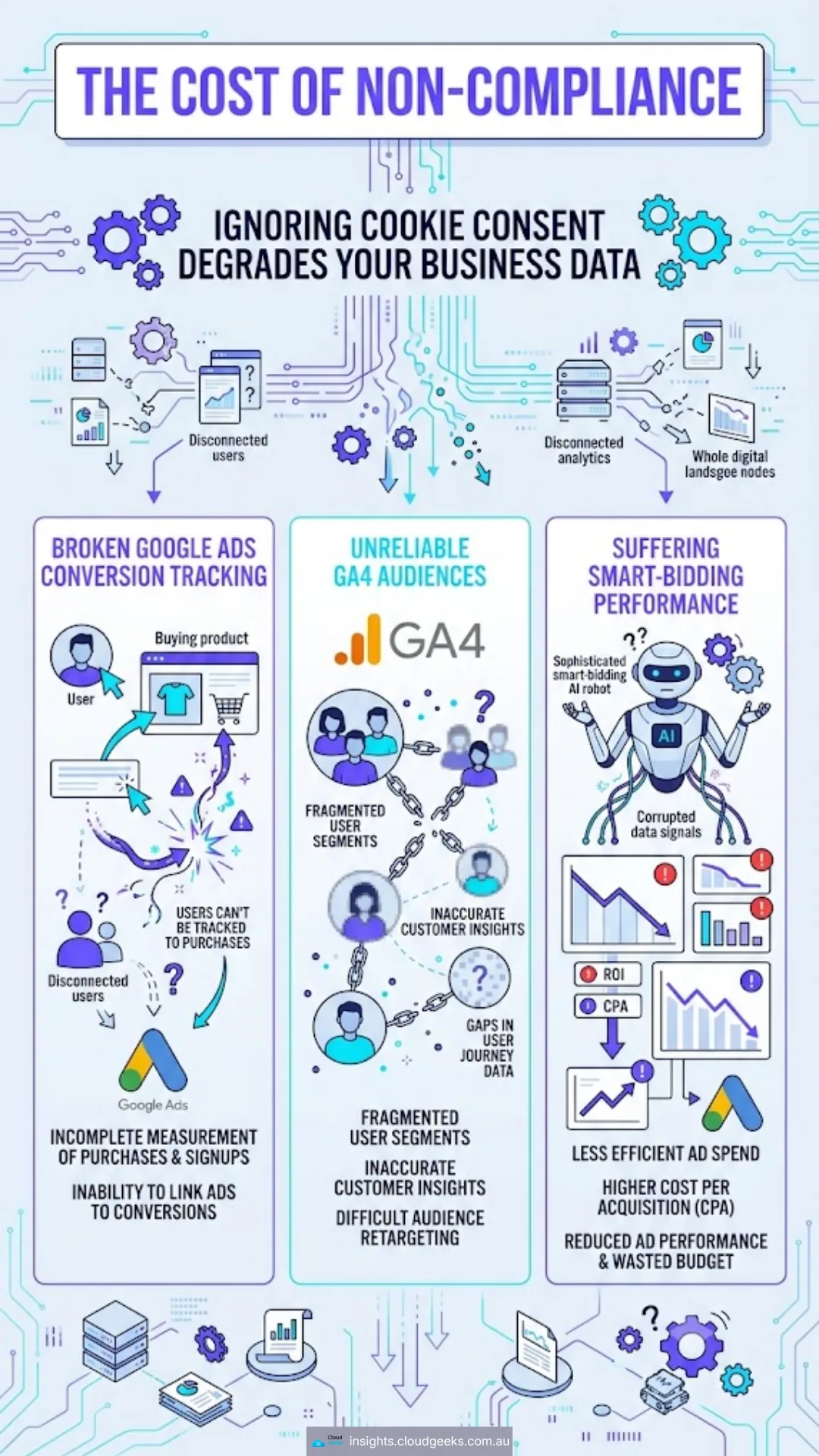
Even if your target customers are entirely in Australia, Google’s enforcement means your Google Ads and GA4 data quality degrades if you have not implemented Consent Mode v2 correctly. Specifically:
- Google Ads conversion tracking becomes less accurate. Without Consent Mode v2, Google may not be able to attribute conversions properly for any traffic coming from users whose browsers block cookies (which includes Safari users by default, via Intelligent Tracking Prevention).
- GA4 audiences and remarketing lists become less reliable. Audience segments you build in GA4 for remarketing will have gaps.
- Smart bidding performance can suffer. Google’s automated bidding strategies (Target ROAS, Maximise Conversions, etc.) rely on conversion signal quality. Degraded conversion data means less effective bidding.
And if even a small proportion of your website visitors happen to be based in Europe — a former client, a supplier, someone who found you through organic search — the legal obligation kicks in for that traffic.
The March 2024 Deadline Has Already Passed
Many Australian businesses are not aware that this deadline has come and gone. Google began enforcing Consent Mode v2 requirements in March 2024. Websites that did not comply by then started seeing the data degradation described above.
If you have noticed that your Google Ads conversion numbers have seemed lower or less reliable over the past year, this may be part of the reason.
The Australian Privacy Act and Cookies
Australia’s primary privacy legislation is the Privacy Act 1988 (Cth). It is administered by the Office of the Australian Information Commissioner (OAIC) and applies to businesses with an annual turnover above AUD $3 million, as well as health service providers and several other categories regardless of turnover.
The Australian Privacy Principles (APPs) sit within the Privacy Act and set out how personal information must be collected, used, stored, and disclosed.
Do Cookies Count as Personal Information?
This is the critical question, and the answer is: it depends on the cookie.
Strictly functional cookies — ones that keep you logged in, remember your shopping cart, or store language preferences — are not typically collecting personal information in a meaningful sense. They are just making the website work.
Analytics cookies (Google Analytics, for example) collect data about browsing behaviour, pages visited, time on site, device type, and approximate location. When this data can be used to identify an individual — particularly when combined with other data — it can constitute personal information under the APPs.
Advertising and retargeting cookies (Google Ads, Meta Pixel, LinkedIn Insight Tag, etc.) are specifically designed to build profiles of individuals for targeted advertising. These very clearly involve the collection of personal information.
What the APPs Require
Under APP 5, businesses must notify individuals at or before the time of collecting personal information, including what information is collected, why it is collected, and who it might be disclosed to.
Under APP 3, collection of personal information must be by lawful and fair means, and the individual must be aware of the collection.
This means that if your website is running advertising or analytics cookies without any mechanism to inform visitors and, increasingly, to obtain their consent, you may have a compliance gap under Australian law — even before considering GDPR.
Privacy Act Reform
The Australian Government has been progressively reforming the Privacy Act. The Privacy and Other Legislation Amendment Act 2024 introduced a statutory tort for serious invasions of privacy and strengthened the OAIC’s enforcement powers. Further reforms remain in progress.
The direction of travel is clear: greater individual rights over personal data, stronger enforcement, and closer alignment with international standards. Getting compliant now is considerably less disruptive than retrofitting compliance after legislation tightens further.
GDPR and Australian Businesses
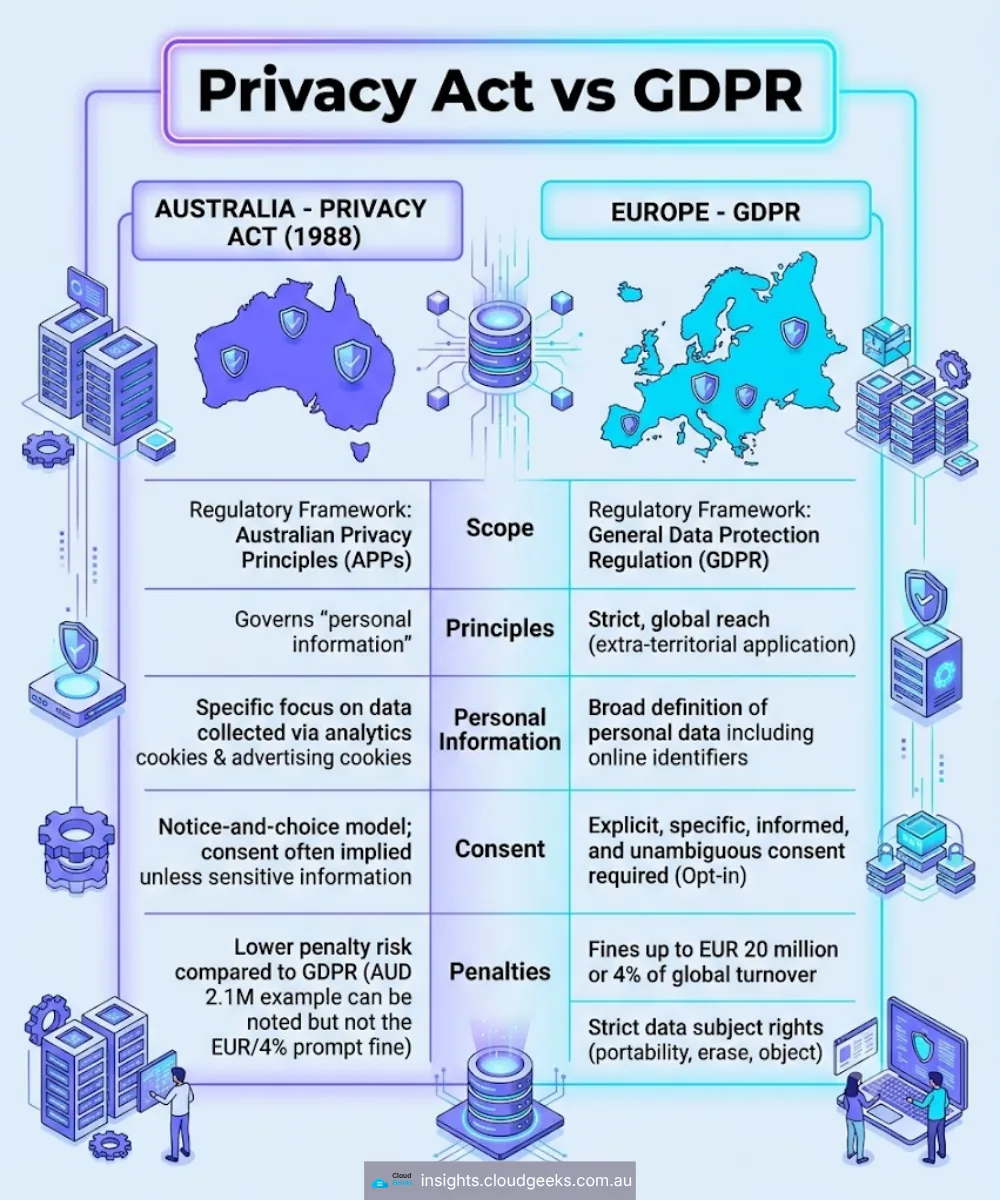
The General Data Protection Regulation (GDPR) is a European Union law that applies based on where the data subject is located, not where the business is based. If an Australian business operates a website and that website is accessed by a person in the European Union, the GDPR applies to that interaction.
You do not need to be targeting the EU market. A European tourist who looks up your tourism business before visiting Australia. A former employee who moved back to Europe. An international student who clicks on an ad during a study break. Any of these interactions can bring GDPR obligations into play.
Under GDPR, collecting personal information through cookies requires either a legitimate legal basis or explicit, informed consent that is freely given, specific, and revocable. The “this site uses cookies” banner — where simply continuing to browse the website is treated as consent — does not meet GDPR’s consent standard.
GDPR fines can reach up to EUR 20 million or 4% of global annual turnover, whichever is higher. For a small Australian business, enforcement action from a European data protection authority is unlikely but not impossible, particularly if you are actively marketing to European customers.
The more practical concern is reputational. With privacy expectations rising globally, a properly functioning consent mechanism signals to visitors that you take data handling seriously — which matters for trust.
What Usercentrics Does
Usercentrics is a Consent Management Platform based in Germany and is one of approximately 40 CMPs that Google has officially certified for Google Consent Mode v2 compliance. It supports GDPR, CCPA (California), LGPD (Brazil), and the Australian Privacy Act, making it suited to businesses that operate across multiple regulatory environments.
Here is what it actually does on your website:
The Consent Banner
When a new visitor arrives at your website, Usercentrics displays a consent banner. You control the appearance — colours, fonts, button labels, positioning — so it can be styled to match your brand. The banner presents clear choices: accept all cookies, reject non-essential cookies, or customise preferences by category (analytics, marketing, functional, etc.).
Critically, Usercentrics blocks all non-essential scripts and tags from firing until the visitor makes a choice. Google Analytics does not load. Facebook Pixel does not load. Your retargeting tags do not fire. Nothing that requires consent loads until consent is given.
Consent Logging
Every consent decision is recorded with a timestamp, the specific choices made, and the version of the privacy notice that was shown. This audit log is stored by Usercentrics and can be exported if you ever need to demonstrate compliance. For GDPR purposes in particular, the ability to prove that consent was properly obtained is essential.
Google Consent Mode v2 Integration
Usercentrics has native integration with Google Consent Mode v2. When a visitor makes their consent choices, Usercentrics automatically communicates those choices to Google’s tags in real time. Consent Mode is activated and configured through the Usercentrics dashboard without requiring manual code changes.
Privacy Policy and Cookie Declaration
Usercentrics can automatically generate a cookie declaration for your privacy policy — a list of every cookie your website uses, what it does, who set it, and how long it lasts. This is kept up to date automatically as scripts are added or changed on your site.
Analytics on Consent Rates
Usercentrics provides a dashboard showing your consent rates: what percentage of visitors accept all cookies, what percentage decline, what percentage customise. This is useful data for understanding how your banner design and wording affects visitor behaviour — and for demonstrating to clients or stakeholders what your data collection consent baseline looks like.
Setting Up Usercentrics on a WordPress Website
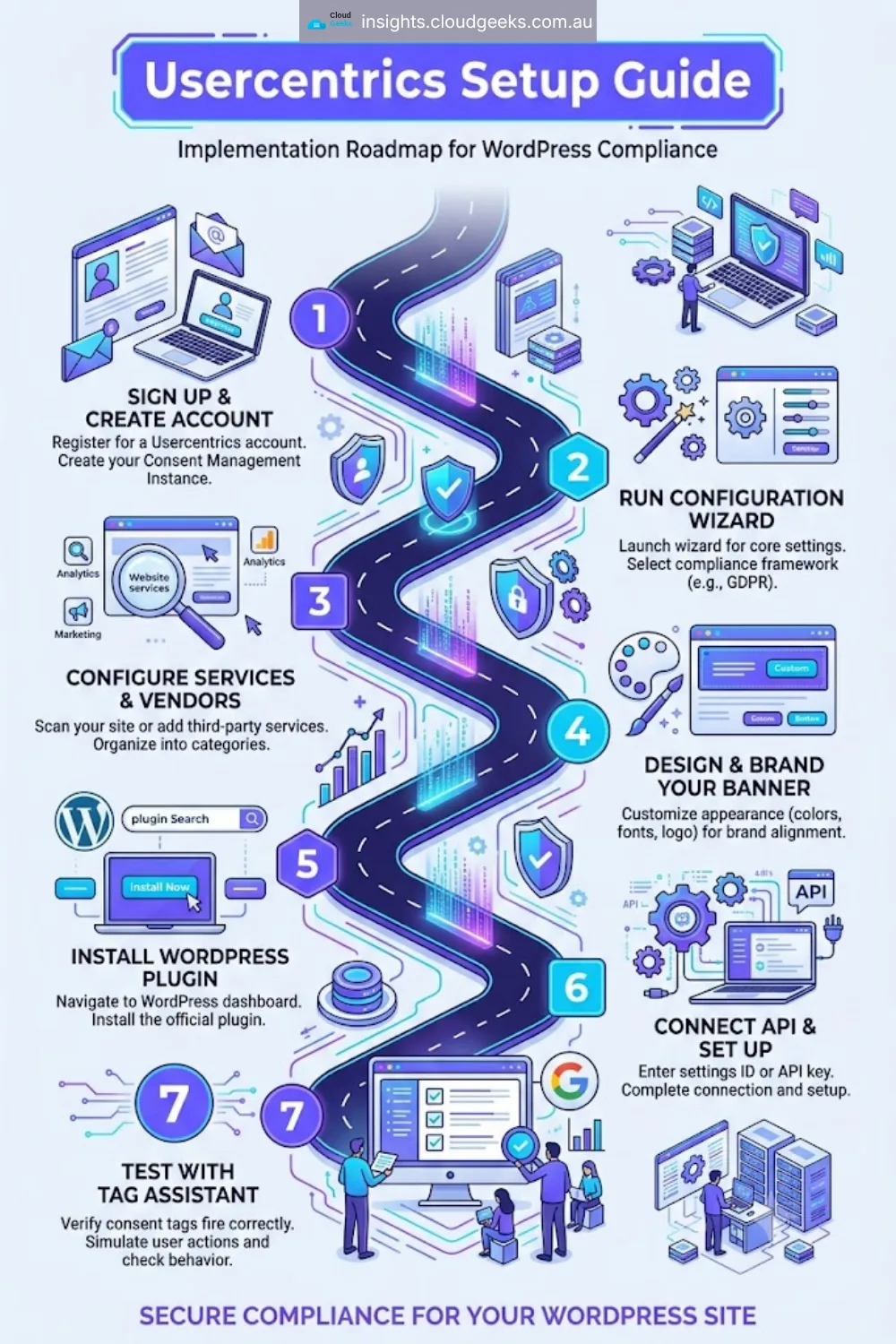
For WordPress sites, the setup process is straightforward:
Step 1: Create an account at Usercentrics / Cookiebot
Sign up for a free account. The free (Starter) plan covers small sites with limited monthly sessions. If your site has moderate traffic, review the session limits before committing to a plan.
Step 2: Use the configuration wizard
After creating your account, Usercentrics guides you through a setup wizard. You will enter your website URL, and Usercentrics will scan it to detect the third-party services and cookies you are already using. This auto-detection saves significant setup time. Review the detected services, add any that were missed, and configure the consent categories.
Step 3: Customise your consent banner
In the Appearance section, configure the look of your consent banner. Adjust colours to match your brand, set the button labels, choose the banner position (bottom bar, pop-up, etc.), and write your consent text. Usercentrics provides compliant default wording that you can adapt.
Step 4: Install the WordPress plugin
Search for “Usercentrics Consent Management Platform” in the WordPress plugin directory, install and activate it. In the plugin settings, enter your Usercentrics Configuration ID (found in your Usercentrics dashboard). Save.
The plugin handles loading the Usercentrics script on every page and ensuring it fires before other scripts.
Step 5: Configure Google Consent Mode v2
In your Usercentrics dashboard, navigate to the Google Consent Mode section and enable it. Select whether you want Basic or Advanced mode. Usercentrics will provide specific instructions for connecting this to your Google Tag Manager setup (if you use GTM) or for implementing it directly.
Step 6: Test with Google Tag Assistant
Google’s Tag Assistant browser extension lets you verify that your Google tags are responding correctly to consent signals. Test with consent given and consent declined to confirm tags are firing (or not firing) as expected. Also test that the Usercentrics banner appears correctly on mobile and desktop.
Step 7: Update your privacy policy
Add a link to your cookie declaration (Usercentrics generates this as an embeddable widget) and update your privacy policy to describe your consent management process. Usercentrics provides guidance on what to include.
The entire setup process for a straightforward WordPress site typically takes two to four hours, including testing.
Pricing: What Does Usercentrics Cost?
Usercentrics offers a tiered pricing model. Pricing is in USD but converts to approximately the following at current exchange rates:
Starter (Free): Available for websites under a certain monthly session threshold (check their current limits at signup — it has typically been suitable for very small sites or low-traffic pages). Includes the core consent banner, consent logging, and Google Consent Mode v2. A practical option for new or very small websites.
Core plans: From approximately USD $8–$12 per month (roughly AUD $12–$18 per month) for small to medium websites. Includes expanded session limits, advanced customisation, and full analytics on consent rates.
Business and Enterprise plans: For higher-traffic websites and organisations that need multi-domain management, dedicated support, or custom SLAs.
To put this in perspective: a Google Ads campaign losing conversion tracking accuracy due to missing Consent Mode v2 integration can cost far more than AUD $18 per month in degraded campaign performance. The cost of non-compliance with GDPR, in the unlikely event of enforcement action, dwarfs any subscription fee. Usercentrics is a sensible business expense for any website generating meaningful revenue from online activity.
How Usercentrics Compares to Alternatives
Two other CMPs commonly considered by Australian small businesses are CookieYes and Cookiebot.
CookieYes is a popular, low-cost option (free tier available, paid from around USD $10/month) with a straightforward WordPress plugin. It supports Google Consent Mode v2. It is a competent choice for businesses with straightforward needs and lower traffic.
Cookiebot (now part of Usercentrics Group, confusingly) is a well-established platform that also supports Consent Mode v2. Its pricing starts at around EUR $9/month and is domain-based rather than session-based, which can work out more economical for high-traffic sites.
The reasons Usercentrics stands out for Australian businesses:
- Google-certified CMP: Usercentrics is on Google’s official list of certified Consent Mode v2 partners. This matters for Google Ads compliance documentation.
- Native Consent Mode v2 integration: The integration is first-party and continuously maintained, reducing the risk of it breaking when Google updates its APIs.
- Comprehensive regulatory coverage: GDPR, CCPA, LGPD, and Australian Privacy Act in a single platform makes it suitable for businesses growing into international markets.
- Established audit trail: Usercentrics has a strong track record of consent records being accepted in GDPR compliance audits.
Cross-Links
For website compliance audits, WordPress maintenance, and managed hosting for Australian business websites — Cloud Geeks reviews website infrastructure and helps businesses implement compliance requirements including cookie consent, SSL, and Privacy Act obligations.
Ash Ganda covers digital governance, data privacy strategy, and the strategic implications of Privacy Act reform for Australian SMEs.
For website design and rebuild that includes privacy-compliant cookie consent setup from day one — Cosmos Web Tech builds websites for Western Sydney small businesses with Usercentrics configured at launch.
Part of the Ganda Tech Services family, Cloud Geeks provides practical IT support and digital compliance services for Australian small and medium businesses.
Frequently Asked Questions
Does my Australian website legally need a cookie consent banner?
It depends on what your website does. If your site uses only functional cookies (login sessions, shopping cart, language preferences) and nothing else, a formal consent banner is not strictly required under current Australian law. However, if your site uses Google Analytics, Facebook Pixel, Google Ads tags, or any other analytics or advertising technology — all of which set tracking cookies — the Australian Privacy Principles require you to be transparent about this data collection. A properly functioning consent banner is the clearest way to demonstrate that transparency and to give users genuine control. If you serve any European users, GDPR requires proper consent mechanisms regardless of your business location.
What happens if I do not implement Google Consent Mode v2?
Your Google Ads conversion tracking and GA4 data quality will degrade. Google uses Consent Mode signals to understand which conversions it can measure directly and which it needs to model statistically. Without Consent Mode v2 properly implemented, Google cannot perform this modelling, particularly for users on browsers that block third-party cookies (Safari, Firefox with Enhanced Tracking Protection, etc.). In practice, this means underreported conversions in Google Ads, less reliable audience data in GA4, and reduced effectiveness of automated bidding strategies like Target ROAS or Maximise Conversions. If you are spending any significant amount on Google Ads, this is a real cost.
Is Usercentrics free?
Usercentrics offers a free Starter plan for websites below a certain monthly sessions threshold — check their current limits at usercentrics.com as these are updated periodically. The free plan includes the core functionality: consent banner, consent logging, and Google Consent Mode v2 integration. For most small Australian business websites with moderate traffic, a paid plan at roughly AUD $12–$18 per month provides the sessions and features needed. It is worth starting on the free plan to evaluate whether it suits your site before upgrading.
Will a cookie consent banner slow down my website?
A well-implemented CMP adds a small amount of JavaScript to your page load, but this is typically negligible (a few kilobytes). More importantly, a CMP that properly blocks tracking scripts until consent is given can actually speed up initial page load for users who decline cookies, because the tracking scripts never fire. For users who accept all cookies, the experience is essentially unchanged from what they had before. Usercentrics is built to be lightweight and loads asynchronously so it does not block other page content from rendering.
How do I know if my current cookie banner is compliant?
The quickest test: open your website in a fresh browser (or in a private/incognito window), open your browser’s developer tools, go to the Network tab, and reload the page — before clicking anything on the cookie banner. Look at what scripts and third-party requests are loading. If you can see requests to google-analytics.com, googletagmanager.com, facebook.net, or similar analytics and advertising domains firing before you have clicked any consent button, your banner is not actually blocking those scripts. It is a notification, not a consent management system. A real CMP will block those requests entirely until you give consent. If you are unsure how to run this test, the CloudGeeks team can audit your current cookie setup as part of a broader website compliance review.
Getting cookie consent right is one of those website compliance tasks that is easy to keep deferring. The banner is already there, customers are not complaining, no one has sent a fine. But the risk is quiet and accumulating: degraded Google Ads performance, potential Privacy Act exposure, and GDPR liability if any European users visit your site.
Usercentrics makes this straightforward to address. The WordPress plugin takes an afternoon to set up properly, the pricing is modest, and the result is a website that handles consent correctly — which is better for compliance, better for your Google Ads data, and better for visitor trust.